MODCAR.ai
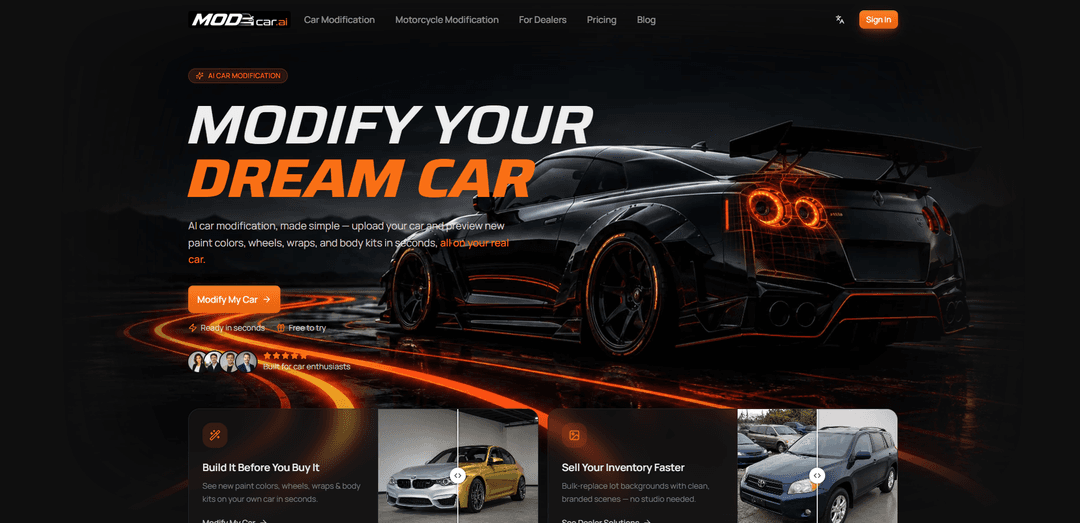
MODCAR.ai is an AI car modification studio: upload a photo of your real car and preview custom paint colors, wheels, body kits, wraps, spoilers and aero in about 30 seconds — no parts, no paint shop, no Photoshop. One-click preset builds (Street, Track, VIP, Widebody, OEM+) generate a full look instantly. Dealers get a second tool that batch-replaces messy lot backgrounds with clean showroom backdrops for listing photos.
https://www.modcar.ai/?utm_source=aipure
Product Information
Updated:Aug 27, 2026
What is MODCAR.ai
MODCAR.ai is an AI-powered car visualization platform designed to help car enthusiasts and automotive businesses quickly create realistic “before and after” images using a photo of a real vehicle. Instead of manual editing or complex design software, users can upload a single car photo (or even batch inventory) and generate photoreal modification previews such as new paint colors, wraps, wheels, aero parts, and body kits, as well as professional listing-ready images through background replacement and showroom scenes. It runs in any modern browser on desktop or mobile and is positioned as a fast way to validate styling ideas, present options to clients, and produce marketing visuals without a photoshoot or Photoshop skills.
Key Features of MODCAR.ai
MODCAR.ai is a browser-based AI car modification and dealership content tool that lets users upload a photo of a real vehicle and generate photorealistic previews of changes—paint colors, wraps, wheels, stance, body kits, spoilers, and aero—in seconds. It also supports background removal/replacement and showroom templates for clean, consistent listing visuals, including batch processing for inventory. Users can choose from a growing parts library or upload images of aftermarket parts to visualize fitment on their specific car, and the platform emphasizes fast iteration, high-resolution exports, and commercial rights to the generated outputs (assuming users have rights to uploaded inputs).
AI mod previews on your real car: Upload a single photo and instantly visualize wheels, paint colors, wraps, body kits, spoilers, splitters, diffusers, and other styling changes aligned to your vehicle’s angle and shape.
Real-time iteration in seconds: Generate modification previews quickly (often under ~30 seconds per photo), making it easy to try multiple combinations—wheels, then color, then kit—without manual editing.
Parts library + upload your own parts: Select from an expanding catalog of wheels/body kits/spoilers/decals, or upload images of specific aftermarket parts so the AI can place them onto your car for a more realistic “before you buy” preview.
Dealership content suite (background replace + templates): Replace cluttered backgrounds with realistic scenes or premium showroom templates while keeping the car consistent, producing listing-ready visuals for marketplaces, websites, and ads.
Batch processing and exports: Upload batches of inventory photos, generate multiple variants quickly, and export high-resolution files optimized for listings and marketing channels.
Commercial usage rights for outputs: The platform states you own the images you create and may use them commercially, provided you have rights to the inputs you upload.
Use Cases of MODCAR.ai
Enthusiast build planning: Car owners can test paint/wrap colors, wheel styles, stance, and body kits on their actual vehicle photo to decide on a final build before spending money on parts or labor.
Aftermarket parts marketing and approvals: Wrap shops, wheel retailers, and body kit brands can generate customer-specific mockups for quotes and approvals, reducing revisions and increasing buyer confidence.
Dealership listing optimization: Dealers can standardize inventory photos with clean backgrounds/showrooms, generate consistent marketing images at scale, and export variants for ads and marketplaces.
Creator and social content production: Automotive creators can rapidly produce photoreal mod concepts (OEM+, widebody, track, VIP, off-road styles) for posts, thumbnails, and concept series without complex editing.
Pre-visualization for design concepts: Small studios or freelancers can use fast renders to communicate styling directions (aero changes, decals, colorways) before committing to more expensive 3D or photo retouch workflows.
Pros
Fast, no-editing workflow: upload a photo and generate mod previews without masking/layers or Photoshop skills.
Broad applicability: works from the user’s photo across makes/models/years and supports both a parts library and user-uploaded part images.
Business-ready outputs: background replacement, templates, batch generation, and export options support listing and ad production.
Commercial rights claim: the service states users own and can commercially use generated images (with appropriate input rights).
Cons
Output realism can vary: AI-generated previews may not perfectly match exact real-world fitment, lighting, or branding details in every case.
Dependent on input photo quality/angle: results are likely to be better with clear, well-lit images and can degrade with occlusions or complex backgrounds.
Third-party processing and cloud storage: prompts/uploads are sent to third-party AI providers and generated images are stored in cloud infrastructure (per the provided policy snippet).
How to Use MODCAR.ai
1) Open MODCAR.ai in your browser: Go to https://www.modcar.ai/ (works on desktop or phone—no software install required).
2) Start the car modification flow: Click a call-to-action like “Modify My Car” or go directly to the car modification page: https://www.modcar.ai/car-modification.
3) Create a free account (if prompted): Create a free account first so you can upload a photo and generate previews (the site is free to try).
4) Upload your car photo (or a batch): Upload a single car photo (or multiple photos for dealership inventory). For best results, use a clear photo—side views are commonly recommended—and upload supported formats like PNG, JPG, or HEIC.
5) Choose what you want to do: Customize or Standardize: Pick whether you want to (a) customize the car with mods (wheels, wraps, colors, body kits, spoilers/aero), or (b) standardize listing photos by placing cars onto consistent, clean showroom-style backgrounds.
6) Apply modification previews (visualize before you buy): Use the car modification preview tools to try different wheels, paint colors/finishes, wraps, body kits, spoilers, splitters, diffusers, decals, lights, and other tuning presets. The preview is rendered on your actual uploaded car photo (not a generic stock model).
7) Use style presets (optional): If you’re not sure what direction to go, apply a one-click style preset (examples mentioned include Street, Track, VIP, Off-road, Clean OEM+, Widebody) to quickly explore looks.
8) Upload your own parts (optional): If you have a specific aftermarket part image (custom wheels, kits, decals, accessories), upload it and preview how it fits on your car.
9) Replace the background (optional, especially for listings): Use background replacement/showroom templates to swap a cluttered scene for a clean studio, garage, street, or landscape look while keeping the car as-shot. This is also positioned for batch workflows for inventory.
10) Iterate quickly: Keep trying combinations (e.g., wheels → new color → body kit) to refine the build. MODCAR.ai is designed for fast iteration, with results typically generated in seconds (often under ~30 seconds per photo).
11) Download high-resolution results: When you’re happy with the preview, download the high-res files. You can save them for yourself, share with friends/clients, or export a whole batch for listings and ads.
12) Use your outputs freely: Use the generated visuals for personal planning, sharing, approvals, or business marketing/listings; MODCAR.ai states the results are “100% yours” with full rights to what you create.
MODCAR.ai FAQs
MODCAR.ai is an AI car modification tool that lets you upload a photo of your real car and preview changes—such as paint colors, wraps, wheels, body kits, spoilers, and aero—within seconds in your browser.
Popular Articles

Atoms: A Multi-Agent AI Platform That Transforms Ideas into Launch-Ready Products
May 22, 2026

Nano Banana SBTI: What It Is, How It Works, and How to Use It in 2026
Apr 15, 2026

Atoms Review — The AI Product Builder Redefining Digital Creation in 2026
Apr 10, 2026

Kilo Claw: How to Deploy and Use a True "Do‑It‑For‑You" AI Agent(2026 Update)
Apr 3, 2026