
Magine
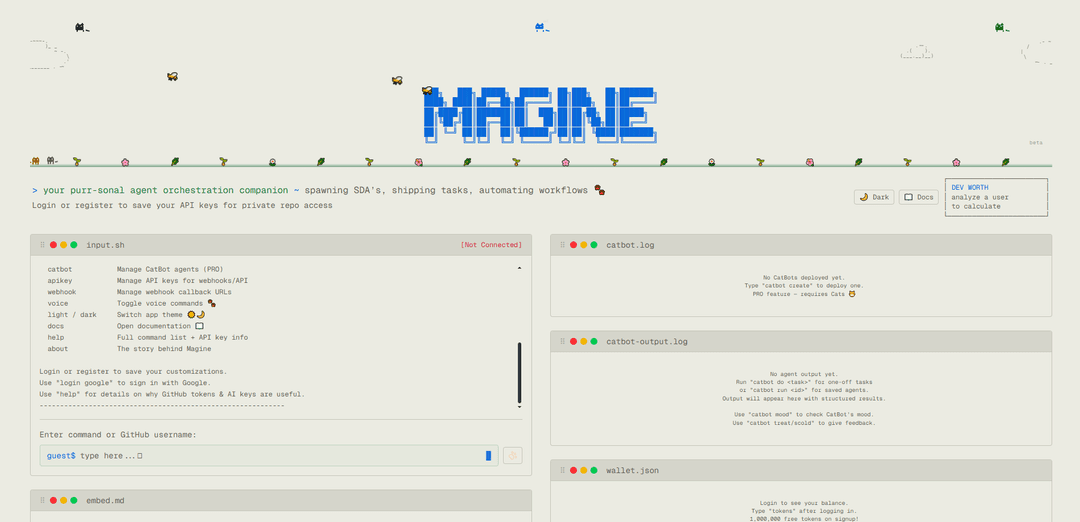
Magine is a cloud-based AI agent orchestration platform that helps developers track development worth, generate GitHub profile cards, and automate workflows through vision-enabled AI agents that can autonomously browse the web.
https://magine.cloud/?ref=producthunt
Product Information
Updated:Apr 8, 2026
What is Magine
Magine is a modern terminal-based UI platform that serves as a personal companion for developers, combining AI capabilities with development tools. It offers features like GitHub profile analysis, embeddable SVG cards generation, and autonomous AI agents called CatBots that can perform web browsing tasks. The platform provides both free and premium (PRO) features, with a token-based system where users can purchase 'Cats' for extended functionality. Built with a playful cat theme, Magine aims to make development tracking and automation more engaging and efficient.
Key Features of Magine
Magine is a modern cloud-based AI agent orchestration platform that helps developers track and manage their development activities, generate embeddable GitHub profile cards, and automate workflows through AI-powered CatBots. It features a terminal-style interface with capabilities for deep profile analysis, customizable themes, social media integration, and autonomous web browsing agents that can perform tasks with minimal human intervention.
GitHub Profile Analysis & Cards: Generate customizable SVG profile cards with AI-powered code analysis and developer worth estimation that can be embedded in GitHub READMEs
AI Agent Orchestration: Deploy and manage autonomous CatBot agents that can browse the web, perform tasks, and maintain persistent sessions with automated authentication
LinkedIn Automation Tools: Comprehensive suite of LinkedIn automation features including profile viewing, job searching, connection management, and content posting through SDAs (Structured Data Agents)
Terminal-style Interface: Modern command-line interface with extensive commands for managing agents, customizing profiles, and controlling workflow automation
Use Cases of Magine
Developer Portfolio Enhancement: Developers can create attractive, dynamic GitHub profile cards that showcase their skills and contributions
Automated Job Search: Professionals can automate their job search process using LinkedIn SDAs to find, track, and apply to relevant positions
Social Media Management: Businesses can automate their social media presence through scheduled posts and connection management
Web Automation Workflows: Organizations can create autonomous agents to handle repetitive web-based tasks and maintain persistent sessions across various platforms
Pros
Extensive automation capabilities with AI-powered agents
User-friendly terminal interface with comprehensive command set
Free tokens provided on signup with flexible pricing model
Cons
Some features require PRO subscription (Cats)
Limited functionality with Twitter and Reddit due to authentication issues
Requires API keys for full functionality
How to Use Magine
Visit Magine Website: Go to magine.cloud to access the terminal-style interface
Create Account: Use 'login' or 'register' command to create an account. You can also use 'login google' to sign in with Google. New users get 1,000,000 free tokens on signup.
Generate Profile Card: Type any GitHub username to generate an embeddable SVG profile card. This is the basic functionality to start with.
Customize Card: Use commands like 'theme' to choose from 20 presets, 'customize' to set custom colors, 'social' to add social media links, and 'bio' to set your job title and bio
Add API Keys: Use 'credentials' command to add GitHub token (for higher rate limits & private repos) and AI key (for code analysis features)
Preview Settings: Use 'preview' to see current card settings. Use 'preview <opt>' to toggle specific sections like devworth, ai, activity, deep
Create CatBot (PRO): Use 'catbot create' to deploy an AI agent or 'catbot create sda' for a Sight-Driven Agent that can browse the web
Configure CatBot: Set tasks with 'catbot prompt', schedule with 'catbot schedule', check status with 'catbot mood', and view logs with 'catbot logs'
Use LinkedIn Features: Start with 'linkedin login' to authenticate, then use commands like 'linkedin jobs' to search jobs, 'linkedin profile' to view profiles, etc
Manage Tokens: Check balance with 'tokens' command. Purchase more with 'topup' ($5 = 1 Cat = 5M tokens)
Magine FAQs
Magine is an AI-powered agent orchestration platform that provides embeddable GitHub profile cards, dev worth analysis, and automated workflow capabilities through a terminal UI interface.
Popular Articles

Vosko AI: Localize and Dub Videos for Global Audiences
Oct 14, 2026

Atoms: A Multi-Agent AI Platform That Transforms Ideas into Launch-Ready Products
Oct 13, 2026

Nano Banana SBTI: What It Is, How It Works, and How to Use It in 2026
Apr 15, 2026

Atoms Review — The AI Product Builder Redefining Digital Creation in 2026
Apr 10, 2026
Latest AI Tools Similar to Magine

invoices.dev
invoices.dev is an automated invoicing platform that generates invoices directly from developers' Git commits, with integration capabilities for GitHub, Slack, Linear, and Google services.

Monyble
Monyble is a no-code AI platform that enables users to launch AI tools and projects within 60 seconds without requiring technical expertise.

Devozy.ai
Devozy.ai is an AI-powered developer self-service platform that combines Agile project management, DevSecOps, multi-cloud infrastructure management, and IT service management into a unified solution for accelerating software delivery.
Mediatr
MediatR is a popular open-source .NET library that implements the Mediator pattern to provide simple and flexible request/response handling, command processing, and event notifications while promoting loose coupling between application components.
Popular AI Tools Like Magine
Launch
Launch is an AI-powered platform that enables users to build full-stack applications instantly while providing comprehensive tools for product launches, entrepreneurship programs, and customer acquisition.

GitHub Copilot Chat
GitHub Copilot Chat is an AI-powered coding assistant that provides natural language interactions, real-time code suggestions, and contextual support directly within supported IDEs and GitHub.com.

Rememberall
Rememberall is a secure, open-source long-term memory solution that enables AI applications and GPT models to maintain persistent memory across conversations through semantic search and vector storage capabilities.

Upsonic
Upsonic is a reliability-focused AI agent framework with dockerized server-client architecture that enables trusted agent workflows through advanced features like verification layers, triangular architecture, and Model Context Protocol (MCP) integration.