
HeyGen CLI
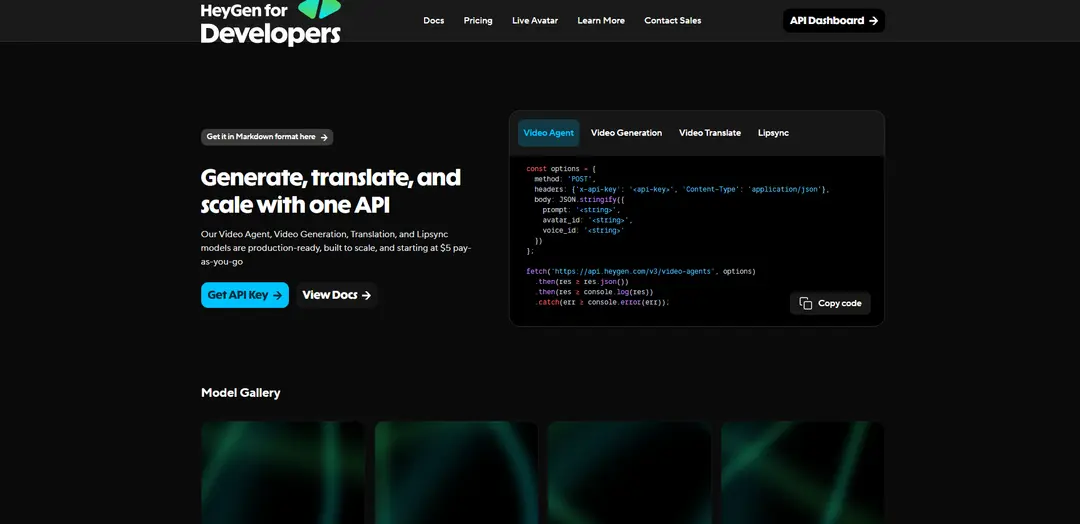
HeyGen CLI is an agent-first command-line tool that enables developers and AI agents to create, poll, and download AI-generated avatar videos directly from the terminal using the full v3 API.
https://developers.heygen.com/?ref=producthunt
Product Information
Updated:Apr 16, 2026
What is HeyGen CLI
HeyGen CLI is a developer-focused command-line interface that wraps HeyGen's complete v3 API, designed specifically for integration with AI agents and automated workflows. Built by HeyGen, a company trusted by over 1,000,000 developers and leading companies, the CLI transforms video generation into a programmable command-line workflow. It allows developers to go from script to avatar creation to rendered video without leaving the terminal, making video production as simple as executing a command. Every command returns structured JSON output, making it naturally compatible with scripts, CI/CD pipelines, and autonomous agent systems. The tool provides access to HeyGen's full suite of video generation capabilities, including Video Agent (prompt-to-video), Digital Twins, Photo Avatars, Video Translation in 175+ languages, Lipsync, and AI voices.
Key Features of HeyGen CLI
HeyGen CLI is an agent-first command-line interface tool that wraps the full HeyGen v3 API, enabling developers and AI agents to create, poll, and download avatar videos directly from the terminal. Designed for seamless integration into automated workflows, scripts, and CI pipelines, the CLI returns structured JSON output making it ideal for autonomous agent operations. It provides programmatic access to HeyGen's complete video generation capabilities including avatar creation, video translation, lip-syncing, and voice generation—all without leaving the terminal environment.
Agent-First Design: Built specifically for AI agents and automation workflows with structured JSON responses that enable seamless integration into scripts, CI/CD pipelines, and autonomous agent systems.
Full v3 API Coverage: Wraps the complete HeyGen v3 API functionality, providing terminal access to video agents, avatar generation, video translation, lip-sync, and voice synthesis capabilities.
Terminal-Native Video Creation: Generate complete videos from script to avatar creation to final delivery entirely from the command line, eliminating the need for GUI interactions or web interfaces.
Structured Output Format: Returns all responses in structured JSON format, making it easy to parse results, chain commands, and integrate with other tools and automation systems.
Video as Output Format: Treats video generation as just another command-line output format, allowing research agents, reporting bots, and automation stacks to produce video content as easily as text or data.
Use Cases of HeyGen CLI
Automated Content Pipeline: Research agents and reporting bots can automatically generate video summaries or presentations as part of their output, turning data and insights into visual content without manual intervention.
CI/CD Video Generation: Integrate video creation into continuous integration and deployment pipelines to automatically generate product demos, release announcements, or documentation videos with each software release.
Agent-Driven Marketing: AI agents can autonomously create marketing videos, product reviews, and social media content by executing CLI commands based on campaign parameters or trending topics.
Batch Video Processing: Developers can script bulk video creation, translation, or dubbing operations for large-scale content localization or personalized video campaigns directly from the terminal.
Developer Workflow Integration: Seamlessly incorporate video generation into existing development workflows, allowing developers to create tutorial videos, documentation, or demos without switching contexts or tools.
Automated Training Content: Generate employee training videos, compliance materials, or educational content programmatically based on updated documentation or policy changes.
Pros
Designed specifically for automation and AI agent workflows with structured JSON output
Provides complete terminal-based access to HeyGen's full video generation capabilities without requiring web interface interaction
Seamlessly integrates into existing developer tools, scripts, and CI/CD pipelines
Enables video to be treated as a standard output format alongside text and data in automated workflows
Cons
Requires technical knowledge and command-line proficiency to use effectively
May have a steeper learning curve for non-developers compared to web-based GUI interfaces
Limited visual feedback compared to traditional video editing interfaces
Dependent on stable API connectivity and may require error handling in automated scripts
How to Use HeyGen CLI
1. Install the HeyGen CLI: Download and install the HeyGen CLI binary. The CLI is designed to install in seconds with no runtime prerequisites. You can use the install script available on GitHub or download directly from developers.heygen.com/cli
2. Get your HeyGen API key: Log into your HeyGen account and navigate to Settings → API in your HeyGen dashboard to generate your API key. This key will be used for authentication when using the CLI
3. Configure authentication: Set up your API key with the CLI by passing it via the X-Api-Key header. The CLI uses this key to authenticate all requests to the HeyGen v3 API
4. Create a video using a single command: Run a CLI command to generate a video. The CLI wraps the full v3 API, allowing you to create videos by specifying parameters like script, avatar_id, and voice_id. Every command returns structured JSON output
5. Poll for video status: Use CLI commands to check the status of your video generation job. The CLI provides polling capabilities to track when your video is ready
6. Download the completed video: Once the video generation is complete, use the CLI to download the finished video file directly from the terminal to your local system
7. Integrate into workflows (optional): Incorporate the CLI commands into scripts, CI/CD pipelines, cron jobs, or autonomous agent workflows. The structured JSON output makes it easy to chain commands and automate video generation at scale
HeyGen CLI FAQs
The HeyGen CLI is an agent-first command-line interface that wraps the full v3 API, allowing developers and AI agents to create, poll, and download avatar videos directly from the terminal. Every command returns structured JSON, making it ideal for scripts, CI pipelines, and autonomous agent workflows.
Popular Articles

Vosko AI: Localize and Dub Videos for Global Audiences
Oct 15, 2026

Atoms: A Multi-Agent AI Platform That Transforms Ideas into Launch-Ready Products
Oct 13, 2026

Nano Banana SBTI: What It Is, How It Works, and How to Use It in 2026
Apr 15, 2026

Atoms Review — The AI Product Builder Redefining Digital Creation in 2026
Apr 10, 2026
Latest AI Tools Similar to HeyGen CLI

Loud Fame
Loud Fame is an AI-powered video transformation tool that allows users to convert regular videos into anime-style animations and create AI-generated celebrity talking videos.

BizBoom.ai
BizBoom.ai is an AI-powered platform that automatically generates professional product videos from product links and images with 95% less cost.

EzVideos
EzVideos is an all-in-one video creation tool that helps users generate viral videos for social media platforms like Instagram, TikTok, and YouTube with automated editing features and built-in resources.

Illuminix
Illuminix is an AI-powered platform that empowers businesses with autonomous hyper-experts and specialized tools for automated business processes, data management, and video content creation.
Popular AI Tools Like HeyGen CLI

HunyuanVideo-I2V
HunyuanVideo-I2V is an open-source AI framework developed by Tencent that transforms static images into high-quality, dynamic videos with customizable motion effects and exceptional visual consistency.

Google Veo 2
Veo 2 is Google DeepMind's state-of-the-art AI video generation model that can create high-quality videos up to 4K resolution with realistic motion, extensive camera controls, and improved physics simulation from text prompts.

Vibing
Vibing is an AI-powered dating app that helps users share authentic moments through video stories and make genuine connections based on personality matching and interactive features.

Edits, an Instagram app
Edits is Instagram's free video creation app that provides creators with professional editing tools, AI features, and analytics capabilities to create high-quality videos directly from their phones.