
Hello Aria
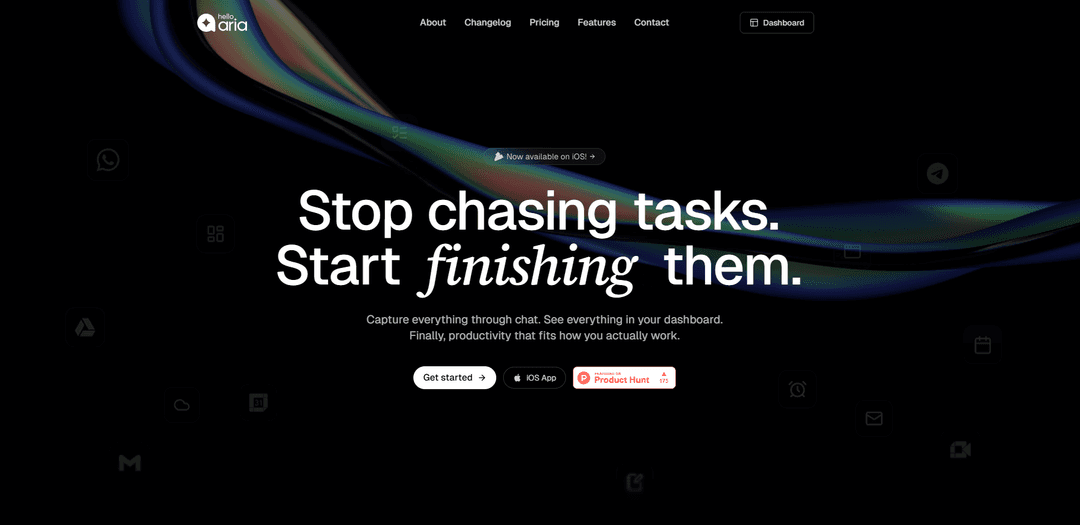
Hello Aria is an AI-powered universal productivity platform that centralizes task management, reminders, calendar, and notes across WhatsApp, Telegram, web, and iOS, with seamless Google and Microsoft integrations.
https://helloaria.io/?ref=producthunt
Product Information
Updated:May 8, 2026
What is Hello Aria
Hello Aria is a comprehensive productivity assistant developed by Realityrift Innovations Pvt. Ltd., based in Hyderabad, India. Founded by Sai Tharun Kakkirala, the platform was designed to solve real-world productivity challenges by eliminating the need for multiple expensive subscriptions and app-switching. Instead of downloading yet another standalone app, Hello Aria meets users where they already are—in their messaging apps like WhatsApp and Telegram, while also offering a web dashboard and iOS mobile app. The platform integrates with essential tools including Google Calendar, Google Drive, Gmail, Google Meet, and Microsoft OneDrive, Mail & Calendar, creating a unified workspace that synchronizes productivity data across all platforms. Supported by NVIDIA Inception Program, AWS Activate, and Google Cloud for Startups, Hello Aria has earned a 5.0 rating on the App Store and is trusted by thousands of users ranging from busy professionals and students to startup founders and families.
Key Features of Hello Aria
Hello Aria is a universal AI-powered productivity platform that consolidates task management, reminders, calendar scheduling, notes, and file integrations into a conversational interface accessible through WhatsApp, Telegram, web dashboard, email, and iOS app. It eliminates app-switching by allowing users to manage their entire workflow through natural chat interactions, with seamless synchronization across all platforms. The platform integrates with Google (Calendar, Drive, Meet, Gmail) and Microsoft (OneDrive, Mail, Calendar) tools, offering features like voice-to-text conversion, meeting transcription (MOM mode), team collaboration through 'Circles', and smart automation that learns user preferences over time.
Multi-Platform Accessibility: Access your productivity tools from anywhere - WhatsApp, Telegram, web dashboard, email, and iOS app - with real-time synchronization across all platforms, eliminating the need to switch between multiple applications.
AI-Powered Conversational Interface: Interact with Aria through natural chat conversations to create tasks, set reminders, schedule meetings, and manage your day without navigating complex menus or interfaces.
Voice & Image-to-Text Conversion: Create tasks, reminders, and notes instantly by sending voice notes or images, with AI automatically converting them into structured, actionable items.
MOM (Minutes of Meeting) Mode: Record and automatically transcribe meetings, generating comprehensive minutes with action items and summaries without manual note-taking.
Circles - Team Collaboration: Create groups (circles) for family, friends, or work teams to share reminders, assign tasks, and coordinate activities with automated notifications to all members.
Smart Integrations: Seamlessly connect with Google Calendar, Drive, Meet, Gmail and Microsoft OneDrive, Mail & Calendar to upload files, sync schedules, and manage communications directly from chat.
Use Cases of Hello Aria
Busy Professionals Managing Multiple Projects: Executives and managers can coordinate team tasks through Circles, schedule meetings via voice commands, and track deadlines across projects while commuting or between meetings using WhatsApp or Telegram.
Students Tracking Academic Deadlines: Students can set recurring reminders for assignment deadlines, exam schedules, and class activities through simple chat messages, with automatic calendar synchronization to prevent missed submissions.
Freelancers Managing Client Work: Freelancers can manage multiple client projects by saving files directly to Google Drive from chat, syncing calendar appointments to avoid double-booking, and setting client-specific reminders for deliverables.
Families Coordinating Household Activities: Family members can create shared circles for grocery lists, chore assignments, bill payment reminders, and children's activities, with everyone receiving automated notifications on their preferred platform.
Startup Teams Running Daily Operations: Startup founders can conduct team standups using MOM mode for automatic transcription, assign tasks through Circles, and manage personal and business schedules from a single WhatsApp interface.
Remote Workers Maintaining Work-Life Balance: Remote professionals can organize both personal and professional tasks through the unified dashboard, accessing everything from their desktop during work hours and managing updates via mobile apps after hours.
Pros
No app-switching required - manage everything through familiar messaging platforms like WhatsApp and Telegram
Affordable pricing (₹91/month for Pro plan) compared to multiple productivity tool subscriptions
Voice-first interaction makes task creation 10x faster than traditional typing
Works with both Google and Microsoft ecosystems, unlike competitors that favor one platform
Cons
Requires internet connectivity for chat-based interactions, limiting offline functionality
Privacy concerns as productivity data flows through messaging platforms
Learning curve for users accustomed to traditional task management interfaces
Limited advanced features compared to specialized tools like Todoist or Notion for power users
How to Use Hello Aria
1: Choose your preferred access method - WhatsApp, Telegram, Email, Web Dashboard, or iOS App. For WhatsApp, message +917075471676 to start chatting with Aria.
2: Sign up for an account by following the onboarding prompts. You can start with the free plan or choose a paid plan (₹91/month for Pro).
3: Connect your productivity tools by integrating Google Calendar, Google Drive, Gmail, Microsoft OneDrive, Outlook Mail & Calendar through the settings or dashboard.
4: Set reminders by simply chatting with Aria. Example: 'Remind me to call mom every Sunday at 5 pm' or 'Remind me about the dentist next Tuesday'.
5: Create to-do lists and tasks by telling Aria what you need. Example: 'Add milk to my grocery list' or 'Create a task to finish the report by Friday'.
6: Use voice notes to set reminders or create tasks - just speak naturally and Aria will understand and process your request.
7: Create Circles (groups) to send reminders to family, friends, or work teams. Set up shared to-do lists and assign tasks to specific people or circles.
8: Upload files to Google Drive directly from chat by sending files or photos to Aria and asking it to save them to Drive.
9: Use MOM (Minutes of Meeting) mode by sending voice notes from meetings - Aria will automatically transcribe and create action items with summaries.
10: Save quick notes by chatting with Aria to capture ideas and information instantly, which will be organized in your dashboard.
11: Access your unified dashboard on the web (app.helloaria.in) to view all reminders, tasks, notes, and calendar events in one place.
12: Sync across all platforms - tasks created on WhatsApp will appear on your iOS app, web dashboard, and other connected channels automatically.
Hello Aria FAQs
Hello Aria is a universal productivity platform that centralizes task management, calendar, reminders, notes, and integrations with Google and Microsoft tools. It's accessible from WhatsApp, Slack, Telegram, web, email, and iOS app, allowing you to manage your productivity from anywhere.
Hello Aria Video
Popular Articles

Vosko AI: Localize and Dub Videos for Global Audiences
Oct 15, 2026

Atoms: A Multi-Agent AI Platform That Transforms Ideas into Launch-Ready Products
Oct 13, 2026

Nano Banana SBTI: What It Is, How It Works, and How to Use It in 2026
Apr 15, 2026

Atoms Review — The AI Product Builder Redefining Digital Creation in 2026
Apr 10, 2026
Latest AI Tools Similar to Hello Aria

Inbox AI
Inbox AI is a privacy-focused MacOS productivity app that combines voice-driven AI automation with email management capabilities, allowing users to create custom workflows and commands while offering both cloud-based and on-device AI options.

Cart.ai
Cart.ai is an AI-powered service platform that provides comprehensive business automation solutions including coding, customer relations management, video editing, e-commerce setup, and custom AI development with 24/7 support.

Hiyllo Work
Hiyllo Work is an all-in-one team workspace platform that combines chat, project management, calendar, email, file storage and video meetings in a single integrated environment.

MailSense
MailSense is an AI-powered email assistant that filters, summarizes, and generates replies to emails through a Telegram bot interface to help users manage their inbox more efficiently.
Popular AI Tools Like Hello Aria

Magentic-UI
Magentic-UI is an open-source, human-centered web agent prototype by Microsoft Research that enables collaborative planning and execution of complex web-based tasks through transparent interaction between humans and AI agents.

Microsoft Copilot Cowork
Microsoft Copilot Cowork is an AI-powered assistant that turns user intent into actionable plans and autonomously executes multi-step tasks across Microsoft 365 apps while keeping users in control through checkpoints and approvals.

Upsonic
Upsonic is a reliability-focused AI agent framework with dockerized server-client architecture that enables trusted agent workflows through advanced features like verification layers, triangular architecture, and Model Context Protocol (MCP) integration.

CampEd Hire
CampEd Hire is a powerful Chrome extension that streamlines recruitment by automatically collecting and organizing job applicant data from LinkedIn job posts, with features like automated data collection, CSV export, and batch resume downloads.