
FlowGenie
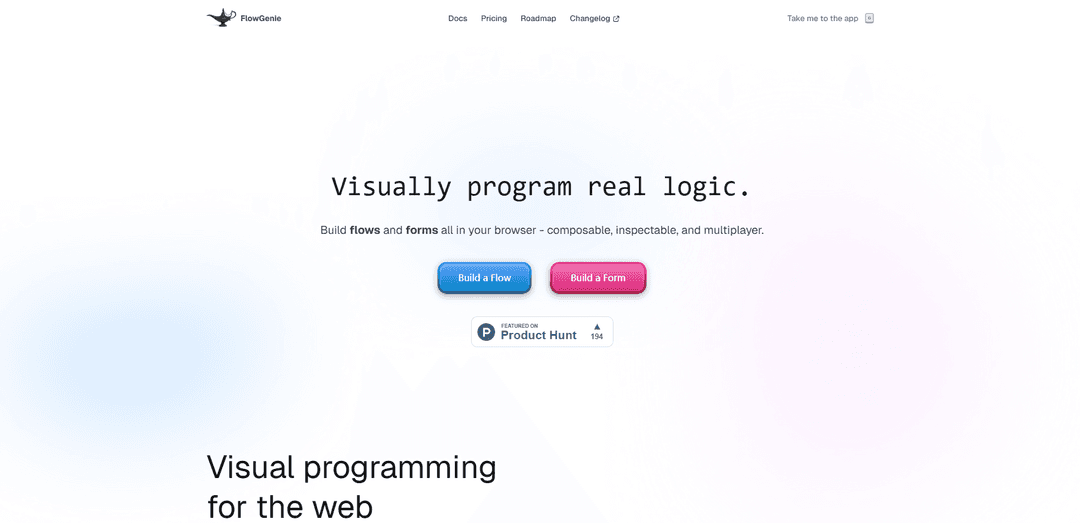
FlowGenie is a no-code visual development platform that enables users to build powerful applications, automate workflows, and create intelligent processes using an intuitive drag-and-drop editor with built-in AI capabilities.
https://www.flowgenie.pro/?ref=producthunt
Product Information
Updated:Feb 8, 2026
What is FlowGenie
FlowGenie is ProcessMaker's AI-powered platform designed to integrate artificial intelligence seamlessly into business process automation. It combines visual programming with AI capabilities, allowing users to create complex workflows, forms, and automations without writing code. The platform is inspired by Unreal Engine blueprints, where logic lives directly in the graph rather than being hidden in configuration panels, making it accessible to developers, founders, and technical teams who want automation without sacrificing clarity or control.
Key Features of FlowGenie
FlowGenie is a comprehensive no-code visual development platform that combines AI-powered automation with intuitive drag-and-drop functionality. It allows users to create workflows, forms, and automated processes through a blueprint-style editor, featuring real-time collaboration capabilities, AI integration for intelligent decision-making, and the ability to deploy solutions across multiple platforms. The platform supports various input types including images, PDFs, and CSV files, while offering multilingual support for global accessibility.
Visual Flow Builder: Create complex workflows using a blueprint-style editor with branches, loops, variables, and nested flows - all visible and inspectable without coding
AI-Powered Automation: Integrate AI capabilities directly into workflows for intelligent processing, data analysis, and automated decision-making
Form Builder: Design and deploy dynamic forms with built-in validation, conditional logic, and workflow triggers that can be embedded anywhere
Real-time Collaboration: Enable team members to build, debug, and deploy together with real-time cursor tracking and simultaneous editing capabilities
Use Cases of FlowGenie
Business Process Automation: Streamline complex business workflows by automating validation, payment processing, and multi-step processes without coding
Environmental Monitoring: Monitor and report flue and stack emissions using the Emission FlowGenie system to meet regulatory requirements
Lead Management: Automate lead capture and nurturing processes with intelligent workflows that identify, qualify, and engage prospects 24/7
Knowledge Management: Unify scattered team tools and data into a centralized knowledge hub for improved decision-making and productivity
Pros
No coding required for complex automation
Comprehensive AI integration
Flexible deployment options
Real-time collaborative features
Cons
Some advanced AI features are still in development
File processing limited to 3 pages and 2MB for PDFs and CSVs
How to Use FlowGenie
Access FlowGenie Studio: Log in to your ProcessMaker account and ensure you have the 'FlowGenies: View FlowGenies' permission or Super Admin access
Create a New Genie: Enter a unique name for your Genie, provide a description, and select relevant categories and projects from the drop-down menus
Configure Genie Settings: In the FlowGenie Studio interface, configure the input and output settings, including variable mapping and response format (Text, Table, or JSON)
Create Prompts: Enter prompts in the 'Enter a user message' box to train the Genie for specific tasks. Use mustache syntax to pass request variables between Genies
Test and Preview: Use the Preview function in FlowGenie Studio to test your Genie's responses and adjust configurations as needed
Build Workflows: Use the drag-and-drop editor to create visual workflows, combining multiple Genies and logic flows in your process
Add Input Processing: Configure the Genie to process various input types including images, PDFs, CSV files, or URLs as needed for your workflow
Integrate into Process Maps: Incorporate your configured Genies directly into process maps as part of your automated workflows
Save and Deploy: Click Save to finalize your Genie configuration and make it available for use in your processes
Monitor and Optimize: Review the performance of your Genies and fine-tune their behavior using the FlowGenie Studio's testing and preview capabilities
FlowGenie FAQs
FlowGenie is a no-code platform that allows users to visually build flows, forms, and logic in their browser. It features a blueprint-style editor where users can create complex workflows without writing code.
Popular Articles

Vosko AI: Localize and Dub Videos for Global Audiences
Oct 15, 2026

Atoms: A Multi-Agent AI Platform That Transforms Ideas into Launch-Ready Products
Oct 13, 2026

Nano Banana SBTI: What It Is, How It Works, and How to Use It in 2026
Apr 15, 2026

Atoms Review — The AI Product Builder Redefining Digital Creation in 2026
Apr 10, 2026
Latest AI Tools Similar to FlowGenie

Hapticlabs
Hapticlabs is a no-code toolkit that enables designers, developers and researchers to easily design, prototype and deploy immersive haptic interactions across devices without coding.

Monyble
Monyble is a no-code AI platform that enables users to launch AI tools and projects within 60 seconds without requiring technical expertise.

Abyss
Abyss is an AI-powered platform that enables users to create, share and run automated task-specific Widgets without requiring technical expertise.

AppScape
AppScape is a no-code platform offering ready-to-use AI-powered apps and customizable SaaS solutions, enabling quick deployment without traditional development costs and technical expertise.
Popular AI Tools Like FlowGenie
GitHub MCP Server
GitHub MCP Server is a Model Context Protocol server that enables seamless integration between AI models and GitHub APIs, providing standardized tools for repository management, issue tracking, and code operations.

GoCodeo SaaS Builder
GoCodeo SaaS Builder is an AI-native framework that automatically generates production-ready full-stack SaaS applications using autonomous AI agents, complete with authentication, real-time features, and TypeScript integration.

iBrowsy
iBrowsy is a modern, AI-powered web browser for macOS that combines intelligent features, privacy-first design, and seamless user experience with built-in GPT-4 assistance.
VibeSDK by CloudFlare
VibeSDK is an open-source AI-powered platform by Cloudflare that enables developers to deploy their own full-stack vibe coding environment with one click, allowing users to generate and deploy applications through natural language descriptions.