
Chat
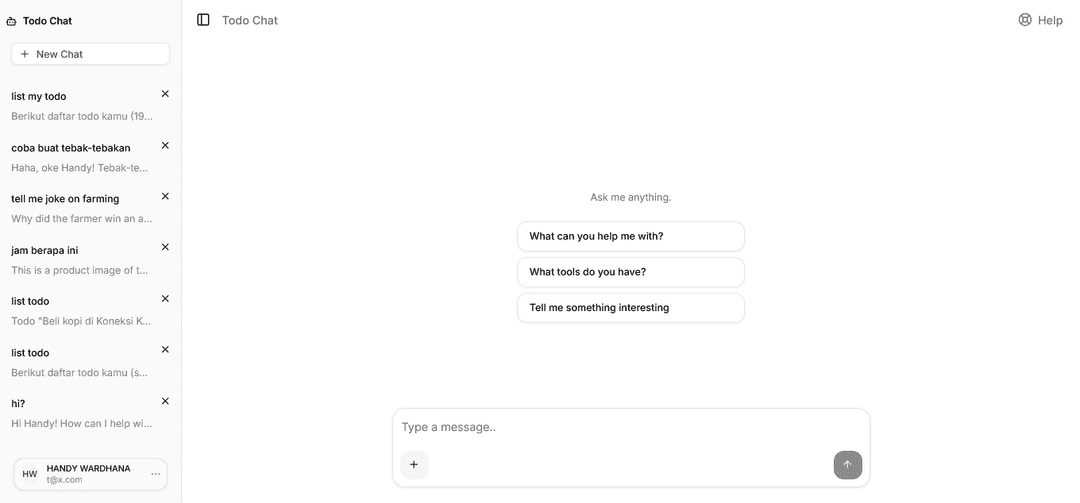
Chat is a general-purpose AI chat interface powered by MCP that enables natural language conversations with GitHub repositories, featuring multi-language support, image processing, and location services.
https://github.com/repaera/chat?ref=producthunt
Product Information
Updated:Apr 8, 2026
What is Chat
Chat is a sophisticated AI-powered application built with Next.js, AI SDK, and Prisma that transforms how developers interact with code repositories. It serves as a bridge between users and GitHub repositories, allowing them to have meaningful discussions, ask questions, and retrieve relevant information through natural language conversations. The application supports multiple languages including English, Indonesian, Korean, Japanese, Spanish, Chinese, German, Dutch, French, and Italian, making it accessible to a global audience.
Key Features of Chat
Chat is a comprehensive AI-powered chat interface built with Next.js that enables natural language conversations with AI assistants. It features real-time streaming responses, multi-language support, image handling capabilities, and secure authentication. The system can be customized for different domains and integrates with various LLM providers while offering robust features like conversation history, background jobs, and flexible deployment options.
Multi-Provider AI Integration: Supports 9 different LLM providers including OpenAI, Azure, Anthropic, and others, allowing flexible choice of AI backends with streaming responses
Advanced Image Handling: Supports image uploads with mandatory cropping, compression, and secure storage in R2, plus the ability for AI to analyze images and include them in responses
Comprehensive Localization: Built-in support for 10 languages with automatic locale detection based on IP geolocation and browser settings, covering both UI elements and AI system prompts
Secure Authentication System: Features email/password authentication with verification, password reset, email change capabilities, and Google OAuth integration
Use Cases of Chat
Customer Support Platform: Can be deployed as an AI-powered customer service interface that handles inquiries, analyzes support tickets, and provides multilingual assistance
Technical Documentation Assistant: Helps developers and users navigate through technical documentation, providing contextual answers and code explanations
Service Booking Interface: Can be customized for booking services like food delivery or handyman services, with natural language interaction and location-aware features
Educational Tool: Serves as an interactive learning assistant that can explain concepts, analyze images, and provide multilingual support for students
Pros
Highly customizable with support for multiple AI providers and deployment options
Robust security features including authentication and rate limiting
Comprehensive internationalization support with automatic locale detection
Production-ready with built-in background jobs and monitoring capabilities
Cons
Requires significant setup and configuration for full functionality
SQLite not recommended for production with multiple app instances
Requires external services setup (R2 for storage, Redis for rate limiting in production)
How to Use Chat
Install Dependencies: Run 'npm install' to install all required dependencies for the chat application
Configure Environment Variables: Create a .env.local file and add required environment variables including OpenAI API key, R2 credentials for image storage, and other configuration settings
Initialize Database: Run 'npm run db:generate' to generate the Prisma client and 'npm run db:push' to create the database schema
Start Development Server: Run 'npm run dev' to start the development server on http://localhost:3000
Register Account: Visit the application URL and register a new user account with email/password or Google OAuth
Start Chat: Navigate to the Chat section to begin conversing with the AI assistant. You can ask questions and get responses powered by the configured LLM
Upload Images (Optional): Use the image upload button to attach images to your messages. Images will be compressed and stored in R2 storage
Share Location (Optional): Use the location sharing feature to share your location or search places using Google Places integration
View Chat History: Access your conversation history which is persistently stored and paginated with infinite scroll
Customize Settings: Visit the Settings page to change your profile, email, password, language preference and other account settings
Chat FAQs
Chat is a general-purpose AI chat interface powered by MCP. It allows users to connect any MCP server for services like delivery, handyman booking, task management, or any domain, and interact through natural language conversation. It's built with Next.js App Router, AI SDK v6, and Prisma v7.
Popular Articles

Atoms: A Multi-Agent AI Platform That Transforms Ideas into Launch-Ready Products
May 22, 2026

Nano Banana SBTI: What It Is, How It Works, and How to Use It in 2026
Apr 15, 2026

Atoms Review — The AI Product Builder Redefining Digital Creation in 2026
Apr 10, 2026

Kilo Claw: How to Deploy and Use a True "Do‑It‑For‑You" AI Agent(2026 Update)
Apr 3, 2026
Latest AI Tools Similar to Chat

Folderr
Folderr is a comprehensive AI platform that enables users to create custom AI assistants by uploading unlimited files, integrating with multiple language models, and automating workflows through a user-friendly interface.

Peache.ai
Peache.ai is an AI character chat playground that enables users to engage in flirty, witty, and daring conversations with diverse AI personalities through real-time interactions.

TalkPersona
TalkPersona is an AI-powered video chatbot that provides real-time human-like conversation through a virtual talking face with natural voice and lip-sync capabilities.

Thaly AI
Thaly AI is an AI-powered sales assistant that automates customer conversations and lead qualification to help businesses scale their sales operations while saving time.
Popular AI Tools Like Chat

GPT‑5.5 | ChatGPT Official
GPT‑5.5 in ChatGPT is OpenAI’s latest work-focused model designed to understand complex goals, use tools effectively, check its work, and carry multi-step tasks (coding, research, documents, spreadsheets) through to completion with stronger safeguards.

DuckDuckGo AI Chat
DuckDuckGo AI Chat is a free, anonymous way to access popular AI chatbots like GPT-3.5, Claude, and others while preserving user privacy.

Arch
Arch is an intelligent Layer 7 gateway built on Envoy Proxy that provides secure handling, robust observability, and seamless integration of prompts with APIs for building fast, robust, and personalized AI agents.

Off-grid LLM over Radio
A platform that integrates Large Language Models (LLMs) with Meshtastic mesh communication networks to enable off-grid AI interactions and automated task execution through radio communication.