
Caret
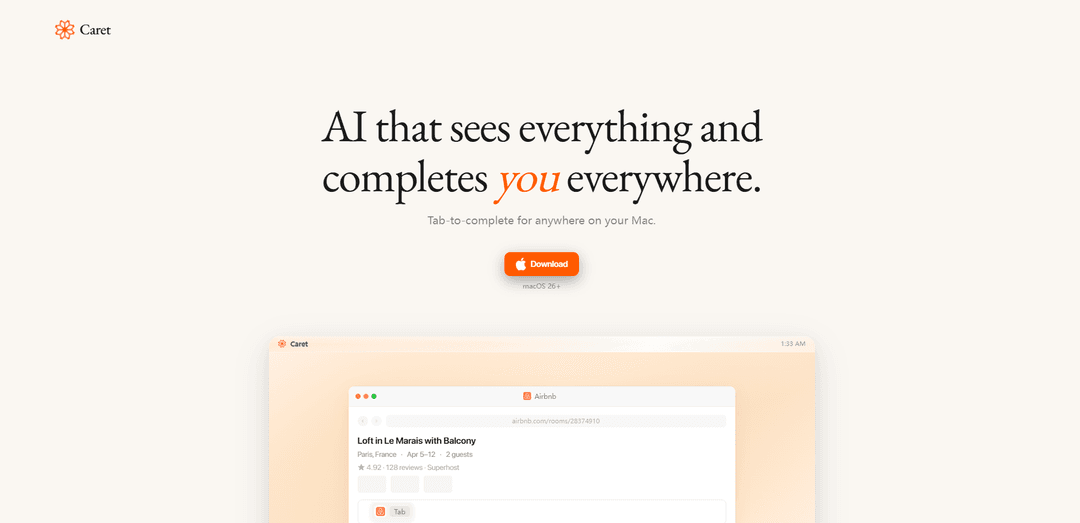
Caret is an AI-powered Mac application that reads your screen, understands context, and provides intelligent tab-to-complete functionality across every app on your system.
https://trycaret.com/?ref=producthunt
Product Information
Updated:Apr 10, 2026
What is Caret
Caret is a revolutionary AI assistant designed exclusively for macOS 13+ that fundamentally changes how users interact with their computers. Unlike traditional chat-based AI tools, Caret operates as an always-on, context-aware companion that integrates seamlessly into every application on your Mac. By continuously reading your screen and building memories of your work sessions, Caret learns your writing style, understands your workflow, and anticipates your needs. Simply press Tab in any application—whether it's Messages, Mail, Slack, Notion, Google Docs, or any other app—and Caret completes your thoughts with contextually relevant suggestions that sound like you.
Key Features of Caret
Caret is an AI-powered autocomplete assistant for macOS that works system-wide across all applications. Unlike traditional chat-based AI tools, Caret continuously monitors your screen, builds contextual memory of your work session, and provides intelligent text completions by simply pressing the Tab key. It integrates seamlessly into any app on your Mac—from Messages and Mail to Slack, Notion, and beyond—understanding your context and writing style to complete sentences, responses, and thoughts in your voice with full awareness of what you're working on.
Universal Tab-to-Complete: Press Tab in any application on your Mac to instantly complete your thoughts, sentences, or responses without switching to a separate chat interface.
Contextual Screen Reading: Continuously reads and analyzes everything on your screen to build comprehensive memory of your work session, understanding the full context of your activities.
System-Wide Integration: Works across all macOS applications including Messages, Mail, Slack, Notion, Google Docs, Safari, and hundreds of other apps without requiring individual integrations.
Adaptive Learning: Gets smarter over time by learning your writing style, preferences, and work patterns to provide increasingly personalized and accurate completions.
Always-On Assistant: Runs continuously in the background like a shadow, ready to assist the moment you need it without manual activation or context switching.
Use Cases of Caret
Customer Support Communication: Support teams can respond to customer inquiries faster across email, Slack, and ticketing systems with context-aware responses that maintain consistency and professionalism.
Content Creation and Writing: Writers, bloggers, and marketers can accelerate content production in any text editor or CMS by having AI complete sentences, paragraphs, and ideas while maintaining their unique voice.
Software Development Documentation: Developers can quickly write code comments, commit messages, documentation, and technical responses in tools like VS Code, GitHub, and Slack with context from their current work.
Professional Email Management: Business professionals can compose emails faster in Mail, Outlook, or Superhuman with AI-generated responses that understand the conversation thread and maintain appropriate tone.
Team Collaboration: Remote teams can communicate more efficiently in Slack, Microsoft Teams, and project management tools with quick, context-aware message completions that save time.
Personal Productivity: Individuals can manage daily tasks, notes, reminders, and messages across all personal apps with intelligent autocomplete that learns their communication patterns.
Pros
Works universally across all macOS applications without requiring app-specific integrations
Provides context-aware completions by continuously monitoring screen activity and building session memory
Simple Tab-key activation makes it faster than switching to separate AI chat applications
Learns and adapts to individual writing style and preferences over time
Cons
Only available for macOS 26+, limiting accessibility to users with older systems or other operating systems
Requires screen recording permissions which may raise privacy concerns for sensitive work
Continuous screen monitoring could impact system performance and battery life
May require adjustment period as users learn when AI completions are helpful versus intrusive
How to Use Caret
1: Download and install Caret on your Mac (requires macOS 26+)
2: Launch Caret - it will run in the background and begin monitoring your screen activity
3: Allow Caret to read your screen and create memories of your work sessions - it gets smarter the longer you use it
4: Open any app on your Mac where you want to type (Messages, Mail, Slack, Notes, Safari, Google Docs, etc.)
5: Start typing your message or text in any text field
6: Press the Tab key when you want Caret to complete your thought
7: Caret will analyze the context from your screen and your typing patterns to generate a completion in your voice
8: Review the suggested completion and accept it or continue typing to refine
9: Continue using Caret across all your Mac apps - it works everywhere, not just in a chat interface
10: Let Caret learn from your usage patterns over time to provide increasingly accurate and personalized completions
Caret FAQs
Caret is an AI-powered application for Mac that provides tab-to-complete functionality across your entire system. It continuously reads your screen, creates memories of your work, and can complete your thoughts and sentences in any app by simply pressing the Tab key. Unlike traditional chat apps, Caret works universally across all applications on macOS.
Caret Video
Popular Articles

Atoms: A Multi-Agent AI Platform That Transforms Ideas into Launch-Ready Products
May 22, 2026

Nano Banana SBTI: What It Is, How It Works, and How to Use It in 2026
Apr 15, 2026

Atoms Review — The AI Product Builder Redefining Digital Creation in 2026
Apr 10, 2026

Kilo Claw: How to Deploy and Use a True "Do‑It‑For‑You" AI Agent(2026 Update)
Apr 3, 2026
Latest AI Tools Similar to Caret

Inbox AI
Inbox AI is a privacy-focused MacOS productivity app that combines voice-driven AI automation with email management capabilities, allowing users to create custom workflows and commands while offering both cloud-based and on-device AI options.

Cart.ai
Cart.ai is an AI-powered service platform that provides comprehensive business automation solutions including coding, customer relations management, video editing, e-commerce setup, and custom AI development with 24/7 support.

Hiyllo Work
Hiyllo Work is an all-in-one team workspace platform that combines chat, project management, calendar, email, file storage and video meetings in a single integrated environment.

MailSense
MailSense is an AI-powered email assistant that filters, summarizes, and generates replies to emails through a Telegram bot interface to help users manage their inbox more efficiently.
Popular AI Tools Like Caret

Magentic-UI
Magentic-UI is an open-source, human-centered web agent prototype by Microsoft Research that enables collaborative planning and execution of complex web-based tasks through transparent interaction between humans and AI agents.

Microsoft Copilot Cowork
Microsoft Copilot Cowork is an AI-powered assistant that turns user intent into actionable plans and autonomously executes multi-step tasks across Microsoft 365 apps while keeping users in control through checkpoints and approvals.

Upsonic
Upsonic is a reliability-focused AI agent framework with dockerized server-client architecture that enables trusted agent workflows through advanced features like verification layers, triangular architecture, and Model Context Protocol (MCP) integration.

CampEd Hire
CampEd Hire is a powerful Chrome extension that streamlines recruitment by automatically collecting and organizing job applicant data from LinkedIn job posts, with features like automated data collection, CSV export, and batch resume downloads.