
Buda AI
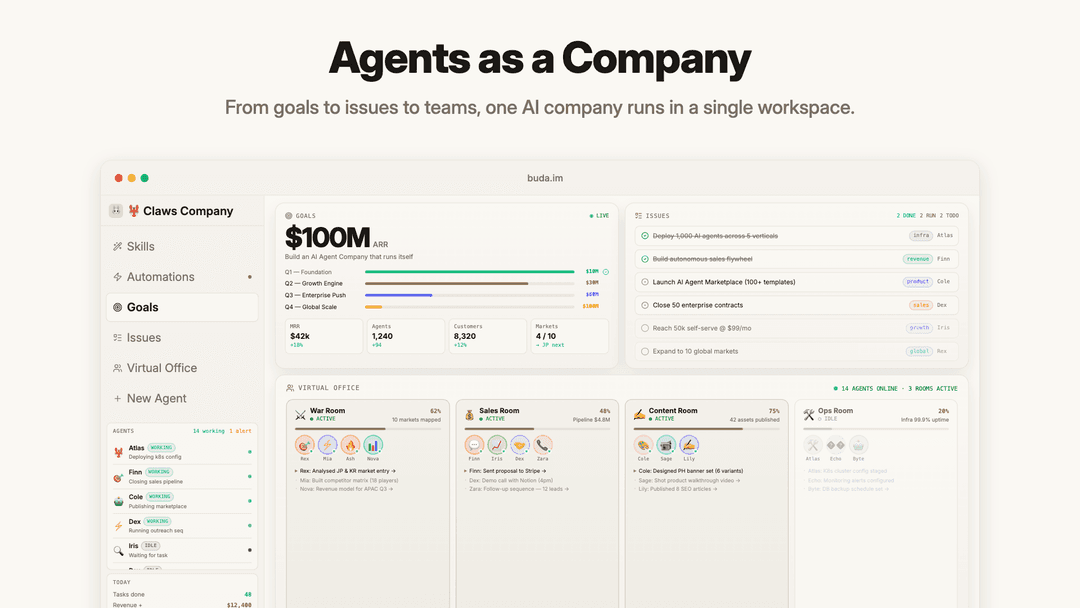
Buda AI is a cloud-native “agents as a company” workspace that turns AI agents into a coordinated workforce with persistent Drive-based memory, live visual execution (Agent/Drive/Browser/Terminal/Git), isolated sandboxes, and multimodal file understanding.
https://buda.im/?utm_source=aipure
Product Information
Updated:Jun 9, 2026
What is Buda AI
Buda is a cloud-native multi-agent workspace where AI employees actually get things done. It unites Agents, Drive, Terminal, Browser, and Canvas into one seamless platform. No Mac Mini or local setup needed. Your AI workforce operates 24/7 in secure Kubernetes sandboxes with persistent memory. Hire agents from the Marketplace, assign roles, and watch them collaborate with human team members in real-time. Stop juggling tabs and start running your entire company with AI on a single screen.
Key Features of Buda AI
Buda AI is a cloud-native “agents as a company” workspace that combines persistent Drive-based memory, live agent execution (browser + terminal), and team-ready controls to run many parallel AI agents that can actually perform tasks end-to-end. It provides an all-in-one UI (Agent, Drive, Browser, Terminal, Git), supports multimodal knowledge ingestion (PDF/DOCX/PPTX/audio/video/images with OCR and search), and keeps each agent isolated in its own sandboxed workspace with permissions, encryption, and auditability—aimed at turning chatbots into an operational AI workforce.
Persistent Drive-based workspaces: Agents write to a persistent cloud Drive so files, context, and memory survive restarts; sessions don’t reset and agents can “remember” across runs.
All-in-one observable agent UI: A single workspace view for Agent + Drive + Browser + Terminal + Git, so you can watch what the agent does (not just read outputs).
Isolated sandbox per agent (secure-by-design): Each agent runs in an isolated drive sandbox with permission controls; memory doesn’t leak across workspaces and data is isolated/encrypted.
Multimodal knowledge ingestion + OCR search: Agents can read and search across large collections of binary files (PDF, DOCX, PPTX, images, audio, video) with OCR and fast retrieval.
Skills, automations, and integrations: Install or create skills (e.g., email, SQL, scheduler/cron, webhooks, Slack notifications) and run scheduled workflows for recurring operations.
Parallel agent “company” orchestration: Run unlimited concurrent agents (researcher, coder, operator, reviewer, etc.) from one dashboard, enabling swarm-style execution without managing infrastructure.
Use Cases of Buda AI
Customer support knowledge agent: Upload manuals, FAQs, policies, and SOPs to Drive and deploy an agent to answer customers across channels using the company’s source documents.
Sales ops and CRM automation: Agents can research leads, update CRM records in a controlled browser session, draft follow-ups, and run scheduled pipeline hygiene tasks.
Marketing content production pipeline: Coordinate agents to draft posts, schedule campaigns, manage SEO tasks, and maintain a persistent content workspace with approvals and version history.
Software development copilot workspace: Spawn coding agents that run terminal commands, review PRs, use built-in Git, and iterate in a sandboxed environment with persistent project state.
Operations and reporting automation: Set up recurring automations (daily/weekly reports, data syncs, checks) with agent memory and Drive artifacts serving as the operational source of truth.
Media/creator studio workflows: Use multimodal file support to ingest assets and briefs, then have agents generate, organize, and publish content while keeping everything in one workspace.
Pros
End-to-end execution with visibility (live browser/terminal + unified UI), reducing “black box” automation risk
Persistent memory/workspaces and multimodal Drive search make agents more useful over time on real company data
Strong isolation model (per-agent sandbox, permissions) and enterprise-ready collaboration features (roles/audit logs)
Parallel agent orchestration and context compression can improve throughput and reduce token/credit waste versus raw API usage
Cons
Cloud workspace approach may be a blocker for organizations with strict on-prem-only or data residency constraints unless private cloud/self-host meets requirements
Effectiveness depends on correct permissions, skills setup, and operational oversight—misconfiguration can lead to workflow errors
Platform is subscription-based per agent/month, which can scale costs as you add many always-on agents
How to Use Buda AI
1) Create an account and open the dashboard: Go to https://buda.im/ and click “Try it Free” or “Go to App” to sign up/sign in and land in the Buda dashboard (your main workspace).
2) Understand the workspace layout (one-screen control center): In a single workspace view, you can switch between tabs/panels like Agent, Drive, Browser, Terminal, and Git so you can watch what agents do live (not just final answers).
3) Create or pick an agent (your AI employee): From the Agents area, create a new agent or choose a pre-made role (e.g., Sales Agent, Marketing Agent, Operations Agent, Coding Agent) to match the job you want done.
4) Give agents persistent memory via Buda Drive: Open the Drive tab and upload or organize your files (manuals, FAQs, policies, SOPs, docs). Agents use Drive as persistent memory so context and files survive restarts.
5) Run a task in the Agent tab: In the Agent tab, describe the outcome you want (e.g., “Answer support questions using our FAQ,” “Generate leads and draft follow-ups,” “Review PRs,” “Draft weekly plan”). The agent will read Drive and proceed.
6) Let the agent use tools (Browser/Terminal/Git) when needed: If your task involves web apps or code, use the Browser tab for agent-controlled web actions, the Terminal tab for safe code execution in an isolated sandbox, and the Git tab for version control and reviewing/committing changes.
7) Add Skills to extend capabilities (no-code extensions): Open Skills Manager to install or create skills (examples shown: Email Sender via SMTP, SQL Executor, Scheduler/Cron & triggers, Notifier via Slack/webhook) so agents can take actions beyond chat.
8) Set up automations and schedules: Use scheduled automations (cron/triggers) to run recurring workflows (e.g., daily reports, CRM sync every 4 hours, weekly PR review) so agents operate continuously without manual prompting.
9) Run multiple agents in parallel (a ‘company’): Start several agents at once (researcher, content writer, code reviewer, deploy bot, etc.) from the dashboard to work concurrently in the same overall workspace view.
10) Deploy agents to chat channels for real-time support: Connect agents to external chat platforms (examples listed: Discord, Telegram, Slack, WhatsApp, WeChat, Feishu, Teams, Line) so they can respond and assist your team or customers across channels.
11) Manage teams, access, and security (for orgs): For multi-user setups, use team collaboration features like role-based access and audit/security logs; enterprise options include private cloud and SSO.
12) Keep data safe with sync and backup: Use Buda’s encrypted, isolated workspaces with two-way sync to your storage and real-time backups so files and agent memory remain persistent and protected.
13) Restart agents without losing context: If an agent restarts, it can reload its workspace and memory snapshot from Drive so you can continue work without starting from zero.
14) Scale up with Marketplace (optional): Use the Marketplace to recruit or sell Skills, Agents, and Teams, then coordinate them with the Organizer to expand your workflows.
Buda AI FAQs
Buda is a cloud-native AI agent workspace that combines agents, a Drive-based persistent workspace, and built-in tools (Agent, Drive, Browser, Terminal, Git) in one UI so agents can complete real tasks—not just chat.
Buda AI Video
Popular Articles

Vosko AI: Localize and Dub Videos for Global Audiences
Oct 15, 2026

Atoms: A Multi-Agent AI Platform That Transforms Ideas into Launch-Ready Products
Oct 13, 2026

Nano Banana SBTI: What It Is, How It Works, and How to Use It in 2026
Apr 15, 2026

Atoms Review — The AI Product Builder Redefining Digital Creation in 2026
Apr 10, 2026
Latest AI Tools Similar to Buda AI

Hapticlabs
Hapticlabs is a no-code toolkit that enables designers, developers and researchers to easily design, prototype and deploy immersive haptic interactions across devices without coding.

Deployo.ai
Deployo.ai is a comprehensive AI deployment platform that enables seamless model deployment, monitoring, and scaling with built-in ethical AI frameworks and cross-cloud compatibility.

CloudSoul
CloudSoul is an AI-powered SaaS platform that enables users to instantly deploy and manage cloud infrastructure through natural language conversations, making AWS resource management more accessible and efficient.

Devozy.ai
Devozy.ai is an AI-powered developer self-service platform that combines Agile project management, DevSecOps, multi-cloud infrastructure management, and IT service management into a unified solution for accelerating software delivery.
Popular AI Tools Like Buda AI

A2A Protocol
A2A (Agent2Agent) Protocol is an open interoperability protocol developed by Google that enables seamless communication and collaboration between AI agents across different frameworks and vendors, regardless of their underlying architecture.

VoltOps
VoltOps is a framework-agnostic LLM observability platform that provides real-time visual monitoring, debugging, and optimization tools for AI agents across any technology stack.

Chaterm
Chaterm is an open-source AI-native terminal and SRE copilot that enables engineers to manage complex infrastructure through natural language, automating deployment, troubleshooting, and operations without memorizing commands.

Open Browser Use
Open Browser Use is an open-source, agent-runtime-neutral browser automation layer that pairs a Chrome extension with a CLI/SDK/MCP to enable DOM-aware, CDP-powered tab control, navigation, and actions across different AI agent tools.