
Atech
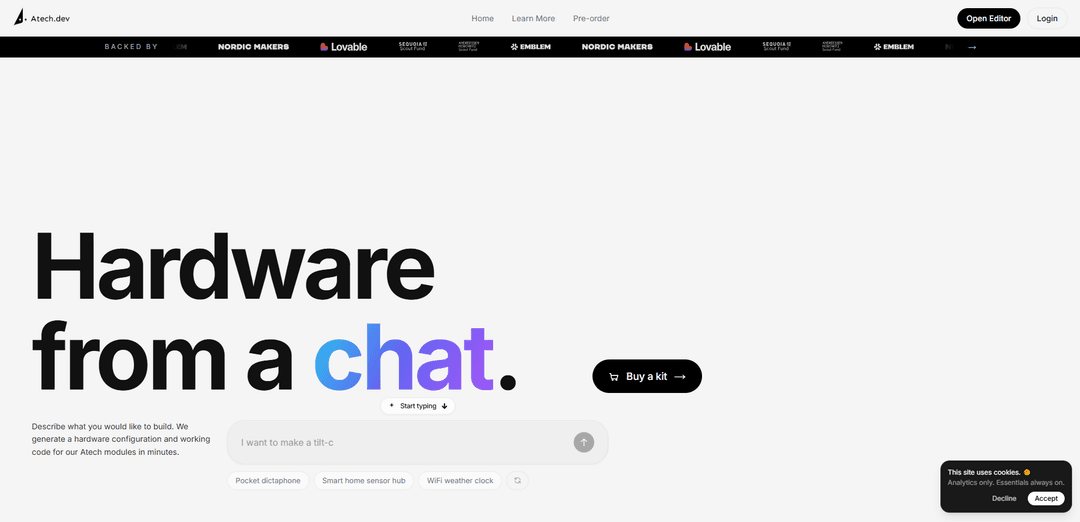
Atech is a “hardware from a chat” platform that turns natural-language device ideas into a working hardware configuration and firmware code in minutes using snap-together modular electronics.
https://atech.dev/?ref=producthunt
Product Information
Updated:May 19, 2026
What is Atech
Atech is a Copenhagen-based startup building what it calls “vibe-engineering” for hardware—making it dramatically easier for individuals and companies to prototype physical devices without deep embedded expertise. Users describe what they want to build in plain language, and Atech generates a suggested configuration of its modular components along with working firmware to bring the prototype to life quickly. The company has raised a $800K pre-seed round and is backed by investors including Nordic Makers, Emblem, and Lovable, with scout participation connected to Sequoia and a16z.
Key Features of Atech
Atech is a “hardware from a chat” platform that lets users describe a physical device in natural language and quickly receive a working prototype built from Atech’s snap-together modular electronics, including an auto-generated hardware configuration and working firmware/code. It aims to make hardware prototyping feel like software development—reducing the need for deep embedded expertise—by abstracting complexity and speeding iteration from idea to a live device.
Natural-language hardware design: Users describe the device they want to build in plain language, and Atech translates the prompt into an actionable build plan.
Auto-generated module configuration: The platform produces a recommended configuration using Atech modules, turning a concept into a concrete parts-and-connections setup.
Working firmware/code generation: Atech generates functioning embedded code/firmware for the selected module setup, enabling fast bring-up without writing everything from scratch.
LEGO-like modular electronics system: Electronic components are designed to snap together, lowering friction for assembling advanced circuits and iterating on prototypes.
Rapid prototype-to-device workflow: Designed for quick iteration cycles—configure, assemble, upload firmware (e.g., via USB serial), and validate that “your creation is alive.”
Use Cases of Atech
Startup MVP prototyping: Early-stage teams can validate a hardware product idea quickly by generating a module configuration and firmware to demo functionality to users or investors.
R&D and rapid experimentation: Engineering teams can explore sensor/actuator combinations and embedded behaviors faster by iterating via chat-driven configuration and code generation.
Education and hands-on learning: Students and educators can build real electronics projects with snap-together modules while learning embedded concepts without steep setup overhead.
IoT proof-of-concepts: Teams can prototype connected devices (e.g., monitoring or automation concepts) using modular electronics plus generated firmware to accelerate feasibility testing.
Maker and hobbyist builds: Individuals can go from idea to functioning device with less specialized knowledge, using modular components and generated code to get to first working results.
Pros
Speeds up hardware prototyping by generating both configuration and working firmware from a chat prompt.
Lowers the barrier to entry with snap-together modular electronics and reduced need for deep embedded expertise.
Encourages fast iteration cycles from concept to a live, testable device.
Cons
Tied to the Atech module ecosystem, which may limit flexibility versus fully custom components/PCBs.
Generated designs may not match the performance, cost, or manufacturability needs of production-grade hardware without additional engineering.
Availability may be constrained early on (e.g., pre-order/waitlist), limiting immediate adoption.
How to Use Atech
1. Decide what you want to build: In plain English, describe the device/project you want to create (what it should sense/do, outputs, connectivity, and any constraints).
2. Use Atech’s chat-based builder: Enter your description into Atech (“hardware from a chat”). Atech generates a recommended hardware configuration (which Atech modules you need) and working starter code.
3. Get the required Atech hardware: Pre-order or purchase the Atech board and the suggested modules, based on the generated configuration.
4. Snap modules into the labeled ports: Physically connect the modules by snapping them into the board’s labeled ports until they click into place—no tools needed.
5. Connect the board to your computer via USB-C: Plug a USB-C cable from the Atech board into your computer. Your system should detect it as a USB serial device (e.g., “USB Serial Device (COM3)” on Windows).
6. Open Chrome for uploading: Use Google Chrome as indicated by Atech’s workflow (the upload flow is designed to work in Chrome).
7. Select your board in the uploader: In the Atech upload interface, choose the connected Atech board from the device list (the USB serial device you just connected).
8. Upload the generated firmware/code: Click upload to flash the generated code to the board. You should see an “Uploading firmware...” status during the process.
9. Verify it’s running: After upload completes, confirm the project behaves as expected (Atech indicates success with messaging like “Your creation is alive!”).
10. Iterate by updating the chat description and re-uploading: Refine your project by adjusting your plain-English requirements, regenerating configuration/code, and repeating the upload process as you add or swap modules.
Atech FAQs
Atech is a platform for building hardware “from a chat,” where you describe the device you want to build and Atech generates a hardware configuration and working code for its Atech modules in minutes.
Atech Video
Popular Articles

Atoms: A Multi-Agent AI Platform That Transforms Ideas into Launch-Ready Products
May 22, 2026

Nano Banana SBTI: What It Is, How It Works, and How to Use It in 2026
Apr 15, 2026

Atoms Review — The AI Product Builder Redefining Digital Creation in 2026
Apr 10, 2026

Kilo Claw: How to Deploy and Use a True "Do‑It‑For‑You" AI Agent(2026 Update)
Apr 3, 2026
Latest AI Tools Similar to Atech
Foundry
Foundry is a versatile platform that exists in multiple forms - as a smart contract development toolchain, a virtual tabletop gaming software, and a traditional metal casting facility - each offering specialized features for their respective domains.
PythonConvert.com
PythonConvert.com is a free web-based tool that provides AI-powered code translation between Python and other programming languages as well as Python type conversion capabilities.

Softgen
Softgen.ai is an AI-powered full-stack project generator platform that enables users to transform their ideas into functional web applications without coding requirements.

Micro SaaS Ideas
Micro SaaS Ideas are small-scale, niche-focused software solutions that target specific problems or markets, offering entrepreneurs a way to build profitable businesses with minimal resources and complexity.
Popular AI Tools Like Atech

GitHub Copilot Chat
GitHub Copilot Chat is an AI-powered coding assistant that provides natural language interactions, real-time code suggestions, and contextual support directly within supported IDEs and GitHub.com.

CopilotForXcode
CopilotForXcode is an Xcode Source Editor Extension that integrates GitHub Copilot, Codeium, and ChatGPT to provide AI-powered code suggestions, chat assistance, and prompt-to-code functionality within Xcode.

OpenAI Codex CLI
OpenAI Codex CLI is a lightweight, open-source coding agent that runs in your terminal, enabling developers to translate natural language into code execution while providing ChatGPT-level reasoning with the ability to run code, manipulate files, and iterate under version control.

GoCodeo SaaS Builder
GoCodeo SaaS Builder is an AI-native framework that automatically generates production-ready full-stack SaaS applications using autonomous AI agents, complete with authentication, real-time features, and TypeScript integration.