
Index for ChatGPT
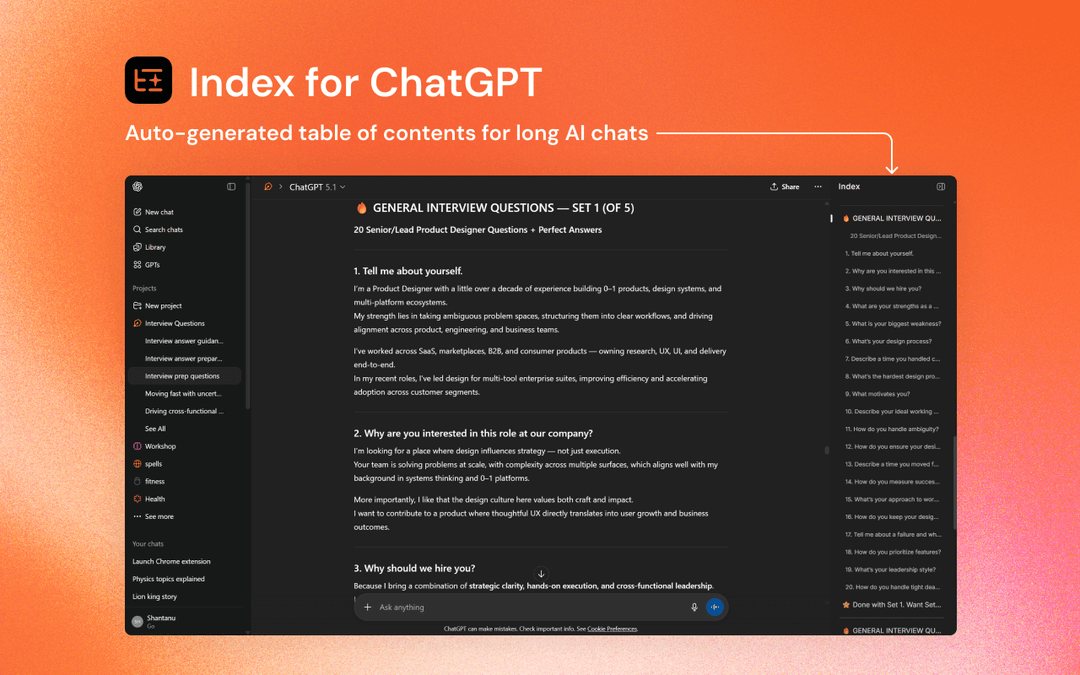
Index for ChatGPT is a Chrome extension that automatically generates a clean, clickable table of contents for long ChatGPT conversations, allowing users to instantly navigate to any section.
https://chromewebstore.google.com/detail/mideipckdlfgejjjdacbjgdjjdeodfko?utm_source=item-share-cb&ref=producthunt
製品情報
更新日:2025年12月08日
Index for ChatGPTとは
Index for ChatGPT is a lightweight Chrome browser extension designed to enhance the ChatGPT experience by adding smart navigation capabilities to conversations. It addresses the common challenge of scrolling through lengthy ChatGPT discussions by providing an organized, structured way to access different parts of the conversation. The extension operates entirely within the browser, requiring no external data collection or storage, making it both efficient and privacy-focused.
Index for ChatGPTの主な機能
Index for ChatGPT is a Chrome extension that automatically generates a clean, clickable table of contents for long ChatGPT conversations, allowing users to easily navigate through different sections of their chat history. The extension creates structured headings from the chat content and provides instant navigation links, making it especially useful for managing and revisiting lengthy conversations without endless scrolling.
Auto-Generated Index: Automatically creates a structured table of contents from chat content that updates in real-time as conversations grow
One-Click Navigation: Provides clickable links to instantly jump to specific sections of the conversation
Clean Interface: Adds a well-organized sidebar with clear, readable headings for easy reference
Privacy-Focused: Runs entirely in browser with no data collection or external storage
Index for ChatGPTのユースケース
Research Sessions: Helps researchers organize and quickly navigate through lengthy research discussions and findings
Technical Discussions: Enables developers and technical teams to easily reference different parts of complex technical conversations
Brainstorming Sessions: Allows creative teams to structure and revisit different ideas and topics from brainstorming conversations
Tutorial Documentation: Helps create organized, easily navigable tutorial content from ChatGPT conversations
メリット
Lightweight and fast performance
No data collection or privacy concerns
Works with both existing and new chats
デメリット
Limited to Chrome browser only
Requires installation of extension
Only works with ChatGPT interface
Index for ChatGPTの使い方
Install the extension: Visit Chrome Web Store and install the 'Index for ChatGPT - Auto Table of Contents' extension
Visit ChatGPT: After installation, go to chatgpt.com
Locate the index icon: Find the orange index icon located on the center right side of the ChatGPT interface
Access the index: Click on the orange index icon to view the automatically generated table of contents for your conversation
Navigate using hotkey (optional): Use the hotkey Ctrl-Shift-P to quickly open the index
Use the index: Click on any section in the index to instantly jump to that part of the conversation
Wait for initial setup: Note that the extension needs some time after first install to fetch your existing chats and create a local index. You can monitor the progress of conversation sync in the sidebar
Index for ChatGPTのよくある質問
Index for ChatGPT is a Chrome extension that automatically generates a clickable table of contents for long ChatGPT conversations, allowing users to jump to any section instantly instead of scrolling through the entire chat.




Index for ChatGPTに類似した最新のAIツール

Folderr
Folderr is a comprehensive AI platform that enables users to create custom AI assistants by uploading unlimited files, integrating with multiple language models, and automating workflows through a user-friendly interface.

Peache.ai
Peache.aiは、ユーザーがリアルタイムのインタラクションを通じて多様なAIの個性とフリーティ、ウィットに富んだ、そして大胆な会話に参加できるAIキャラクターのチャット遊び場です

TalkPersona
TalkPersonaは、自然な声とリップシンク機能を備えた仮想トーキングフェイスを通じて、リアルタイムの人間のような会話を提供するAI駆動のビデオチャットボットです

Thaly AI
Thaly AIは、顧客との会話やリードの資格確認を自動化し、企業が営業業務を拡大しながら時間を節約できるようにするAI駆動の営業アシスタントです。
Index for ChatGPTに似た人気のAIツール

GPT‑5.5 | ChatGPT Official
ChatGPTのGPT-5.5は、OpenAIの最新の作業特化型モデルであり、複雑な目標を理解し、ツールを効果的に使用し、その作業をチェックし、より強力な安全対策で多段階のタスク(コーディング、研究、ドキュメント、スプレッドシート)を完了まで実行するように設計されています。

DuckDuckGo AI Chat
DuckDuckGo AI Chatは、ユーザーのプライバシーを保護しながら、GPT-3.5、Claudeなどの人気AIチャットボットにアクセスするための無料で匿名の方法です。

Arch
Archは、Envoy Proxy上に構築されたインテリジェントなレイヤー7ゲートウェイであり、安全な処理、堅牢な可視性、およびAPIとのプロンプトのシームレスな統合を提供し、高速で堅牢かつパーソナライズされたAIエージェントの構築を可能にします。

Off-grid LLM over Radio
オフグリッドAIインタラクションとラジオ通信を通じた自動タスク実行を可能にするために、大規模言語モデル(LLM)とMeshtasticメッシュ通信ネットワークを統合するプラットフォームです