
iArt.ai
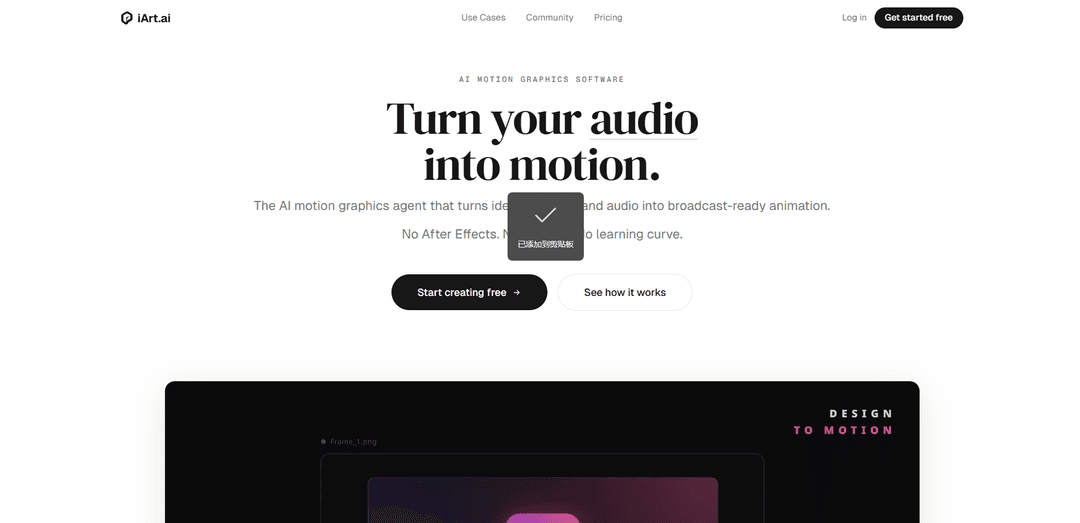
iArt.ai is an AI motion-graphics platform that turns text, designs, and audio into editable, broadcast-ready animations in seconds—no After Effects, timeline, or keyframing required.
https://www.iart.ai/?utm_source=aipure&utm_medium=referral&ref=producthunt
Informasi Produk
Diperbarui:Jun 15, 2026
Apa itu iArt.ai
iArt.ai is an AI-powered motion graphics engine designed for people who need professional animated content without learning complex tools like After Effects. It generates vector-precise motion graphics—such as kinetic typography, explainer-style sequences, and presentation-grade visuals—from simple prompts or uploaded assets. Users can start from a concept, import existing materials (e.g., Figma designs, Notion docs, images, audio, or even YouTube links), and export production-ready videos in formats like MP4 (up to 4K/60fps), GIF, or Lottie JSON.
Fitur Utama iArt.ai
iArt.ai is an AI motion-graphics engine that turns text prompts, designs (e.g., Figma), documents (e.g., Notion), and audio/voice into broadcast-ready animated videos—without After Effects, timelines, or manual keyframing. It generates scene-by-scene layouts, typography, transitions, and timing in seconds, supports voice cloning/TTS and music, keeps styles consistent across assets, and lets users edit outputs (timing, colors, text, easing) before exporting production formats like 4K MP4, GIF, or Lottie JSON.
Prompt/design/audio → motion graphics: Create keynote-style vector animations from plain-language prompts or by uploading assets like images, Figma designs, documents, audio files, or YouTube links.
Scene-by-scene auto composition: The agent builds animations with intentional layout, typography, transitions, and timing—assembling a full motion sequence automatically rather than generating “footage.”
Audio-synced kinetic typography: Sync motion to narration and beats—supporting voice cloning or built-in TTS plus optional background music for punchy, rhythm-aligned graphics.
Editable outputs (real control): Adjust timing, colors, text, and easing curves after generation, enabling iterative refinement beyond simple “accept or regenerate.”
Multi-format, production-ready export: Export MP4 (H.264) up to 4K/60fps, GIF, or Lottie JSON, or share via a playable link—no render-queue workflow.
Tool connectivity via MCP integrations: Connect to existing workflows and sources (e.g., Notion/Figma) with native-style ingestion to reduce import/export friction.
Kasus Penggunaan iArt.ai
Product marketing & launches: Turn product briefs, landing-page copy, or Figma mockups into polished launch teasers, feature highlights, and social-ready motion assets.
Explainer videos for complex topics: Animate algorithms, processes, strategies, or technical concepts into clear scene-based explainers for SaaS, fintech, or developer tools.
Social media shorts from long-form audio: Convert podcasts, lectures, or interviews into highlight clips with kinetic type and branded motion for Reels/Shorts/TikTok.
Sales enablement & presentations: Create animated openers, lower thirds, and end cards that match brand style for decks, demos, webinars, and customer pitches.
Internal comms & training: Transform Notion docs or written SOPs into quick animated training modules and announcements without needing an animation team.
Kelebihan
Very low learning curve compared with After Effects (no timeline/keyframing required).
Accepts many input types (text, Figma, Notion, audio, links) and generates fast, scene-structured motion graphics.
Editable results (timing/colors/text/easing) provide more control than many one-shot AI video tools.
Exports to common production formats including 4K MP4 and Lottie for web/app animation.
Kekurangan
Primarily focused on motion graphics (typography/layout/vector animation), not cinematic, live-action-style video generation.
Credit-based pricing tied to AI compute may make costs less predictable at higher iteration volumes.
Best results may depend on having clear source content/brand assets; fully bespoke art direction may still require iteration.
Cara Menggunakan iArt.ai
1) Create an account and start with free credit: Go to https://www.iart.ai/ and sign up. New accounts include a $5 signup credit (no credit card required), which you can use to generate your first motion graphics.
2) Choose your starting point (Prompt, Design, or Voice): Decide what you want to feed iArt: (a) a text description, (b) an existing design file (e.g., Figma mockup/brand poster), or (c) voice/script + audio for synced motion.
3) Provide input by typing or uploading: Either type what you want to create or upload/drop in assets such as images, Figma designs, documents (e.g., Notion docs), audio files, or even a YouTube link. iArt supports multimodal inputs and can connect to existing tools via MCP integrations.
4) Set narration voice (optional): If your video needs narration, choose a built-in TTS voice or clone your own voice (if available in your workflow). You can do this in your preferred language.
5) Add background music (optional): Add BGM if desired so iArt can align pacing and transitions to the audio feel.
6) Describe the motion and style in plain language: Write a clear description of what you want. Include key details like: the on-screen text, mood, pacing, visual style, and any timing constraints. Example (kinetic type): "The phrase THINK BIGGER appears word by word, each word scaling up, white on black, 3 seconds total."
7) Generate the motion graphic: Click generate. iArt builds the animation scene by scene—handling layout, typography, timing, and transitions automatically. You can watch it come together in seconds.
8) Iterate by re-prompting if needed: If the first result isn’t right, describe what to change (e.g., faster pacing, different mood, different typography emphasis) and regenerate. This is intended to be a quick revision loop.
9) Edit the output (timing, colors, text, easing): Open the generated result and make manual adjustments. iArt outputs are editable—change timing, colors, text, and easing curves rather than being forced to accept-or-regenerate only.
10) Export or share: Export in the format you need: MP4 (H.264), GIF, or Lottie JSON. Exports support up to 4K resolution at up to 60fps. Alternatively, generate a share link that others can play instantly.
11) Use the right aspect ratio and destination workflow: When creating, tailor your prompt and content to the destination (e.g., explainer video, title sequence, logo animation, kinetic typography, social clips). If you’re turning audio into kinetic type, provide the audio and ask iArt to highlight key moments for Shorts/Reels/TikTok-style outputs.
12) Work in your preferred language: Prompt, chat with the agent, generate narration, and render on-screen text in supported languages (e.g., English, Chinese, Japanese, Spanish, French, German, Portuguese, Arabic, Korean). No English is required.
FAQ iArt.ai
iArt.ai is an AI motion graphics platform (an “AI motion graphics agent”) that turns ideas, text prompts, designs, and audio into broadcast-ready motion graphics—without needing After Effects, a timeline workflow, or a learning curve.
Video iArt.ai
Artikel Populer

Atoms: Platform AI Multi-Agen yang Mengubah Ide menjadi Produk Siap Diluncurkan
May 22, 2026

Nano Banana SBTI: Apa Itu, Bagaimana Cara Kerjanya, dan Cara Menggunakannya di Tahun 2026
Apr 15, 2026

Ulasan Atoms — Pembuat Produk AI yang Mendefinisikan Ulang Kreasi Digital di Tahun 2026
Apr 10, 2026

Kilo Claw: Cara Menerapkan dan Menggunakan Agen AI "Lakukan-Untuk-Anda" Sejati (Pembaruan 2026)
Apr 3, 2026
Alat AI Terbaru Serupa dengan iArt.ai

Loud Fame
Loud Fame adalah alat transformasi video bertenaga AI yang memungkinkan pengguna mengubah video biasa menjadi animasi bergaya anime dan membuat video selebriti berbicara yang dihasilkan AI.

BizBoom.ai
BizBoom.ai adalah platform bertenaga AI yang secara otomatis menghasilkan video produk profesional dari tautan dan gambar produk dengan biaya 95% lebih rendah.

EzVideos
EzVideos adalah alat pembuatan video all-in-one yang membantu pengguna menghasilkan video viral untuk platform media sosial seperti Instagram, TikTok, dan YouTube dengan fitur pengeditan otomatis dan sumber daya bawaan.

Illuminix
Illuminix adalah platform bertenaga AI yang memberdayakan bisnis dengan hyper-experts otonom dan alat khusus untuk proses bisnis otomatis, manajemen data, dan pembuatan konten video.
Alat AI Populer Seperti iArt.ai

HunyuanVideo-I2V
HunyuanVideo-I2V adalah kerangka kerja AI sumber terbuka yang dikembangkan oleh Tencent yang mengubah gambar statis menjadi video dinamis berkualitas tinggi dengan efek gerakan yang dapat disesuaikan dan konsistensi visual yang luar biasa.

Google Veo 2
Veo 2 adalah model generasi video AI canggih dari Google DeepMind yang dapat membuat video berkualitas tinggi hingga resolusi 4K dengan gerakan realistis, kontrol kamera yang luas, dan simulasi fisika yang lebih baik dari pengaturan teks.

Vibing
Vibing adalah aplikasi kencan yang didukung AI yang membantu pengguna membagikan momen autentik melalui cerita video dan menjalin koneksi yang tulus berdasarkan pencocokan kepribadian dan fitur interaktif.

Edits, an Instagram app
Edits adalah aplikasi pembuatan video gratis dari Instagram yang menyediakan pembuat dengan alat pengeditan profesional, fitur AI, dan kemampuan analitik untuk membuat video berkualitas tinggi langsung dari ponsel mereka.