
Google Chrome Skills
WebsiteBrowser ExtensionFree
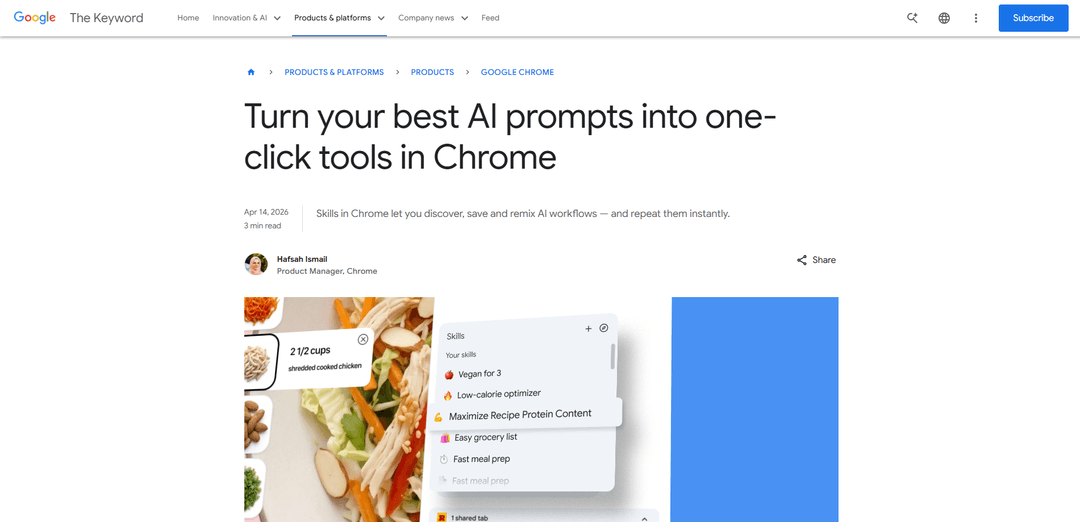
Google Chrome Skills is a new feature that allows users to save, reuse, and customize AI prompts as one-click workflows within the Gemini-powered Chrome browser, streamlining repetitive tasks across web pages and tabs.
https://blog.google/products-and-platforms/products/chrome/skills-in-chrome?ref=producthunt
產品資訊
更新時間:2026年05月08日
Google Chrome Skills 每月流量趨勢
Google Chrome Skills 在上個月收到了 8.5m 次訪問,呈現出 -12.1% 的輕微下降。根據我們的分析,這個趨勢與人工智能工具領域的典型市場動態相符。
查看歷史流量什麼是 Google Chrome Skills
Google Chrome Skills, launched on April 14, 2026, is an innovative browser feature that transforms frequently used AI prompts into reusable, one-click tools integrated directly into Chrome's Gemini sidebar. Instead of repeatedly typing the same prompts while browsing different web pages, users can now save their most valuable AI instructions as 'Skills' and execute them instantly with a keyboard shortcut or button click. The feature is available on Chrome desktop (Mac, Windows, and ChromeOS) for users with English-US language settings. Chrome Skills comes with both the ability to create custom workflows from your chat history and access to a curated Skills library featuring pre-built prompts for common tasks across categories like shopping, productivity, health and wellness, learning, and research. These saved Skills sync across all signed-in Chrome desktop devices, making AI-powered workflows portable and accessible wherever users work.
Google Chrome Skills 的主要功能
Google Chrome Skills is a new AI-powered feature that allows users to save, reuse, and customize their most valuable AI prompts within the Gemini in Chrome experience. Instead of repeatedly typing the same prompts, users can create one-click workflows called 'Skills' that can be applied across different web pages and multiple tabs. The feature includes a curated library of pre-built Skills for common tasks in categories like productivity, shopping, health & wellness, and research. Skills can be accessed by typing a forward slash (/) or clicking the plus sign (+) in the Gemini sidebar, and they work across all signed-in Chrome desktop devices. The feature is built on Chrome's security and privacy foundation, requiring user confirmation for sensitive actions like calendar updates or sending emails.
One-Click Prompt Reusability: Save frequently used AI prompts as Skills directly from chat history and execute them instantly with a single click, eliminating the need to retype complex prompts repeatedly across different web pages.
Multi-Tab Functionality: Run Skills across multiple open tabs simultaneously, allowing users to compare information, analyze data, or perform tasks across several web pages at once with a single command.
Pre-Built Skills Library: Access a curated collection of ready-to-use Skills organized by categories (Learning, Research, Shopping, Writing, Productivity) that can be customized to fit individual needs and workflows.
Custom Skill Creation and Editing: Create personalized Skills by saving custom prompts and edit existing Skills to refine instructions, update parameters, or adjust the prompt to better match specific requirements.
Cross-Device Synchronization: Access saved Skills on any signed-in Chrome desktop device (Mac, Windows, ChromeOS), ensuring consistent workflows across multiple computers.
Built-in Security Safeguards: Utilizes Chrome's security and privacy protections with mandatory confirmation prompts for sensitive actions like adding calendar events or sending emails, plus automated red-teaming and auto-update capabilities.
Google Chrome Skills 的使用案例
Health & Nutrition Planning: Quickly calculate protein macros for any recipe found online, analyze ingredient nutritional content, or suggest healthier substitutions while maintaining flavor profiles across multiple recipe websites.
E-commerce Product Comparison: Generate side-by-side specification comparisons of products across multiple tabs, break down product ingredients, or cross-reference budget constraints with product features when shopping online.
Document Research & Analysis: Scan lengthy documents for important information, extract key points from articles, or summarize YouTube videos and web content for faster information processing and learning.
SEO & Marketing Workflows: Compare competitor pages against your own, extract structured data from product pages during audits, or analyze multiple web pages simultaneously for marketing research and optimization.
Gift Selection & Planning: Select the perfect gift by cross-referencing budget with recipient interests across multiple shopping sites, or plan dinners by analyzing recipes and dietary requirements.
Content Creation & Writing: Rewrite emails with consistent tone and style, generate content variations, or transform information into infographics and visualizations for better content digestion.
優點
Eliminates repetitive prompt typing, significantly improving productivity and reducing friction in AI-assisted workflows
Works across multiple tabs simultaneously, enabling powerful cross-page analysis and comparison capabilities
Free to use with no paid AI plan required, making advanced AI workflows accessible to all Chrome users
Customizable and editable Skills allow users to refine prompts over time and adapt them to specific needs
缺點
Currently only available for desktop (Mac, Windows, ChromeOS) with no mobile support announced
Limited to users with Chrome language set to English-US at launch, excluding international users
May be glitchy at initial launch and require gradual improvements over subsequent months
Feature may go unnoticed by average Chrome users who don't actively use the Gemini sidebar, limiting adoption
如何使用 Google Chrome Skills
1: Open the Gemini in Chrome sidebar by clicking on the 'Ask Gemini' sparkle icon in the upper-right corner of your Chrome browser screen.
2: Navigate to any webpage where you want to use an AI prompt (for example, a recipe page, product page, or article).
3: Type your desired prompt into the Gemini chat box (for example, 'Summarize this page in bullet points for a busy reader' or 'Calculate the protein macros for this recipe').
4: After Gemini responds, save the prompt as a Skill directly from your chat history by selecting the save option.
5: To reuse a saved Skill, type a forward slash (/) or click the plus sign (+) button in the Gemini sidebar prompt box.
6: Select the Skill you want to run from the list that appears. The Skill will automatically execute on the current page you're viewing.
7: Optional: To run a Skill across multiple tabs, select additional open tabs when prompted, and the Skill will pull information from all selected pages simultaneously.
8: Optional: Browse the Skills Library by typing forward slash (/) and clicking the compass icon, or visit chrome://skills/browse to discover pre-built Skills for common tasks.
9: Optional: Add pre-built Skills from the library to your saved Skills collection by clicking on them and selecting 'Add to saved Skills'.
10: Optional: Edit any saved Skill by accessing your Skills library (type / and click the compass icon), selecting the Skill, and updating the prompt to customize it to your needs.
11: Optional: Manage all your saved Skills by typing forward slash (/) in Gemini in Chrome and clicking the compass icon to view, edit, or delete Skills.
Google Chrome Skills 常見問題
Skills in Chrome are reusable AI prompts that you can save and run with a single click in the Gemini sidebar. Instead of retyping the same prompt repeatedly, you can save frequently used prompts as Skills and instantly apply them to any webpage you're viewing, making AI-powered workflows more efficient.




Google Chrome Skills 網站分析
Google Chrome Skills 流量和排名
8.5M
每月訪問量
#8357
全球排名
#353
類別排名
流量趨勢:Nov 2024-Jun 2025
Google Chrome Skills 用戶洞察
00:00:53
平均訪問時長
1.93
每次訪問的頁面數
55.03%
用戶跳出率
Google Chrome Skills 的主要地區
US: 26.94%
IN: 8.76%
GB: 5.14%
JP: 4.24%
DE: 3.01%
Others: 51.91%