Wan 3.0 AI

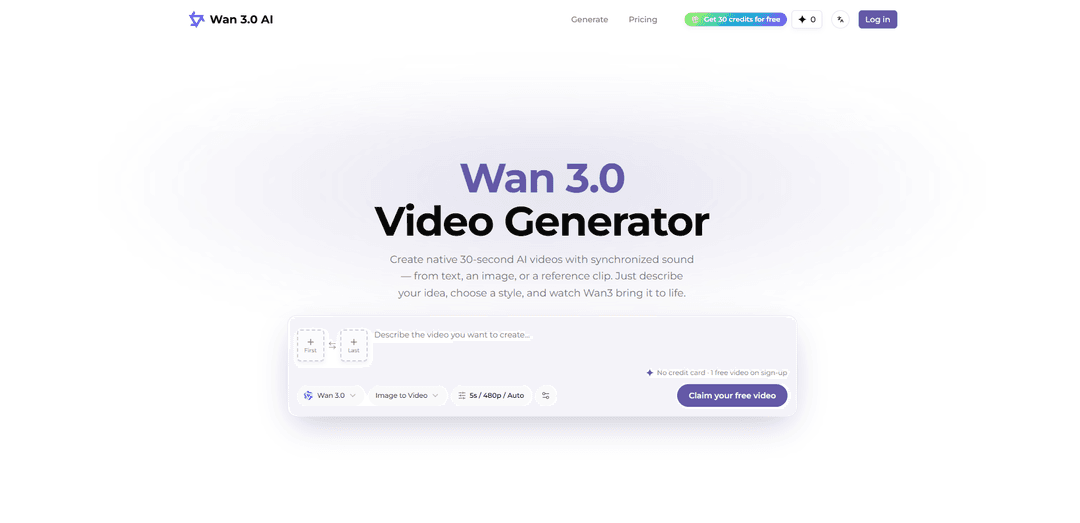
Wan 3.0 is an online AI video generator for creators, marketers, and teams. Create native videos up to 30 seconds long with synchronized audio, starting from text prompts, images, audio, video references, documents, or public webpages.
https://wan30.video/?utm_source=aipure
Wan 3.0 AI

Product Information

Updated:Sep 7, 2026

What is Wan 3.0 AI

Wan 3.0 AI is the latest generation in Alibaba Tongyi Lab’s Wan video model family, built to help creators turn prompts and existing assets into cinematic short-form video. It’s positioned as a practical, production-oriented system for generating complete clips in one continuous take—rather than stitching together multiple short outputs—making it useful for storyboards, previs, pitch materials, product demos, ads, and rapid creative exploration. Wan 3.0 supports multiple creation modes (text, image, and reference-to-video) and emphasizes stronger subject/identity consistency, more controllable camera and motion direction, and integrated audio generation to deliver a more “finished” draft straight from the model.

Key Features of Wan 3.0 AI

Wan 3.0 AI is a multimodal, production-oriented AI video generator that creates cinematic clips in a single pass (typically 2–30 seconds) with synchronized audio, supporting text-to-video, image-to-video, and reference-to-video workflows. It emphasizes stronger subject/character consistency, improved motion and real-world physics, and more “director-note” style controllability (camera, action, mood), while also enabling continuation/extension and prompt-driven editing to turn isolated clips into more coherent short-form stories and campaign-ready assets.
Native 2–30s single-pass generation: Generates full-length clips in one continuous take (not stitched), with duration control and “intelligent duration” that can pick pacing based on prompt and references.
Synchronized audio generation (supported workflows): Produces picture and sound together, enabling prompts that specify dialogue/voiceover direction, ambience, and music timing for more complete scene drafts.
Multimodal reference control (omni-reference): Guides generations using combinations of text plus references such as images, video clips, and audio (and, in some described workflows, documents/webpages), improving faithfulness to characters, props, and scenes.
Improved identity & subject consistency: Designed to reduce character drift across a clip and across multiple generations—helping keep faces, clothing, and key attributes steadier for narrative and brand work.
Higher-quality motion & physics: Targets smoother movement, more believable object behavior (hair/cloth/liquids), and stronger facial expression/micro-expression rendering for cinematic realism.
All-in-one workflow: generate, extend, and edit: Supports iterative creation—generate a clip, then continue/extend the story or reshape/edit with natural-language instructions depending on the chosen workflow.

Use Cases of Wan 3.0 AI

Performance marketing & social ads: Turn campaign concepts into short-form video variants quickly (multiple hooks, product moments, closings) for TikTok/Reels/YouTube ads without a full shoot.
E-commerce product demos: Animate product images or reference clips into polished product scenes and feature callouts, maintaining product identity and materials across shots.
Storyboards, previs, and mood reels: Generate fast cinematic drafts from scripts, moodboards, and references to align stakeholders on tone, camera language, and pacing before production.
Character-driven short narratives: Use reference-led consistency to keep a recurring character stable across multiple clips for micro-dramas, episodic content, or branded storytelling.
Music videos and audio-led visuals: Create scenes that align with rhythm, ambience, and soundtrack direction using synchronized audio workflows for concepting and rapid iteration.
Creative tooling & media pipeline integration: Embed Wan-style generation into internal workflows or products (e.g., creative platforms, marketing automation, media pipelines) via browser tools and potential API-oriented packages.

Pros

Single-pass up to ~30 seconds enables more complete short-form scenes without stitching artifacts.
Multimodal references plus improved consistency reduce character/product drift and increase faithfulness.
Audio sync in supported workflows helps produce more “finished” drafts (picture + sound) for ads and story concepts.
Iterative workflow (generate/extend/edit) supports rapid experimentation and refinement.

Cons

Feature availability can depend on the specific workflow/platform (e.g., audio sync, editing controls, reference modes).
Higher resolution/longer duration typically costs more credits and may require more iteration to get a perfect result.
Despite improvements, careful prompting is still needed to avoid common AI artifacts and ensure consistent objects/motion.
Ecosystem branding and third-party pages can create confusion about what is officially supported vs. platform-specific implementations.

How to Use Wan 3.0 AI

1) Open the Wan 3.0 AI Video Generator in your browser: Go to the Wan 3.0 web workflow (no software to install). Create an account if required; some workflows unlock after sign-up and may include free credits for a first test video.
2) Choose the right workflow (generation mode): Select the mode that matches your starting material: Text-to-Video (T2V) for prompt-only creation; Image-to-Video (I2V) to animate a photo/first frame; First-and-Last-Frame to guide motion between two frames; Reference-to-Video (R2V) to combine multiple assets (images/videos/audio) for stronger consistency; or Video Edit to restyle/reshape an existing clip using instructions.
3) Prepare your inputs (optional but recommended): Start from text, or upload references to guide identity, style, motion, and sound. Use clear images for character/product identity and location; use reference video for action/camera movement; use audio for dialogue, voice tone, rhythm, ambience, or music direction. Crop/trim media in the form if the workflow supports it.
4) Name and order references exactly as the selected workflow expects: Follow the reference naming and ordering shown in the UI for that workflow (don’t assume one universal syntax). When prompting, refer to assets by their type and position (e.g., “Image 1”, “Video 1”, “Audio 1”) so Wan 3.0 maps each reference correctly. Pro tip: explicitly state how each reference should influence subject, motion, style, or sound.
5) Write a director-style prompt that defines the shot: Describe the subject, action, environment, style, camera movement, and mood. The more cinematic and specific the direction, the more controllable the result. Keep it readable like production notes rather than vague keywords.
6) Set core generation settings: Choose duration (or use intelligent duration if available), aspect ratio, and resolution (commonly up to 1080p depending on the workflow/service). Enable audio if the workflow supports synchronized sound generation.
7) Use Prompt Expansion and Negative Prompt strategically: If Prompt Expansion is available, enable it to enrich prompts for more creative output. Add a Negative Prompt only when needed to remove artifacts or unwanted traits (e.g., “blurry, low quality, deformed”).
8) Review credit cost and generate: Check the displayed credit cost before running. Start with a shorter, lower-resolution test (e.g., a few seconds at 720p) to validate the prompt and references, then scale up to longer duration and higher resolution once the direction is correct.
9) Review the result and iterate: Watch the preview and note issues (identity drift, motion oddities, lighting shifts, unwanted objects). Refine by tightening the prompt, clarifying which reference controls what, adjusting duration/resolution, or adding/removing references.
10) Continue, extend, or edit the clip: If available, use video extension to continue the story naturally from the end of the generated take. Use editing/instruction tools (style transfer, reshape, natural-language edits) to adjust the scene without restarting from scratch.
11) Use multi-shot/director controls when the shot truly needs them: For more complex sequences, enable multi-shot or director-style controls (if present in your chosen workflow) to plan multiple beats in one generation. Otherwise keep the setup simple for faster iteration.
12) Download/export using the workflow’s options: Use the download/export controls provided by the selected workflow/service (format and watermark/download availability may depend on plan/credits). Save versions as you iterate so you can compare prompt changes and reuse successful reference setups.

Wan 3.0 AI FAQs

Wan 3.0 is an AI video generation model in the Wan/Alibaba ecosystem. It is presented as supporting text-to-video, image-to-video, and reference-driven workflows, with an emphasis on longer single-take generation and improved subject/character consistency.

Latest AI Tools Similar to Wan 3.0 AI

Loud Fame
Loud Fame
Loud Fame is an AI-powered video transformation tool that allows users to convert regular videos into anime-style animations and create AI-generated celebrity talking videos.
BizBoom.ai
BizBoom.ai
BizBoom.ai is an AI-powered platform that automatically generates professional product videos from product links and images with 95% less cost.
EzVideos
EzVideos
EzVideos is an all-in-one video creation tool that helps users generate viral videos for social media platforms like Instagram, TikTok, and YouTube with automated editing features and built-in resources.
Illuminix
Illuminix
Illuminix is an AI-powered platform that empowers businesses with autonomous hyper-experts and specialized tools for automated business processes, data management, and video content creation.