
VideoAI
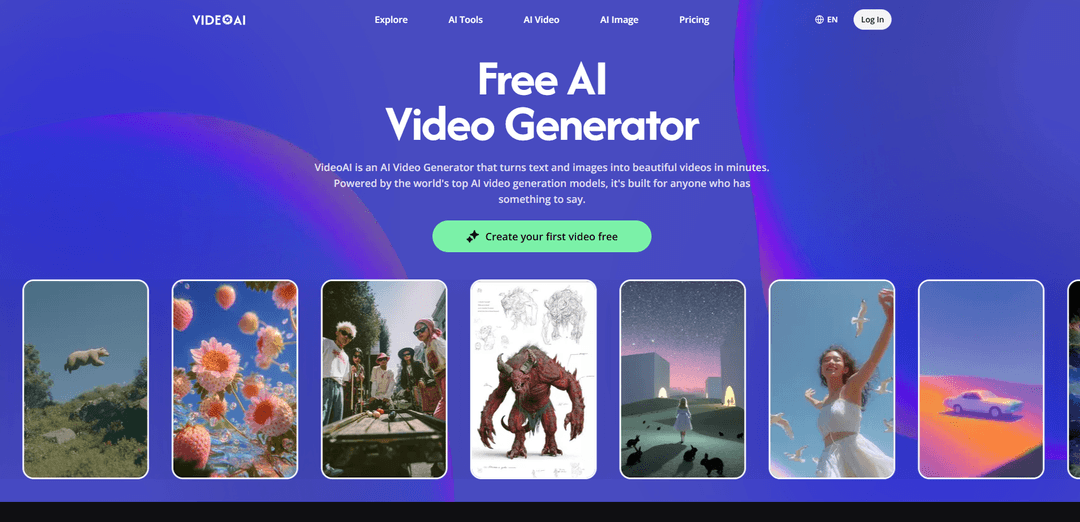
VideoAI is a free AI video generator that turns text prompts and images into videos using multiple top models (Kling, Wan, Seedance, Veo) and includes pro tools like video extension, motion control, and avatar creation.
https://www.videoai.ai/?utm_source=aipure
Product Information
Updated:Apr 24, 2026
What is VideoAI
VideoAI is a web-based AI creation platform designed to help anyone generate and edit videos (and supporting images) in minutes without traditional filming or complex editing software. It supports both text-to-video and image-to-video workflows, letting you start from a written prompt or upload a photo/AI image and then generate a moving clip in a chosen style. VideoAI brings several leading video generation models into one interface and offers both a free plan (no credit card required) and paid plans for higher-resolution exports and advanced options.
Key Features of VideoAI
VideoAI is a browser-based AI video generator that turns text prompts and still images into short videos using multiple leading generation models (including Kling, Wan, Seedance, and Veo) within one interface. It supports both text-to-video and image-to-video workflows, plus practical pre-processing and enhancement tools (e.g., background removal, upscaling, style transfer) to improve consistency and output quality. The platform also offers creator-oriented capabilities like extending generated clips, building reusable avatars from a single photo, and motion controls to guide camera movement and subject behavior, with a free plan that provides access to core features without a credit card.
Text-to-video with model choice: Generate videos from a written prompt and route it through different models (Kling, Wan, Seedance, Veo) to match the style/quality you want.
Image-to-video animation: Upload a photo or AI image and describe the motion; the system generates a clip where movement is guided by both the image content and your prompt.
Multi-model workflow in one UI: Switch between several top video models and complementary image models (e.g., Flux, Nano Banana) without leaving the platform, enabling rapid iteration and style exploration.
Extend Videos: Lengthen an existing AI-generated clip while keeping the scene and motion consistent, avoiding the need to restart generation from scratch.
Avatar creation from one photo: Create a consistent avatar from a single image that can be reused across multiple videos for a stable on-screen presence without filming.
Motion control + image prep tools: Guide camera direction/speed and subject behavior, and improve inputs with background removal, upscaling, and style transfer for sharper, more accurate results.
Use Cases of VideoAI
Ecommerce product promos: Animate product shots into short social-ready clips for launches and ads when you don’t have a production budget or video team.
Paid social creative production: Rapidly generate and iterate on ad variations (different hooks, scenes, styles) to produce same-day creatives for performance marketing.
Creator content for Shorts/Reels/TikTok: Turn concepts or images into engaging short-form videos with minimal editing, useful for solo creators maintaining frequent posting schedules.
Education and tutorials: Create illustrative visuals and short explainer segments from text prompts to support lessons, concepts, or course content.
Agency and studio prototyping: Use multiple models to explore looks and motion quickly, maintain consistency with references/avatars, and present fast visual directions to clients.
Music visuals and release assets: Generate mood-matching music video clips by describing the visual tone, producing custom visuals instead of relying on generic stock footage.
Pros
Free plan provides real access to core text-to-video and image-to-video features with no credit card requirement.
Multiple leading video models in one place, making it easier to match output style/quality to the project.
Useful workflow tools like clip extension, avatar creation, and image enhancement (background removal/upscaling/style transfer).
Cons
Higher-resolution exports and some advanced models/features are gated behind paid plans.
Output quality and consistency can vary by model and prompt, often requiring multiple generations to get the desired result.
How to Use VideoAI
1. Open VideoAI and sign in (optional): Go to https://www.videoai.ai/. You can start with the free plan (no credit card required per the site FAQ). Log in if you want to save creations under “My Creation”.
2. Start a new generation: Click “AI Video” (or “Create your first video free” / “Start Generating Free”) to open the video generator.
3. Choose your workflow: Text-to-Video or Image-to-Video: Pick Text-to-Video if you want to generate a clip from a written description, or Image-to-Video if you want to animate a photo/illustration with motion guided by your prompt.
4. (Text-to-Video) Enter your prompt: Type what you want to see. VideoAI will route your request through available video models (the site lists Kling, Wan, Seedance, and Veo).
5. (Image-to-Video) Upload an image and describe the motion: Upload a still image (photo or AI-generated image), then write what you want to happen. VideoAI generates a clip where motion responds to both the image content and your prompt.
6. Select the AI model that matches your goal: Choose among the listed models depending on the result you want: Wan (strong image-to-video results), Kling (better consistency over longer durations), Seedance (smooth/expressive movement; newer versions support synchronized audio and lip-sync per the site), or Veo (cinematic/high-quality output per the site).
7. (Optional) Use Motion Control before generating: If available in your project, set camera direction, speed, and subject behavior upfront using “Motion Control” to better match the output to your intent.
8. Generate the video and iterate: Run generation. If the result isn’t right, adjust the prompt and/or switch models and generate again until you get the look you want (the site explicitly encourages model switching and repeated generations).
9. (Optional) Extend a clip instead of restarting: If your generated clip ends too soon, use “Extend Videos” to continue the scene while keeping motion smooth and consistent, according to the site.
10. (Optional) Create and reuse a consistent avatar: Use “Create Avatars” by uploading one photo to generate a consistent AI avatar you can reuse across multiple video projects (same face/presence across videos per the site).
11. (Optional) Prep or refine images with AI Image tools: Before generating video from an image, you can improve inputs using tools the site lists such as Background Remover (clean subject), Upscale Image (sharper frames), and Image Style Transfer (consistent look across assets).
12. Save and manage outputs: View and organize your generated assets in “My Creation” (visible in the site navigation).
13. Upgrade if you need higher resolution or more advanced usage: If you hit limits or need higher-resolution exports/advanced models, go to “Pricing” / “Get Credits” and choose a plan (Plus/Pro/Professional) based on monthly credits.
VideoAI FAQs
VideoAI is an AI video generator that turns text and images into videos. It’s powered by multiple top AI video generation models and is designed to help users create videos in minutes.
Popular Articles

Vosko AI: Localize and Dub Videos for Global Audiences
Oct 15, 2026

Atoms: A Multi-Agent AI Platform That Transforms Ideas into Launch-Ready Products
Oct 13, 2026

Nano Banana SBTI: What It Is, How It Works, and How to Use It in 2026
Apr 15, 2026

Atoms Review — The AI Product Builder Redefining Digital Creation in 2026
Apr 10, 2026
Latest AI Tools Similar to VideoAI

Loud Fame
Loud Fame is an AI-powered video transformation tool that allows users to convert regular videos into anime-style animations and create AI-generated celebrity talking videos.

BizBoom.ai
BizBoom.ai is an AI-powered platform that automatically generates professional product videos from product links and images with 95% less cost.

EzVideos
EzVideos is an all-in-one video creation tool that helps users generate viral videos for social media platforms like Instagram, TikTok, and YouTube with automated editing features and built-in resources.

Illuminix
Illuminix is an AI-powered platform that empowers businesses with autonomous hyper-experts and specialized tools for automated business processes, data management, and video content creation.
Popular AI Tools Like VideoAI

HunyuanVideo-I2V
HunyuanVideo-I2V is an open-source AI framework developed by Tencent that transforms static images into high-quality, dynamic videos with customizable motion effects and exceptional visual consistency.

Google Veo 2
Veo 2 is Google DeepMind's state-of-the-art AI video generation model that can create high-quality videos up to 4K resolution with realistic motion, extensive camera controls, and improved physics simulation from text prompts.

Vibing
Vibing is an AI-powered dating app that helps users share authentic moments through video stories and make genuine connections based on personality matching and interactive features.

Edits, an Instagram app
Edits is Instagram's free video creation app that provides creators with professional editing tools, AI features, and analytics capabilities to create high-quality videos directly from their phones.