
Velo
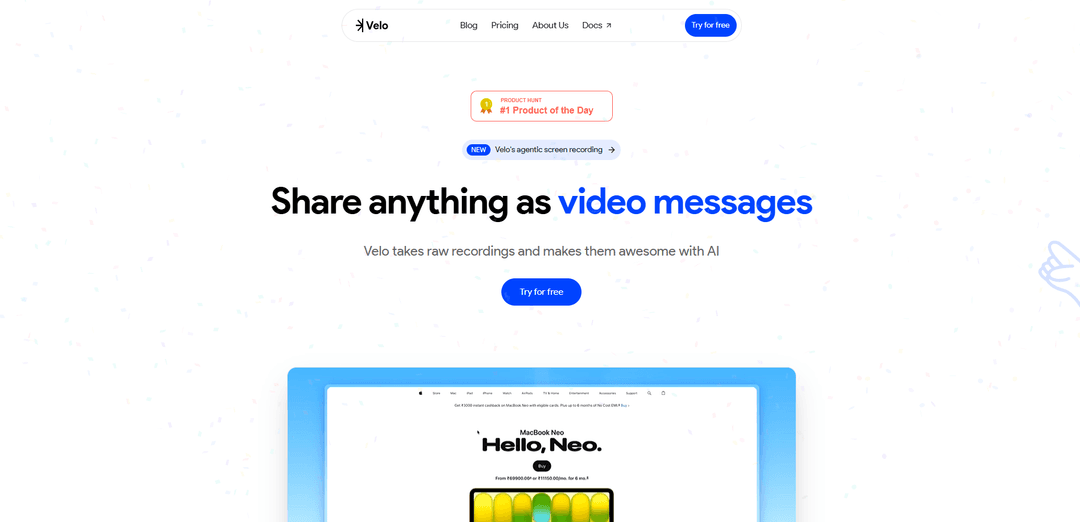
Velo is an AI-native video messaging platform that transforms raw recordings into studio-quality product demos and video messages using AI avatars, voice cloning, and automated script generation—no manual recording required.
https://www.usevelo.ai/?ref=producthunt
Product Information
Updated:Apr 10, 2026
What is Velo
Velo is an innovative AI-powered video creation platform developed by FlowFrame Inc., headquartered in San Francisco. The platform revolutionizes how professionals create video content by eliminating the traditional recording loop and post-production hassles. Instead of spending hours on multiple takes and manual editing, Velo uses artificial intelligence to transform raw recordings, screen captures, or even existing videos into polished, share-ready video messages. The platform features hyper-realistic AI avatars that can replicate your face and voice with natural expressions including lip sync, eye blinks, and hand gestures. Whether you're in sales, product management, customer support, marketing, education, or content creation, Velo enables you to create professional-grade video content in minutes rather than hours, making it an essential tool for modern teams looking to communicate more effectively through video.
Key Features of Velo
Velo is an AI-native video messaging platform that transforms raw recordings into polished, share-ready video messages without requiring manual re-recording. It features an intelligent browser agent that automates screen recording, generates AI-powered scripts, and creates hyper-realistic AI avatars with natural expressions, lip sync, and gestures. Users can upload existing recordings from various sources (Zoom, Gong, MP4 files) and Velo will automatically rewrite scripts, add professional touches, and deliver studio-quality product demos and video messages in minutes rather than hours.
AI Avatar with Hyper-Realistic Expressions: Creates lifelike digital avatars using your face and voice with natural lip sync, eye blinks, and hand gestures to present demos professionally without turning on your camera.
Automated Browser Agent Recording: Runs inside your browser to listen to instructions, track clicks, and automatically capture workflows while you focus on other tasks, eliminating the need for manual screen recording.
AI Script Generation and Rewriting: Automatically generates professional scripts from raw recordings or rewrites existing content with context-aware AI to transform rough footage into polished, share-ready video messages.
Raw Recording Transformation: Uploads and processes existing recordings from Zoom, Gong, Fathom, or MP4 files, automatically writing new scripts and syncing everything to create professional video content.
Brand Customization and Personas: Allows users to add brand kits, choose different personas, customize cursor styles and sizes, and maintain consistent branding across all video messages.
One-Click Screen Recording: Chrome extension enables effortless workflow capture across entire desktop with a single click, making it easy to express ideas and document processes without technical complexity.
Use Cases of Velo
Sales Prospecting and Pitches: Sales teams can send polished video pitches to prospects without requiring multiple takes, creating personalized outreach that stands out and increases engagement rates.
Product Feature Walkthroughs: Product managers can quickly create professional feature demonstrations and share product updates that team members actually watch, improving internal communication and adoption.
Customer Onboarding and Support: Support teams can build comprehensive onboarding guides and training videos without a production team, reducing support tickets and improving customer success.
Content Creation for Social Media: Creators can produce product reviews, tutorials, and educational content for YouTube, X (Twitter), and other platforms efficiently, maintaining consistent quality and posting schedules.
Marketing Launch Videos: Marketing teams can create product launch videos, feature walkthroughs, and promotional content in minutes instead of days, accelerating go-to-market timelines.
Educational Course Development: Educators can record professional courses, lectures, and instructional walkthroughs from day one without video production experience or expensive equipment.
Pros
Dramatically reduces video creation time from hours to minutes, with users saving approximately 55 minutes per video by eliminating the need for multiple takes
No technical video editing skills required with intuitive AI-powered automation that handles scripting, recording, and polishing automatically
Versatile input options accepting raw recordings from multiple sources (Zoom, Gong, Fathom, MP4) and transforming them into professional content
Comprehensive customization features including brand kits, personas, cursor styles, and shareable links for professional presentation
Cons
May require quality oversight as AI-generated content needs human review to ensure accuracy and appropriate messaging
Videos are stored for only 60 days, requiring users to download and archive important content elsewhere for long-term retention
Relatively new platform that may lack some advanced features found in more established video editing or screen recording tools
Effectiveness depends on quality of input recordings and instructions provided to the AI system
How to Use Velo
1. Sign up and access Velo: Go to app.usevelo.ai and create a free account to get started with Velo's AI-powered video messaging platform.
2. Choose your creation method: Select how you want to create your video: use the browser agent for automated recording, record your screen with the Chrome extension, upload an existing raw recording (from Zoom, Gong, Fathom, or MP4 files), or create from photos.
3. Record or upload your content: If using the browser agent, simply give instructions and let it record while you work. If screen recording, launch the Chrome extension and capture your workflow. If uploading, select your raw recording file from your computer or integrated platform.
4. Let AI generate the script: Velo's AI will automatically analyze your recording or input and write a polished script from scratch. You can start from a prompt, feature list, or existing copy. Talk naturally with mistakes and filler words - the AI will clean it up.
5. Review and edit the script: Review the AI-generated script and make any necessary edits to perfect your messaging, adjust the flow, or refine specific talking points using Velo's built-in editor.
6. Choose your presentation style: Select whether to use your real face or create an AI avatar. If using an AI avatar, shoot a quick video of your face to generate a hyper-realistic digital twin, or choose from diverse pre-made avatars with different ethnicities and accents.
7. Customize your video: Add your brand kit (logos, colors), select personas, change cursor styles and sizes, adjust timing, and make any visual refinements. You can also rewrite scripts with context and add smart zooms.
8. Generate the final video: Let Velo create your studio-grade 4K video with AI-generated voiceovers (including voice cloning), automatic syncing, professional editing, and polished output. The AI handles all editing automatically.
9. Review and make final adjustments: Use Velo's easy-to-use editor to tweak timing, adjust visuals, or make any final refinements before publishing.
10. Share your video: Share your video via shareable links or export it in multiple formats for YouTube, Instagram, and other platforms. Videos are stored in your library for up to 60 days for easy access, download, and sharing.
Velo FAQs
Velo is an AI-powered video messaging tool that transforms raw recordings into polished, professional video messages. It uses AI to automatically generate scripts, create hyper-realistic avatars with your face and voice, and turn unedited recordings into share-ready videos without requiring multiple takes or re-recording.
Velo Video
Popular Articles

Atoms: A Multi-Agent AI Platform That Transforms Ideas into Launch-Ready Products
May 22, 2026

Nano Banana SBTI: What It Is, How It Works, and How to Use It in 2026
Apr 15, 2026

Atoms Review — The AI Product Builder Redefining Digital Creation in 2026
Apr 10, 2026

Kilo Claw: How to Deploy and Use a True "Do‑It‑For‑You" AI Agent(2026 Update)
Apr 3, 2026
Latest AI Tools Similar to Velo

Loud Fame
Loud Fame is an AI-powered video transformation tool that allows users to convert regular videos into anime-style animations and create AI-generated celebrity talking videos.

BizBoom.ai
BizBoom.ai is an AI-powered platform that automatically generates professional product videos from product links and images with 95% less cost.

EzVideos
EzVideos is an all-in-one video creation tool that helps users generate viral videos for social media platforms like Instagram, TikTok, and YouTube with automated editing features and built-in resources.

Illuminix
Illuminix is an AI-powered platform that empowers businesses with autonomous hyper-experts and specialized tools for automated business processes, data management, and video content creation.
Popular AI Tools Like Velo

HunyuanVideo-I2V
HunyuanVideo-I2V is an open-source AI framework developed by Tencent that transforms static images into high-quality, dynamic videos with customizable motion effects and exceptional visual consistency.

Google Veo 2
Veo 2 is Google DeepMind's state-of-the-art AI video generation model that can create high-quality videos up to 4K resolution with realistic motion, extensive camera controls, and improved physics simulation from text prompts.

Vibing
Vibing is an AI-powered dating app that helps users share authentic moments through video stories and make genuine connections based on personality matching and interactive features.

Edits, an Instagram app
Edits is Instagram's free video creation app that provides creators with professional editing tools, AI features, and analytics capabilities to create high-quality videos directly from their phones.