URL To Video
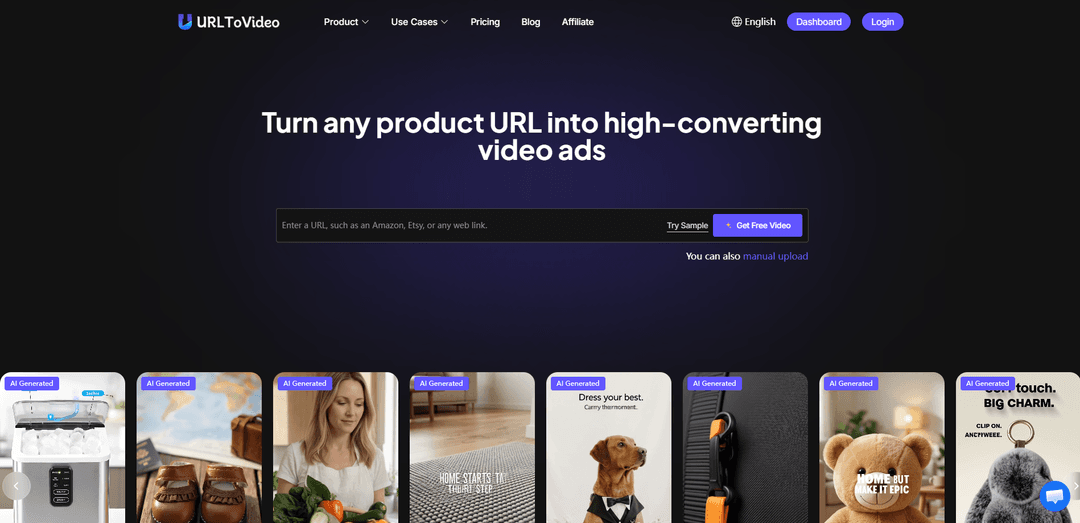
URL To Video is an AI tool that converts any product URL into ready-to-publish, high-converting marketing videos in minutes.
https://urltovideo.ai/?utm_source=aipure
Product Information
Updated:Jun 1, 2026
What is URL To Video
URL To Video is an AI-powered platform built for ecommerce brands, dropshippers, and performance marketers to quickly create video ads from existing product pages. By pasting a link from platforms like Shopify, Amazon, TikTok Shop, Etsy (and more), the tool automatically pulls key product information and on-page assets to generate structured, conversion-focused video creatives. It also includes an ad library and “clone” capabilities to replicate winning ad styles, plus tools like template videos, image ads, and an AI script generator to streamline production from idea to export.
Key Features of URL To Video
URL To Video is an AI video ad generator built for ecommerce marketers that turns product page links (e.g., Shopify, Amazon, TikTok Shop, Etsy) into ready-to-run video ads. It automatically extracts product text and images from the URL, generates conversion-focused scripts and scene structures using proven ad frameworks, and outputs platform-ready MP4s quickly for rapid creative testing. It also includes an ad library for cloning/replicating winning styles, plus AI avatars, voice cloning/text-to-speech, captions, and an editing-lite workflow designed to prioritize speed and iteration over premium production.
Product URL → video automation: Paste a product link and the system crawls the page to pull product details (text, images, key selling points) and automatically assembles a structured video draft.
Proven ad frameworks & auto script generation: Generates structured ad copy and scene flow based on conversion-focused templates so videos follow common high-performing ad patterns rather than random layouts.
Ad Library + 1-click style replication (Ad Clone): Includes a library of high-performing ad creatives and lets you replicate/clone successful ad structures, automatically adapting them to your specific product page.
UGC-style AI avatars and AI voice: Create UGC-like ads without filming by using AI avatars, text-to-speech, and voice cloning with lip sync for more human-feeling presentations.
Fast iteration & variation generation: Designed for performance marketing workflows—quickly produce many creative variants (different hooks/angles/formats) from a single product URL for testing.
Platform-ready exports: Exports ready-to-publish MP4 videos intended for common ad platforms (e.g., TikTok/short-form social), minimizing resizing or additional editing steps.
Use Cases of URL To Video
Ecommerce performance ad testing: Media buyers and growth teams generate multiple ad variations per product (hooks, offers, angles) to A/B test creatives faster and improve ROAS.
Marketplace listing videos (Amazon/Etsy/Shopify): Sellers turn existing product pages into product showcase videos to enhance listings and improve conversion without hiring editors.
TikTok Shop and short-form social ads: Creators and brands convert product links into TikTok/Reels-style ads with captions, voiceover, and UGC-style avatar delivery.
Dropshipping creative production at scale: Dropshippers rapidly produce ad creatives for many SKUs using URLs as the source of truth, reducing the need for manual asset collection.
Agency creative ops for client catalogs: Agencies generate first-draft video ads from client product URLs, then iterate quickly to deliver more creatives per week without increasing headcount.
Pros
Very fast workflow: paste a URL and get a usable video draft quickly, enabling rapid iteration.
Ecommerce-focused output: built around product-page extraction and conversion-oriented ad structures.
Scale-friendly: supports generating many variations and cloning winning styles from an ad library.
Reduces production needs: AI avatars/voice features help create UGC-style ads without filming.
Cons
Quality may not match premium, fully custom production (positioned more for speed/iteration than cinematic polish).
Output depends on the quality/structure of the source product page; weak pages can yield weaker scripts/scenes.
Some product links may not be recognized, requiring manual input or support.
Teams still need oversight for compliance and truthful claims when using AI-generated ads.
How to Use URL To Video
1. Open URL To Video: Go to https://urltovideo.ai/ and access the URL-to-video generator from the homepage or Dashboard.
2. Sign in (if required) and claim starter credits: Log in to continue. New users can claim free credits (the site notes new users get credits and daily check-in credits).
3. Paste your product page URL: Copy the link to your product page (e.g., Shopify, Amazon, TikTok Shop, Etsy, eBay, AliExpress) and paste it into the URL input. If your link isn’t recognized or is inaccessible (e.g., requires login), use manual input/upload instead.
4. Let the AI analyze the webpage: URL To Video automatically crawls the page and extracts key content such as titles/headlines, descriptions, product details, images, and brand elements to understand what to feature.
5. Generate the video draft (script + scenes): Start generation so the system creates a structured ad video: it highlights key selling points, builds a storyboard with scenes, and produces conversion-focused ad copy using proven ad frameworks.
6. Choose an ad style/framework or clone a winning ad (optional): Optionally select a template/proven ad structure or use the Ad Library/Ad Clone features to replicate a high-performing style and automatically adapt it to your product URL.
7. Add voice, captions, and motion: Enable text-to-speech or voice cloning and generate subtitles/voiceover in one step. Optionally select an AI avatar for UGC-style presenter videos with lip sync.
8. Preview and refine (optional): Preview the generated video and adjust elements as needed (e.g., script wording, scenes, avatar/voice choices) to better match your brand and claims.
9. Export the final video: Export/download the platform-ready MP4 with one click.
10. Launch and iterate: Upload the MP4 to your ad platforms (e.g., TikTok Shop, Shopify placements, marketplace ads). Generate multiple variations from the same URL to test different hooks/angles and improve performance.
URL To Video FAQs
URL To Video is an AI-powered tool that turns a webpage (especially ecommerce product pages) into a structured, ready-to-run video ad by analyzing the page’s content (text, images, product info, and brand elements) and generating scenes, script, voiceover, and subtitles automatically.
Popular Articles

Vosko AI: Localize and Dub Videos for Global Audiences
Oct 15, 2026

Atoms: A Multi-Agent AI Platform That Transforms Ideas into Launch-Ready Products
Oct 13, 2026

Nano Banana SBTI: What It Is, How It Works, and How to Use It in 2026
Apr 15, 2026

Atoms Review — The AI Product Builder Redefining Digital Creation in 2026
Apr 10, 2026
Latest AI Tools Similar to URL To Video

Loud Fame
Loud Fame is an AI-powered video transformation tool that allows users to convert regular videos into anime-style animations and create AI-generated celebrity talking videos.

BizBoom.ai
BizBoom.ai is an AI-powered platform that automatically generates professional product videos from product links and images with 95% less cost.

EzVideos
EzVideos is an all-in-one video creation tool that helps users generate viral videos for social media platforms like Instagram, TikTok, and YouTube with automated editing features and built-in resources.

Illuminix
Illuminix is an AI-powered platform that empowers businesses with autonomous hyper-experts and specialized tools for automated business processes, data management, and video content creation.
Popular AI Tools Like URL To Video

HunyuanVideo-I2V
HunyuanVideo-I2V is an open-source AI framework developed by Tencent that transforms static images into high-quality, dynamic videos with customizable motion effects and exceptional visual consistency.

Google Veo 2
Veo 2 is Google DeepMind's state-of-the-art AI video generation model that can create high-quality videos up to 4K resolution with realistic motion, extensive camera controls, and improved physics simulation from text prompts.

Vibing
Vibing is an AI-powered dating app that helps users share authentic moments through video stories and make genuine connections based on personality matching and interactive features.

Edits, an Instagram app
Edits is Instagram's free video creation app that provides creators with professional editing tools, AI features, and analytics capabilities to create high-quality videos directly from their phones.