
Termsy
WebsiteBrowser ExtensionFree
Termsy is a Chrome extension that automatically scans and simplifies Terms of Service and Privacy Policy pages by highlighting critical clauses and presenting them in an easy-to-understand format.
https://chromewebstore.google.com/detail/termsy/lamggcieoigjafjbkhonahbaplhemeln?ref=producthunt
Product Information
Updated:Feb 28, 2026
What is Termsy
Termsy is an AI-powered Chrome browser extension designed to help users understand complex legal documents like Terms of Service and Privacy Policies. Developed by Gopigraphy, this tool addresses the common problem of users agreeing to terms without fully understanding them by providing clear, concise summaries of lengthy legal agreements. While not offering legal advice, Termsy serves as a practical tool to help users make informed decisions about the services they sign up for.
Key Features of Termsy
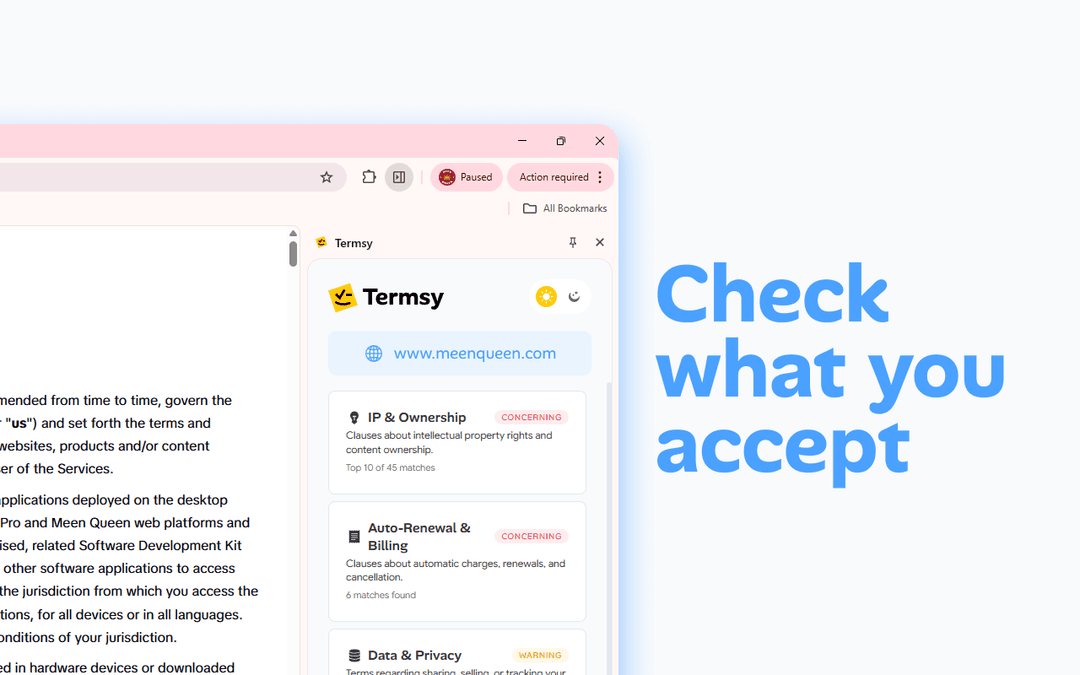
Termsy is a Chrome extension that automatically scans and analyzes Terms of Service and Privacy Policy pages, presenting complex legal agreements in an easy-to-understand format. It highlights critical clauses and displays them in a clean sidebar, helping users quickly grasp important terms without reading through lengthy documents. The tool uses AI technology to detect potential risks, data practices, and user rights instantly.
Automatic Scanning: Automatically detects and analyzes Terms of Service and Privacy Policy pages as you browse websites
Critical Clause Highlighting: Identifies and highlights important clauses directly on the webpage for easy review
Clean Sidebar Summary: Presents simplified summaries of complex legal terms in a well-organized sidebar interface
Privacy-Focused Processing: Handles data processing within the browser while maintaining user privacy and security
Use Cases of Termsy
Personal Online Shopping: Helps consumers quickly understand terms and conditions when signing up for new online services or making purchases
Business Contract Review: Assists businesses in reviewing service agreements and terms when evaluating new software or services
Legal Research: Supports legal professionals in efficiently scanning and comparing multiple terms of service documents
Pros
Time-saving tool for understanding complex legal documents
User-friendly interface with clear presentation
Privacy-focused design that processes data locally
Cons
Not a replacement for legal advice
Limited to Terms of Service and Privacy Policy documents
Requires Chrome browser to function
How to Use Termsy
Install the Extension: Add Termsy to your Chrome browser from the Chrome Web Store
Browse Normally: Navigate the web as you usually would
Activate on Terms Pages: When you encounter a Terms of Service or Privacy Policy page, Termsy will automatically scan it
View Analysis in Sidebar: A clean sidebar will appear showing highlighted critical clauses and important terms from the document
Review Key Points: Review the summarized and highlighted sections to understand the key terms you're agreeing to
Access Original Document: You can still access and read the full original document while using Termsy's analysis as a supplementary guide
Termsy FAQs
Termsy is a Chrome extension that automatically scans Terms of Service and Privacy Policy pages, highlights critical clauses, and presents them in a clean sidebar to help users understand what they're signing up for.
Termsy Video
Popular Articles

Atoms: A Multi-Agent AI Platform That Transforms Ideas into Launch-Ready Products
May 22, 2026

Nano Banana SBTI: What It Is, How It Works, and How to Use It in 2026
Apr 15, 2026

Atoms Review — The AI Product Builder Redefining Digital Creation in 2026
Apr 10, 2026

Kilo Claw: How to Deploy and Use a True "Do‑It‑For‑You" AI Agent(2026 Update)
Apr 3, 2026