
Slide2Video
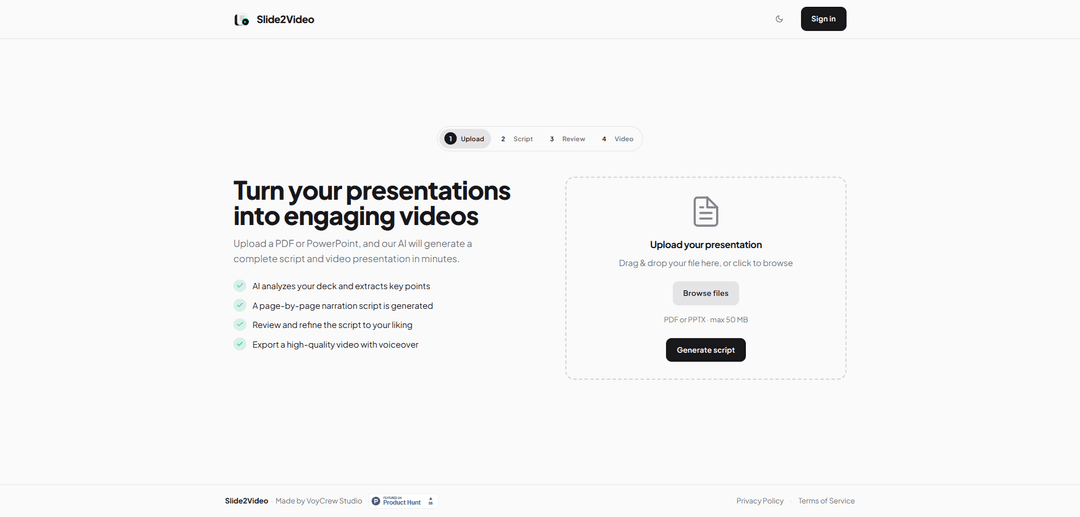
Slide2Video is an AI-powered application that transforms PDF and PowerPoint presentations into professional videos with automated script generation and voiceover narration.
https://slide2video.app/?ref=producthunt
Product Information
Updated:Apr 10, 2026
What is Slide2Video
Slide2Video is an innovative platform designed to convert static presentations into dynamic video content with minimal effort. By leveraging artificial intelligence, the application takes your existing PDF or PowerPoint files and automatically generates a complete video presentation, complete with narration scripts and voiceover. This tool addresses the growing need for video content in education, marketing, and business communications, where visual demonstrations and animated presentations are proven to be more engaging than static slides. The platform streamlines what traditionally would be a time-consuming process of manually creating video content from presentation materials, making professional video production accessible to users without extensive video editing experience.
Key Features of Slide2Video
Slide2Video is an AI-powered application that transforms PDF and PowerPoint presentations into engaging video content with realistic voiceovers. The platform operates entirely client-side, ensuring data privacy by processing files locally without uploading them to servers, and can work offline. It uses artificial intelligence to analyze presentation decks, extract key points, and automatically generate page-by-page narration scripts. Users can review and refine the generated scripts before exporting high-quality videos with professional voiceovers, making it an efficient solution for converting static slides into dynamic video presentations.
AI-Powered Script Generation: Automatically analyzes uploaded presentations and extracts key points to generate a comprehensive page-by-page narration script, eliminating the need for manual scriptwriting.
Realistic AI Voiceover: Converts generated scripts into natural-sounding voiceovers using advanced AI voice technology, creating professional audio narration for video presentations.
100% Client-Side Processing: Processes all files locally on the user's device without uploading data to external servers, ensuring complete privacy and security while enabling offline functionality.
Script Review and Refinement: Allows users to review, edit, and customize the AI-generated script before final video production, ensuring the content aligns with their specific messaging needs.
Multi-Format Support: Accepts both PDF and PowerPoint file formats, providing flexibility for users working with different presentation software and file types.
High-Quality Video Export: Produces professional-grade video output that can be easily shared across various platforms, suitable for business, educational, and marketing purposes.
Use Cases of Slide2Video
Corporate Training and Onboarding: Convert training presentation slides into video modules with voiceovers, allowing employees to learn at their own pace and enabling consistent delivery of training content across the organization.
Educational Content Creation: Transform lecture slides and course materials into engaging video lessons for online learning platforms, helping educators create accessible content for students in remote or hybrid learning environments.
Marketing and Sales Presentations: Turn pitch decks and product presentations into shareable video content for social media, email campaigns, and websites, extending the reach of marketing materials beyond live presentations.
Conference and Webinar Recording: Convert presentation slides from conferences or webinars into standalone video content that can be shared with attendees who missed the event or used as promotional material for future events.
Product Documentation and Tutorials: Transform technical documentation and how-to slides into video tutorials with narration, making complex information more accessible and easier to understand for end users.
Internal Communications: Create video announcements and company updates from presentation materials, enabling leadership to communicate important information in a more engaging format for distributed teams.
Pros
Complete data privacy with 100% client-side processing and no data uploads to external servers
Time-efficient automation that generates scripts and videos in minutes, significantly reducing content creation time
Works offline, allowing users to create videos without internet connectivity
User-friendly workflow with editable scripts, giving users control over the final content while benefiting from AI assistance
Cons
Limited customization options for visual transitions, effects, and animations compared to full-featured video editing software
Dependent on the quality of the original presentation slides, as the AI can only work with the provided content
May require manual script refinement to ensure accuracy and appropriate tone, especially for specialized or technical content
No mention of multiple language support or voice customization options for different accents or speaking styles
How to Use Slide2Video
1: Upload your presentation file (PDF or PowerPoint) to the Slide2Video app
2: The AI automatically analyzes your deck and extracts key points from each slide
3: The system generates a page-by-page narration script based on the content
4: Review the generated script and edit the text for each slide as needed to refine the narration
5: The app converts your edited script into AI speech/voiceover
6: Export your final video with the AI voiceover synchronized to your slides
Slide2Video FAQs
Slide2Video is an AI-powered application that turns presentations into engaging videos. You can upload a PDF or PowerPoint, and the AI will analyze your deck, extract key points, generate a complete page-by-page narration script, and create a high-quality video with voiceover in minutes.
Popular Articles

Atoms: A Multi-Agent AI Platform That Transforms Ideas into Launch-Ready Products
May 22, 2026

Nano Banana SBTI: What It Is, How It Works, and How to Use It in 2026
Apr 15, 2026

Atoms Review — The AI Product Builder Redefining Digital Creation in 2026
Apr 10, 2026

Kilo Claw: How to Deploy and Use a True "Do‑It‑For‑You" AI Agent(2026 Update)
Apr 3, 2026
Latest AI Tools Similar to Slide2Video

Loud Fame
Loud Fame is an AI-powered video transformation tool that allows users to convert regular videos into anime-style animations and create AI-generated celebrity talking videos.

BizBoom.ai
BizBoom.ai is an AI-powered platform that automatically generates professional product videos from product links and images with 95% less cost.

EzVideos
EzVideos is an all-in-one video creation tool that helps users generate viral videos for social media platforms like Instagram, TikTok, and YouTube with automated editing features and built-in resources.

Illuminix
Illuminix is an AI-powered platform that empowers businesses with autonomous hyper-experts and specialized tools for automated business processes, data management, and video content creation.
Popular AI Tools Like Slide2Video

HunyuanVideo-I2V
HunyuanVideo-I2V is an open-source AI framework developed by Tencent that transforms static images into high-quality, dynamic videos with customizable motion effects and exceptional visual consistency.

Google Veo 2
Veo 2 is Google DeepMind's state-of-the-art AI video generation model that can create high-quality videos up to 4K resolution with realistic motion, extensive camera controls, and improved physics simulation from text prompts.

Vibing
Vibing is an AI-powered dating app that helps users share authentic moments through video stories and make genuine connections based on personality matching and interactive features.

Edits, an Instagram app
Edits is Instagram's free video creation app that provides creators with professional editing tools, AI features, and analytics capabilities to create high-quality videos directly from their phones.