
Silkwave
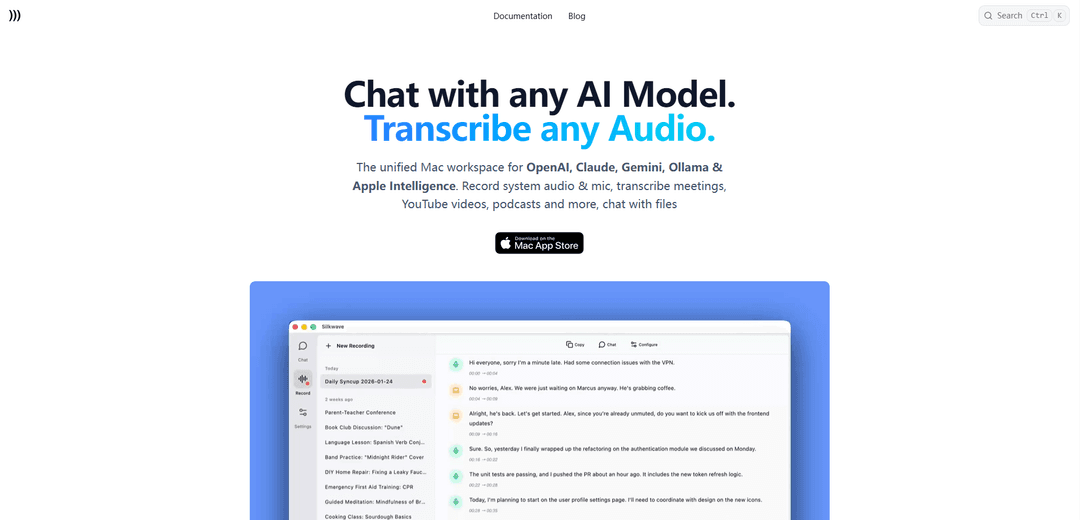
Silkwave is a unified Mac client that integrates multiple AI models (including OpenAI, Claude, Gemini, and Ollama) into one powerful interface with advanced features like audio transcription and file chat capabilities.
https://www.silkwave.ai/?ref=producthunt
Product Information
Updated:Feb 8, 2026
What is Silkwave
Silkwave is a comprehensive AI workspace application designed specifically for Mac users who want to streamline their interaction with various AI models. It operates on a 'Bring Your Own Key' (BYOK) model, allowing users to connect with major AI providers like OpenAI, Google, Anthropic, and Nebius, as well as local Ollama models. The app offers both a free tier with limited messages and a premium version with unlimited access, making it accessible to different user needs while maintaining privacy and security.
Key Features of Silkwave
Silkwave is a comprehensive Mac application that unifies multiple AI models and services into a single interface. It allows users to connect to major AI providers like OpenAI, Google, Anthropic, and local Ollama models, while offering advanced features such as audio/video transcription, file chat capabilities, and multi-modal interactions. The app operates on a 'Bring Your Own Key' (BYOK) model, ensuring user privacy and control over API usage.
Unified AI Model Integration: Seamlessly connects to multiple AI providers (GPT-4, Claude, Gemini) and local Ollama models in one interface, eliminating the need to switch between different browser tabs
Multi-modal Capabilities: Handles text, images, audio, and video content with features like transcription, document analysis, and visual data interpretation
Privacy-Focused Design: Uses BYOK model where API keys are stored locally in macOS Keychain, and all chat content remains on the user's device
Advanced File Handling: Enables users to chat with multiple PDFs, images, audio, and video files simultaneously, with support for large context windows
Use Cases of Silkwave
Business Meeting Documentation: Record and transcribe meetings with timestamps and speaker labels, then analyze the content using AI models
Content Creation and Analysis: Process and analyze various media types including documents, images, and videos for content creation and research
Software Development: Utilize different AI models for coding tasks, with Claude for programming and Gemini for reasoning
Document Processing: Analyze and extract insights from multiple PDFs and documents using AI-powered question-answering capabilities
Pros
All-in-one interface for multiple AI services
Strong privacy features with local storage and BYOK model
Comprehensive multi-modal support for various file types
Cons
Mac-only availability
Requires own API keys from providers
Limited to 10 messages per day in free version
How to Use Silkwave
Download and Install: Download Silkwave from the Mac App Store. The app has a free tier with 10 messages daily limit.
Get API Keys: Obtain your own API keys from providers you want to use (OpenAI, Google, Anthropic, Nebius etc.) as Silkwave is a 'Bring Your Own Key' (BYOK) client.
Connect API Keys: Enter your API keys in Silkwave to connect to your chosen AI providers. Keys are stored securely in the macOS Keychain on your local device.
Select AI Model: Choose which AI model you want to use for your task from the chat input. You can quickly swap between different models.
Start Chatting: Begin interacting with your chosen AI model through the unified interface.
Upload Files (Optional): You can upload documents, images, audio, or video files to chat with them. Ask questions or get summaries about the uploaded content.
Record Audio (Optional): Use the recording feature to capture microphone and system audio from meetings, videos, or podcasts for transcription.
Transcribe Content (Optional): Transcribe recorded audio using either on-device Apple Intelligence (macOS 26+) or OpenAI for multiple language support.
Customize Interface (Optional): Switch between light and dark themes based on your preference.
Silkwave FAQs
Silkwave is a Mac client application that unifies multiple AI models into one interface. It allows users to connect with various AI services like OpenAI (GPT-4), Google (Gemini), Anthropic (Claude), and others in a single workspace.
Silkwave Video
Popular Articles

Vosko AI: Localize and Dub Videos for Global Audiences
Oct 15, 2026

Atoms: A Multi-Agent AI Platform That Transforms Ideas into Launch-Ready Products
Oct 13, 2026

Nano Banana SBTI: What It Is, How It Works, and How to Use It in 2026
Apr 15, 2026

Atoms Review — The AI Product Builder Redefining Digital Creation in 2026
Apr 10, 2026
Latest AI Tools Similar to Silkwave

Folderr
Folderr is a comprehensive AI platform that enables users to create custom AI assistants by uploading unlimited files, integrating with multiple language models, and automating workflows through a user-friendly interface.

Peache.ai
Peache.ai is an AI character chat playground that enables users to engage in flirty, witty, and daring conversations with diverse AI personalities through real-time interactions.

TalkPersona
TalkPersona is an AI-powered video chatbot that provides real-time human-like conversation through a virtual talking face with natural voice and lip-sync capabilities.

Thaly AI
Thaly AI is an AI-powered sales assistant that automates customer conversations and lead qualification to help businesses scale their sales operations while saving time.
Popular AI Tools Like Silkwave

GPT‑5.5 | ChatGPT Official
GPT‑5.5 in ChatGPT is OpenAI’s latest work-focused model designed to understand complex goals, use tools effectively, check its work, and carry multi-step tasks (coding, research, documents, spreadsheets) through to completion with stronger safeguards.

DuckDuckGo AI Chat
DuckDuckGo AI Chat is a free, anonymous way to access popular AI chatbots like GPT-3.5, Claude, and others while preserving user privacy.

Arch
Arch is an intelligent Layer 7 gateway built on Envoy Proxy that provides secure handling, robust observability, and seamless integration of prompts with APIs for building fast, robust, and personalized AI agents.

Off-grid LLM over Radio
A platform that integrates Large Language Models (LLMs) with Meshtastic mesh communication networks to enable off-grid AI interactions and automated task execution through radio communication.