
Scroll
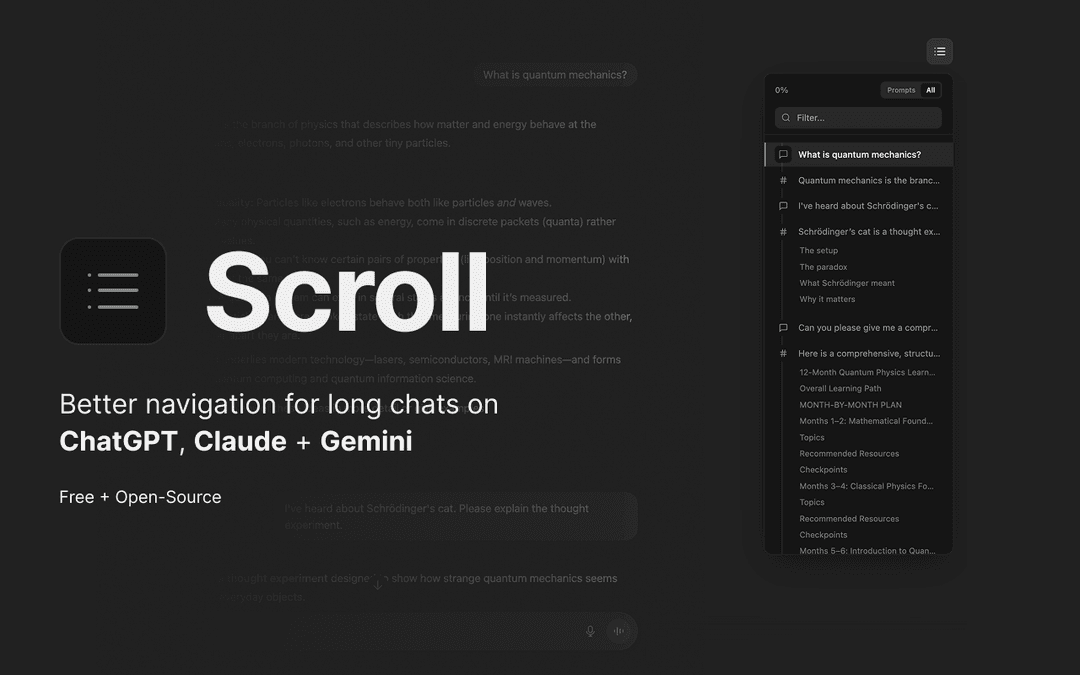
Scroll is a Chrome extension that generates a clickable table of contents for AI conversations in ChatGPT, Claude, and Gemini, enabling instant navigation and efficient conversation management.
https://chromewebstore.google.com/detail/mpcklmodkihbiblhffoganikkdfoaphe?utm_source=item-share-cb&ref=producthunt
Product Information
Updated:Dec 8, 2025
What is Scroll
Scroll is a free, open-source Chrome extension designed to enhance the user experience when engaging with AI conversation platforms like ChatGPT, Claude, and Gemini. It addresses the common challenge of navigating through lengthy AI conversations by providing an organized, easily accessible way to move between different parts of the discussion. The extension maintains user privacy by running entirely locally in the browser, ensuring no conversation data is ever sent to external servers.
Key Features of Scroll
Scroll is a Chrome extension that generates a clickable table of contents for AI conversations in ChatGPT, Claude, and Gemini. It enables users to instantly navigate through long conversations, search specific prompts, track progress, and use keyboard shortcuts for efficient navigation, all while maintaining user privacy through local browser operation.
Instant Navigation System: Generates clickable table of contents that allows users to jump directly to any prompt or response in the conversation
Smart Content Organization: Automatically detects and organizes headings within AI responses for section-specific navigation
Advanced Search and Filter: Provides real-time filtering and search capabilities to quickly locate specific prompts or responses in long conversations
Keyboard-First Interface: Offers comprehensive keyboard shortcuts for hands-on-keyboard navigation and control
Use Cases of Scroll
Research Documentation: Helps researchers efficiently navigate and reference different parts of lengthy AI research conversations
Educational Discussions: Enables students and teachers to quickly access specific topics or explanations within educational AI chat sessions
Technical Support: Allows support staff to easily track and reference different parts of troubleshooting conversations with AI
Pros
Complete privacy with local browser operation
Open-source transparency
Seamless integration with multiple AI platforms
Cons
Limited to Chrome browser only
Requires manual installation and setup
How to Use Scroll
Install the extension: Add the Scroll extension to your Chrome browser from the Chrome Web Store
Open AI chat interface: Navigate to ChatGPT, Claude, or Gemini where you want to use the extension
Open Scroll panel: Press Cmd/Ctrl + . (period) or semicolon (;) to open the Scroll navigation panel
Navigate conversations: Click on any prompt or response in the table of contents to jump directly to that part of the conversation
Use keyboard shortcuts: Use up/down arrows or j/k keys to move selection, Enter to jump to selected message, left/right arrows to toggle between Prompt-view and All-view
Search specific content: Type in the search field to filter and find specific prompts or responses from your conversation
Toggle view modes: Switch between 'All Messages' or 'Prompts Only' views to focus on different aspects of the conversation
Close the panel: Press Esc key to clear search or close the Scroll panel
Scroll FAQs
Scroll is a Chrome extension that generates a clickable table of contents for AI conversations in ChatGPT, Claude, and Gemini. It helps users navigate long conversations by allowing instant jumps to specific parts of the chat without manual scrolling.
Scroll Video
Popular Articles

Vosko AI: Localize and Dub Videos for Global Audiences
Oct 15, 2026

Atoms: A Multi-Agent AI Platform That Transforms Ideas into Launch-Ready Products
Oct 13, 2026

Nano Banana SBTI: What It Is, How It Works, and How to Use It in 2026
Apr 15, 2026

Atoms Review — The AI Product Builder Redefining Digital Creation in 2026
Apr 10, 2026
Latest AI Tools Similar to Scroll

Folderr
Folderr is a comprehensive AI platform that enables users to create custom AI assistants by uploading unlimited files, integrating with multiple language models, and automating workflows through a user-friendly interface.

Peache.ai
Peache.ai is an AI character chat playground that enables users to engage in flirty, witty, and daring conversations with diverse AI personalities through real-time interactions.

TalkPersona
TalkPersona is an AI-powered video chatbot that provides real-time human-like conversation through a virtual talking face with natural voice and lip-sync capabilities.

Thaly AI
Thaly AI is an AI-powered sales assistant that automates customer conversations and lead qualification to help businesses scale their sales operations while saving time.
Popular AI Tools Like Scroll

GPT‑5.5 | ChatGPT Official
GPT‑5.5 in ChatGPT is OpenAI’s latest work-focused model designed to understand complex goals, use tools effectively, check its work, and carry multi-step tasks (coding, research, documents, spreadsheets) through to completion with stronger safeguards.

DuckDuckGo AI Chat
DuckDuckGo AI Chat is a free, anonymous way to access popular AI chatbots like GPT-3.5, Claude, and others while preserving user privacy.

Arch
Arch is an intelligent Layer 7 gateway built on Envoy Proxy that provides secure handling, robust observability, and seamless integration of prompts with APIs for building fast, robust, and personalized AI agents.

Off-grid LLM over Radio
A platform that integrates Large Language Models (LLMs) with Meshtastic mesh communication networks to enable off-grid AI interactions and automated task execution through radio communication.