
ReleaseDock
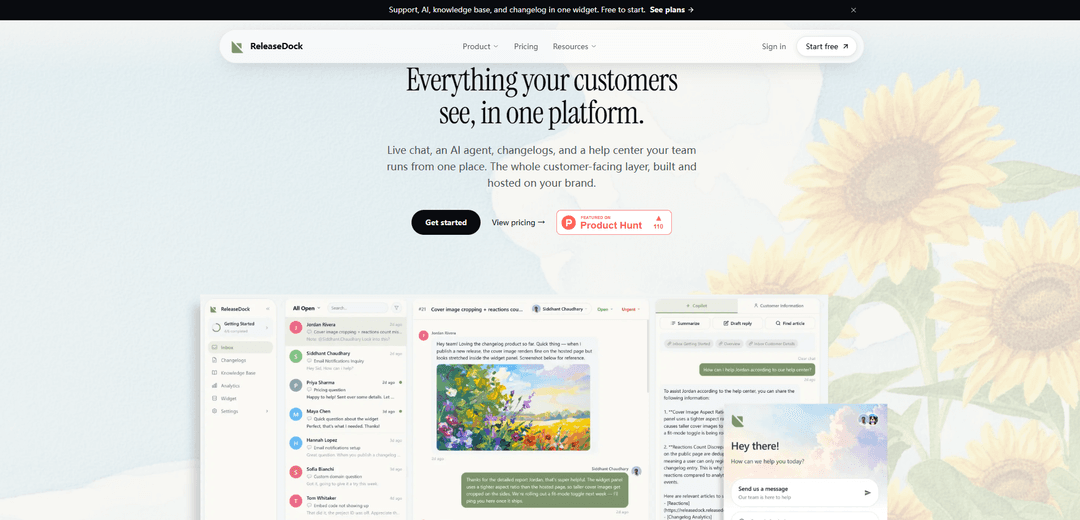
ReleaseDock is an embeddable, brand-controlled support widget that combines live chat, an AI agent with cited answers, a self-serve help center, and a changelog—installed via a single script tag.
https://www.releasedock.co/?ref=producthunt
Product Information
Updated:Jul 8, 2026
What is ReleaseDock
ReleaseDock is a customer-facing support platform that unifies the key surfaces users rely on—support chat, documentation, and product updates—into one widget and one dashboard. It lets teams run an AI-assisted support inbox, publish a branded and searchable help center on their own domain, and ship changelog updates that appear both in the widget and on hosted pages. Designed to be quick to adopt, ReleaseDock aims to replace a stitched-together support stack with a single, cohesive system that’s built and hosted on your brand.
Key Features of ReleaseDock
ReleaseDock is an all-in-one customer-facing support layer that you embed with a single script tag, combining a branded in-app widget (live chat + AI answers), a hosted help center on your own domain, and a changelog/announcements surface—all managed from one dashboard and inbox. It’s designed to get live quickly, reduce repetitive tickets via an AI agent that answers from your docs and changelog with citations, and hand off uncertain conversations to a human with full context.
Single-script embeddable widget: Add one launcher to your site/app that can show live chat, AI-assisted support, help articles, and product updates—embedded via one script tag and isolated from your site’s styles.
AI agent + Copilot workflows: AI answers customer questions using your help center and changelog content (with citations), deflects repeated FAQs, and escalates to your team when confidence is low—passing along the full transcript; Copilot helps draft faster human replies.
Unified support inbox: Run customer conversations from a single inbox so your team focuses on tickets that need a human, while routine questions are handled automatically.
Hosted help center on your domain: Publish a branded, searchable knowledge base served from your own domain, with DNS/SSL handled and feedback/search features included.
Changelog and announcements: Create and publish product updates with rich content (images, videos, code, embeds), organize with tags, and surface updates inside the widget and hosted pages.
Fast setup, customization, and targeting: Go live in minutes: create a project, customize colors/position/launcher/labels, toggle modules, set page targeting, and preview changes live from the dashboard.
Use Cases of ReleaseDock
B2B SaaS in-app support + self-serve docs: Embed the widget inside the product so users can search help articles, get AI answers, and start a chat—reducing ticket volume while keeping support on-brand.
Product-led growth release communication: Use the changelog/announcements to ensure new features are seen and adopted, while the AI agent answers “what changed?” questions directly from release notes.
Startup replacing a multi-tool support stack: Consolidate live chat, help center, and changelog into one platform and one subscription, avoiding multiple integrations and reducing operational overhead.
Customer support teams handling repetitive FAQs: Deflect common questions automatically with AI grounded in your knowledge base, and route only ambiguous/complex issues to humans with full context.
Teams migrating existing documentation/changelog content: Import help center content from Markdown (single files or a zip archive) and migrate changelogs from tools like Canny, Featurebase, Beamer, or AnnounceKit with minimal disruption.
Pros
All-in-one widget + hosted pages: chat, AI, help center, and changelog share one script tag and one data source.
AI deflection with citations plus human handoff reduces repetitive tickets while keeping quality and context.
Quick to launch and customize (branding, modules, page targeting) without a large engineering project.
Hosted help center on your own domain with DNS/SSL handled simplifies publishing and maintenance.
Cons
Best fit is the “single unified customer-facing layer” approach; teams wanting best-of-breed point solutions may find it less flexible.
AI accuracy depends on the completeness/quality of your help center and changelog content.
Requires adding a third-party script to your site/app, which may need security/privacy review in some organizations.
How to Use ReleaseDock
1) Create a ReleaseDock project: Sign up, then create a new project by choosing a project name and slug. As soon as you do, your hosted help center, changelog, and support inbox are live.
2) Customize the widget appearance: In the dashboard, set the widget’s colors, position, launcher style, and labels so it matches your brand.
3) Choose which modules to show: Toggle the modules you want enabled (live chat, AI answers, help articles, product updates/changelog) so the widget includes only what your users need.
4) Set page targeting rules: Configure where the widget should appear by setting page targeting in the dashboard (e.g., show on specific pages/sections of your site).
5) Preview changes live before publishing: Use the dashboard’s live preview to verify your widget configuration (styling, modules, and targeting) before you embed it.
6) Embed ReleaseDock with one script tag: Copy the provided single-line script tag and paste it into your site. This one embed powers the widget experience: conversations, help articles, and updates all flow through the same launcher.
7) Add and manage help center content: Use the hosted help center to publish and maintain your knowledge base. The help center is branded and searchable, and can be served from your own domain with DNS/SSL handled for you.
8) Publish product updates via the changelog: Create and publish changelog entries so releases land in the widget’s updates feed and on your hosted changelog page (and optionally via email notifications, if enabled).
9) Run support from the unified inbox: Handle incoming conversations in the support inbox. Use the built-in Copilot to draft replies and speed up responses.
10) Enable AI support with citations + human handoff: Turn on the AI agent so it answers from your help center and changelog and includes citations to the source articles. When the AI isn’t sure, it hands the conversation to your team with the full transcript attached.
ReleaseDock FAQs
ReleaseDock is a platform that bundles live chat, an AI support agent, a help center, and changelogs into a single customer-facing widget and dashboard, hosted on your brand.
Popular Articles

Vosko AI: Localize and Dub Videos for Global Audiences
Oct 15, 2026

Atoms: A Multi-Agent AI Platform That Transforms Ideas into Launch-Ready Products
Oct 13, 2026

Nano Banana SBTI: What It Is, How It Works, and How to Use It in 2026
Apr 15, 2026

Atoms Review — The AI Product Builder Redefining Digital Creation in 2026
Apr 10, 2026
Latest AI Tools Similar to ReleaseDock

Folderr
Folderr is a comprehensive AI platform that enables users to create custom AI assistants by uploading unlimited files, integrating with multiple language models, and automating workflows through a user-friendly interface.

Peache.ai
Peache.ai is an AI character chat playground that enables users to engage in flirty, witty, and daring conversations with diverse AI personalities through real-time interactions.

TalkPersona
TalkPersona is an AI-powered video chatbot that provides real-time human-like conversation through a virtual talking face with natural voice and lip-sync capabilities.

Thaly AI
Thaly AI is an AI-powered sales assistant that automates customer conversations and lead qualification to help businesses scale their sales operations while saving time.
Popular AI Tools Like ReleaseDock

GPT‑5.5 | ChatGPT Official
GPT‑5.5 in ChatGPT is OpenAI’s latest work-focused model designed to understand complex goals, use tools effectively, check its work, and carry multi-step tasks (coding, research, documents, spreadsheets) through to completion with stronger safeguards.

DuckDuckGo AI Chat
DuckDuckGo AI Chat is a free, anonymous way to access popular AI chatbots like GPT-3.5, Claude, and others while preserving user privacy.

Arch
Arch is an intelligent Layer 7 gateway built on Envoy Proxy that provides secure handling, robust observability, and seamless integration of prompts with APIs for building fast, robust, and personalized AI agents.

Off-grid LLM over Radio
A platform that integrates Large Language Models (LLMs) with Meshtastic mesh communication networks to enable off-grid AI interactions and automated task execution through radio communication.