ReelFluent Web
WebsiteFree Trial
ReelFluent Web is an immersive, drama-based language-learning web app with interactive subtitles and AI-powered context, delivering 1–2 minute “Adrenaline Lessons” that make learning feel like binge-watching.
https://web.reelfluent.app/?ref=producthunt

Product Information
Updated:May 18, 2026
What is ReelFluent Web
ReelFluent Web is a browser-based language learning experience built around short-form, addictive drama content to help learners absorb real-world speech naturally. Instead of traditional drills, it lets you watch series and learn from the exact lines characters say—capturing everyday phrasing, social subtext, and emotional nuance that textbooks often miss. The platform positions itself as a companion tool to other courses or apps, designed for modern attention spans and flexible schedules, with quick lessons that fit both short breaks and longer sessions.
Key Features of ReelFluent Web
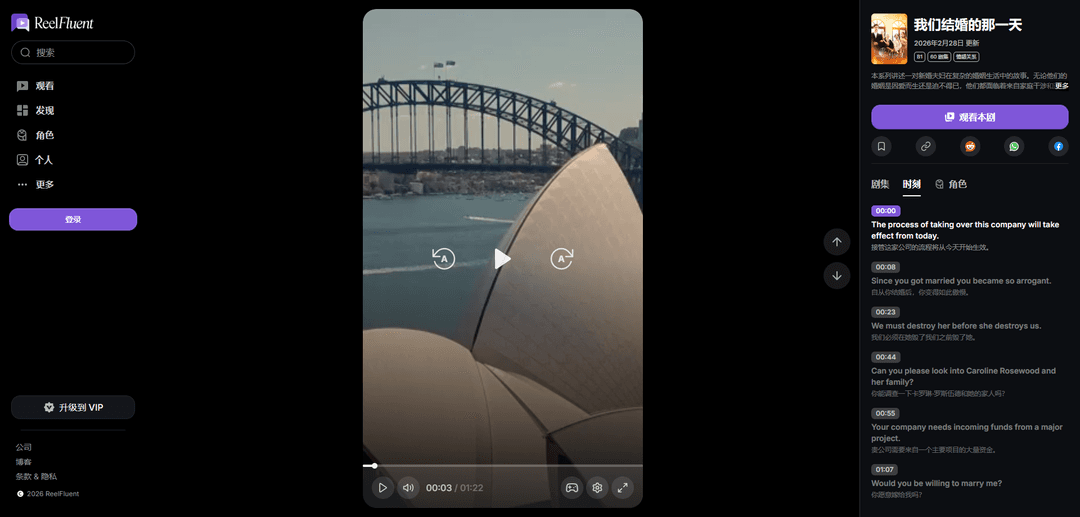
ReelFluent Web is an immersive, drama-based language-learning web app designed to make learning feel like binge-watching. It delivers short “Adrenaline Lessons” (about 1–2 minutes) built around 80+ drama series, with interactive subtitles and AI-powered context to help learners absorb real-world speech, social subtext, and practical phrases. The web experience includes Watch and Discover flows, searchable content, series pages with episode/moment snippets, and account features like settings and VIP membership—positioned as a motivating companion alongside other courses or apps rather than a standalone curriculum.
Immersive drama learning (80+ series): Learn through story-driven episodes across multiple drama genres, designed to keep motivation high and expose learners to natural, real-world dialogue.
Adrenaline Lessons (1–2 minute sessions): Bite-sized learning units optimized for modern attention spans—usable in short breaks or longer binge sessions, scaling to the learner’s schedule.
Interactive subtitles + “lingos” unlocks: Watch scenes and unlock vocabulary/phrases (e.g., “500+ lingos” per drama) using interactive subtitles that support in-the-moment comprehension.
AI-powered context for phrases: Provides contextual explanations around “linguistic gems,” helping learners understand meaning, usage, and nuance beyond literal translation.
Level- and skill-targeted series guidance: Series are tagged with levels (e.g., B1/B2) and learning goals such as negotiations, confrontations, apologies, or philosophical reflection to guide intentional practice.
Web app navigation and account features: Includes Watch/Discover/Characters sections, search, series detail pages (episodes and “moments”), plus settings and VIP membership/upgrade options.
Use Cases of ReelFluent Web
Busy professionals improving listening fluency: Use 1–2 minute lessons during commutes or breaks to build real-world listening comprehension and pick up workplace-relevant phrasing (e.g., negotiation language).
Students supplementing formal language courses: Pair with textbooks/classes to reinforce classroom grammar with authentic dialogue, social subtext, and natural pacing from drama scenes.
Corporate communication and business language practice: Leverage business-themed series (e.g., corporate rivalry, mergers, demanding compliance) to practice professional expressions and assertive communication.
Travelers and expats building everyday conversational intuition: Binge watch to internalize common emotional and situational language (apologies, conflict, relationships) useful for daily interactions abroad.
Language-learning communities and peer challenges: Use the web app alongside community sharing (e.g., user community link) to coordinate watch goals, discuss scenes, and keep accountability through social learning.
Pros
Highly engaging format that reduces study fatigue by turning practice into entertainment
Short lessons make it easy to stay consistent and fit learning into small time windows
Focus on real-world speech and social nuance that traditional materials often miss
Cons
Not positioned as a complete standalone learning solution; works best as a companion tool
Drama-centric content may not match learners who prefer structured curricula or non-fiction contexts
Some learning value may depend on VIP/membership access for full unlocking and features
How to Use ReelFluent Web
1) Open ReelFluent Web: Go to https://web.reelfluent.app/ (e.g., the Product Hunt ref link) to access the ReelFluent web app.
2) Log in (or continue browsing if available): Use the left sidebar or the “More” menu to find “Log in”. Logging in unlocks your profile-related features and membership access.
3) (Optional) Upgrade to VIP: Click “Upgrade to VIP” to access membership benefits (the app also has a dedicated “Membership” page in Settings).
4) Use the left sidebar to navigate: Use the main navigation icons: “Watch” to play lessons/episodes, “Discover” to browse series, and “Characters” to explore character-related content.
5) Search for content: Click “Search” (magnifying glass icon) to find series or content you want to watch.
6) Browse trending or recommended series: From the main area, look for sections like “You may like” and “Trending series” to pick something quickly.
7) Open a series detail page: Click a series poster/title (e.g., “In Her Shadow”) to view its level (e.g., B2), episode count, genre tags, update date, and synopsis.
8) Start watching the series: On the series page, click “Watch the series” to begin playback (it opens the immersive watch experience with an episode/series id).
9) Follow along with the episode timeline and lines: While watching, use the displayed timestamps and dialogue lines (short scene snippets) to track what’s being said and replay moments as needed.
10) Explore Episodes, Moments, and Characters tabs: On a series page, switch between “Episodes”, “Moments”, and “Characters” to navigate the story by full episodes, short highlight moments, or character views.
11) Use playback controls: Use the on-player controls (play button, time indicator like “00:00 / 00:00”, and other visible control icons) to play/pause and manage viewing.
12) Adjust watch settings: Click the settings (gear) icon in the watch interface to change available playback/lesson options.
13) Save or share a series: Use the action icons on the series page such as bookmark (save), link (copy/share), or share buttons (e.g., WhatsApp/Facebook) to share with others.
14) Open Settings: Go to “More” → “Settings” (or the Settings icon shown in the menu) to manage app preferences.
15) Manage Membership from Settings: In the “More” menu, open “Membership” to view or manage your plan (ties to the “Upgrade to VIP” option).
16) Join the user community: From the “More” menu, click “User community” to join the ReelFluent community via the provided WhatsApp group link.
17) Give feedback: Click “Give feedback” (message icon) from the “More” menu to submit product feedback.
18) Read Terms and Privacy Policy: Use the footer links “Terms” and “Policy” to review ReelFluent’s terms of service and privacy policy.
19) Use ReelFluent as a short-lesson companion: Pick short segments (the platform emphasizes 1–2 minute “Adrenaline Lessons”) when you have limited time, or binge longer sessions when you have more time.
ReelFluent Web FAQs
ReelFluent Web is an immersive language-learning web app designed to make learning feel like binge-watching dramas—helping you build listening and real-world comprehension while being entertained.
ReelFluent Web Video
Popular Articles

Nano Banana SBTI: What It Is, How It Works, and How to Use It in 2026
Apr 15, 2026

Atoms Review — The AI Product Builder Redefining Digital Creation in 2026
Apr 10, 2026

Kilo Claw: How to Deploy and Use a True "Do‑It‑For‑You" AI Agent(2026 Update)
Apr 3, 2026

OpenAI Shuts Down Sora App: What the Future Holds for AI Video Generation in 2026
Mar 25, 2026