Raccoon AI
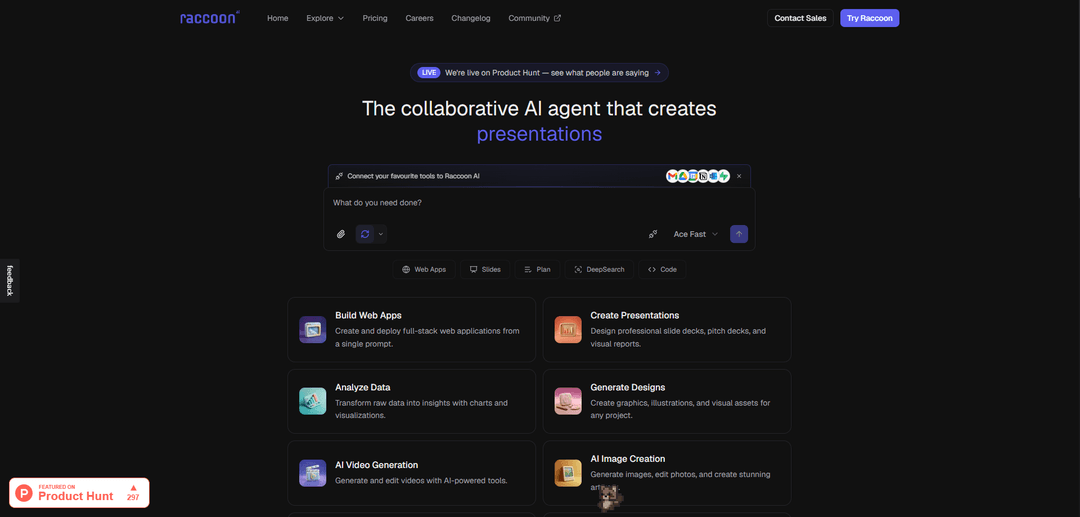
Raccoon AI is a collaborative AI agent platform that enables users to create web apps, presentations, reports and automate workflows across different tools through simple prompts and conversations.
https://raccoonai.tech/?ref=producthunt
Product Information
Updated:Mar 15, 2026
What is Raccoon AI
Founded in 2024 and based in Bengaluru, India, Raccoon AI is a developer-first ecosystem that helps execute actions on behalf of users across the internet. It functions as a business intelligence platform that combines machine learning capabilities with automation tools to help users create content, analyze data, build applications, and manage workflows. The platform comes equipped with pre-programmed ML algorithms and offers services ranging from web app development to presentation creation, data analysis, design generation, and task automation.
Key Features of Raccoon AI
Raccoon AI is a collaborative AI platform that offers a comprehensive suite of AI-powered tools for creating and managing various digital assets. It combines web application development, content creation, data analysis, and workflow automation capabilities. The platform allows users to connect multiple tools and services, generate various types of content (including videos, images, and documents), and automate tasks through natural language interactions, all while providing a collaborative environment for teams.
AI-Powered Content Generation: Creates various types of content including videos, images, presentations, and documents through AI assistance with minimal user input
Tool Integration & Automation: Connects with popular tools like Gmail, Drive, Calendar, Notion, and enables automated workflow creation across multiple platforms
Web Application Development: Allows users to build and deploy full-stack web applications from simple text descriptions without coding
Data Analysis & Visualization: Provides capabilities to analyze data and create visual representations through charts and other visualization tools
Use Cases of Raccoon AI
Business Content Creation: Generate professional presentations, reports, and marketing materials for business communications
Software Development: Rapidly prototype and deploy web applications without extensive coding knowledge
Data Analytics: Transform raw data into meaningful insights through automated analysis and visualization
Customer Service Automation: Implement AI-powered customer service solutions with automated responses and workflow management
Pros
No coding required for complex tasks
Comprehensive tool integration
Versatile content generation capabilities
Cons
Relatively new platform (founded in 2024)
Limited funding and resources as an unfunded startup
May have accuracy limitations with AI-generated content
How to Use Raccoon AI
Sign up for an account: Visit raccoonai.tech and create a free Raccoon AI account. No credit card is required to get started.
Connect your tools: Connect your preferred tools and services like Gmail, Google Drive, Calendar, Notion, Outlook, Supabase etc. to enable Raccoon AI to work with your data.
Provide context and input: Drop in your source materials like spreadsheets, images, documents and provide instructions to Raccoon AI about what you need to accomplish.
Select capability: Choose the type of task you want to perform - web apps, slides, data analysis, design, video generation, image creation, document writing, or workflow automation.
Review and refine: Review the AI-generated output and iterate with Raccoon AI to refine and adjust until you get exactly what you want.
Export or deploy: Download your completed work in your preferred format, or for web apps, deploy directly to a live URL.
Customize settings: Adjust brand guidelines, style preferences, fonts, colors and other settings to match your requirements across projects.
Monitor and manage: Track your usage, manage automated workflows, and control costs through the dashboard.
Raccoon AI FAQs
Raccoon AI is a collaborative AI agent that helps users create web apps, presentations, reports, and more. It can generate and edit videos, create images, draft documents, and automate workflows by connecting various tools like Gmail, Google Drive, Calendar, Notion, Outlook, and Supabase.
Raccoon AI Video
Popular Articles

Vosko AI: Localize and Dub Videos for Global Audiences
Oct 15, 2026

Atoms: A Multi-Agent AI Platform That Transforms Ideas into Launch-Ready Products
Oct 13, 2026

Nano Banana SBTI: What It Is, How It Works, and How to Use It in 2026
Apr 15, 2026

Atoms Review — The AI Product Builder Redefining Digital Creation in 2026
Apr 10, 2026
Latest AI Tools Similar to Raccoon AI

invoices.dev
invoices.dev is an automated invoicing platform that generates invoices directly from developers' Git commits, with integration capabilities for GitHub, Slack, Linear, and Google services.

Monyble
Monyble is a no-code AI platform that enables users to launch AI tools and projects within 60 seconds without requiring technical expertise.

Devozy.ai
Devozy.ai is an AI-powered developer self-service platform that combines Agile project management, DevSecOps, multi-cloud infrastructure management, and IT service management into a unified solution for accelerating software delivery.
Mediatr
MediatR is a popular open-source .NET library that implements the Mediator pattern to provide simple and flexible request/response handling, command processing, and event notifications while promoting loose coupling between application components.
Popular AI Tools Like Raccoon AI
Launch
Launch is an AI-powered platform that enables users to build full-stack applications instantly while providing comprehensive tools for product launches, entrepreneurship programs, and customer acquisition.

GitHub Copilot Chat
GitHub Copilot Chat is an AI-powered coding assistant that provides natural language interactions, real-time code suggestions, and contextual support directly within supported IDEs and GitHub.com.

Rememberall
Rememberall is a secure, open-source long-term memory solution that enables AI applications and GPT models to maintain persistent memory across conversations through semantic search and vector storage capabilities.

Upsonic
Upsonic is a reliability-focused AI agent framework with dockerized server-client architecture that enables trusted agent workflows through advanced features like verification layers, triangular architecture, and Model Context Protocol (MCP) integration.