
Playground by Natoma
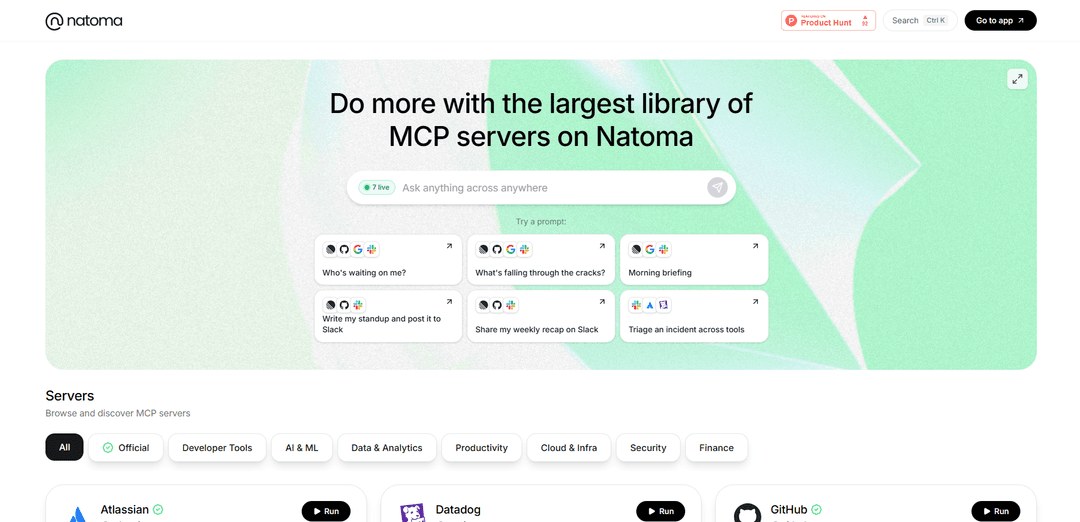
Playground by Natoma is a simple, fast platform that allows users to discover, browse and try various MCP (Model Context Protocol) servers without any setup required.
https://www.natoma.run/?ref=producthunt
Product Information
Updated:Mar 8, 2026
What is Playground by Natoma
Playground by Natoma is a comprehensive platform that serves as a centralized hub for accessing and testing different MCP servers. It provides a user-friendly interface where developers and organizations can explore and connect to a wide range of business tools and services, from popular platforms like GitHub, Slack, and Google Workspace to specialized services like Elasticsearch, Docker, and various AI tools. The platform is designed to make it easy to find, test, and implement MCP server connections for various business needs.
Key Features of Playground by Natoma
Playground by Natoma is a platform that allows users to discover and try MCP (Model Context Protocol) servers without any setup required. It provides a comprehensive interface for browsing, testing, and connecting to various service integrations including GitHub, Slack, Google Workspace, AWS, Azure, and many other popular tools and platforms. The platform offers features like parameter tuning, history tracking, and side-by-side model comparison capabilities.
No-Setup Server Discovery: Browse and instantly connect to a wide range of MCP servers without any installation or configuration required
Interactive Playground UI: Full playground interface with history tracking, parameter tuning capabilities, and keyboard shortcuts for efficient testing
Side-by-Side Comparison: Compare different models and configurations side-by-side with the same prompt to evaluate performance
Enterprise Security: Battle-tested security features including OAuth management, token handling, and least-privilege access policies
Use Cases of Playground by Natoma
Developer Testing: Developers can quickly test and compare different MCP server configurations before implementation
Enterprise Integration: Organizations can evaluate and connect various tools and services through a single unified platform
AI Development: AI developers can experiment with different models and parameters to optimize their applications
Pros
Simple and quick setup process
Comprehensive integration options
Strong security features
Cons
Limited documentation available
Some features still in development
How to Use Playground by Natoma
Visit the Natoma Playground website: Go to www.natoma.run to access the Playground interface
Browse available MCP servers: Browse through the catalog of available Model Context Protocol (MCP) servers like GitHub, Slack, Google Workspace, etc.
Select a server to connect: Click on the MCP server you want to connect to from the list of available integrations
Configure server connection: Follow the authentication and configuration steps specific to your chosen MCP server to establish the connection
Use the playground interface: Once connected, use the full playground UI which includes features like history, parameter tuning, keyboard shortcuts, and logging properties
Compare models: Use the side-by-side comparison feature to test different models with the same prompt and tune parameters individually
Save and manage configurations: Save your preferred configurations and prompts for future use within the playground
Playground by Natoma FAQs
Playground by Natoma is a platform that allows users to discover and try MCP (Model Context Protocol) servers without any setup required. It provides a simple and fast way to connect to various services and tools.
Playground by Natoma Video
Popular Articles

Atoms: A Multi-Agent AI Platform That Transforms Ideas into Launch-Ready Products
May 22, 2026

Nano Banana SBTI: What It Is, How It Works, and How to Use It in 2026
Apr 15, 2026

Atoms Review — The AI Product Builder Redefining Digital Creation in 2026
Apr 10, 2026

Kilo Claw: How to Deploy and Use a True "Do‑It‑For‑You" AI Agent(2026 Update)
Apr 3, 2026
Latest AI Tools Similar to Playground by Natoma

invoices.dev
invoices.dev is an automated invoicing platform that generates invoices directly from developers' Git commits, with integration capabilities for GitHub, Slack, Linear, and Google services.

Monyble
Monyble is a no-code AI platform that enables users to launch AI tools and projects within 60 seconds without requiring technical expertise.

Devozy.ai
Devozy.ai is an AI-powered developer self-service platform that combines Agile project management, DevSecOps, multi-cloud infrastructure management, and IT service management into a unified solution for accelerating software delivery.
Mediatr
MediatR is a popular open-source .NET library that implements the Mediator pattern to provide simple and flexible request/response handling, command processing, and event notifications while promoting loose coupling between application components.
Popular AI Tools Like Playground by Natoma
Launch
Launch is an AI-powered platform that enables users to build full-stack applications instantly while providing comprehensive tools for product launches, entrepreneurship programs, and customer acquisition.

GitHub Copilot Chat
GitHub Copilot Chat is an AI-powered coding assistant that provides natural language interactions, real-time code suggestions, and contextual support directly within supported IDEs and GitHub.com.

Rememberall
Rememberall is a secure, open-source long-term memory solution that enables AI applications and GPT models to maintain persistent memory across conversations through semantic search and vector storage capabilities.

Upsonic
Upsonic is a reliability-focused AI agent framework with dockerized server-client architecture that enables trusted agent workflows through advanced features like verification layers, triangular architecture, and Model Context Protocol (MCP) integration.