PaioClaw
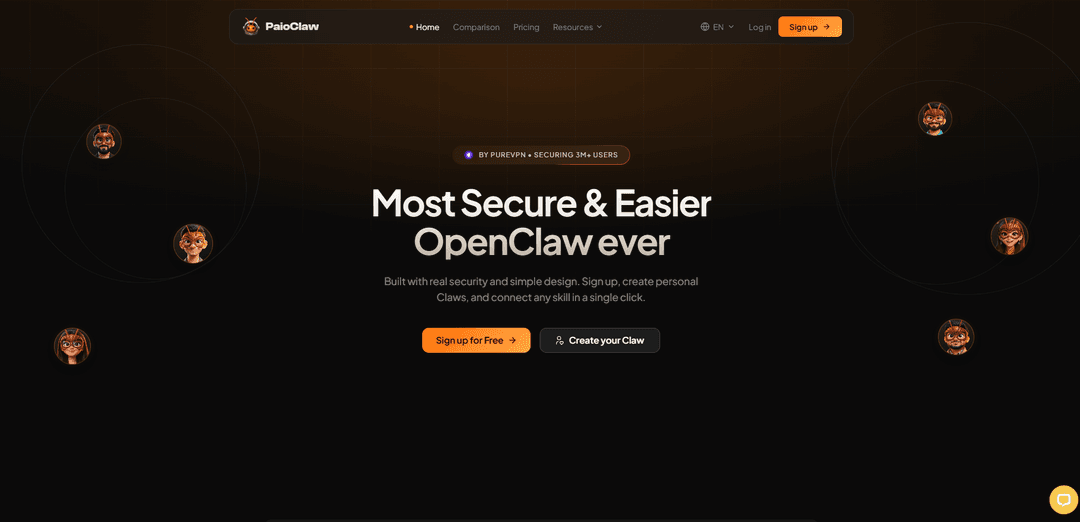
PaioClaw is a secure, always-on managed hosting platform for OpenClaw that spins up private AI assistants in under 60 seconds, with one-click skill integrations, visibility into tasks/tokens, and BYOK (bring-your-own API keys) control.
https://paioclaw.ai/?utm_source=aipure
Product Information
Updated:Jun 18, 2026
What is PaioClaw
PaioClaw is a secure hosting solution for OpenClaw that removes the complexity and high costs of running your own setup. You get a private Clawspace for your AI agents that is secure, auto-updating, and highly optimized. Token use drops by up to 50%, setup takes under 60 seconds, and persona-based Claws let you spin up pre-configured agents for specific jobs instead of building everything from scratch. Add new capabilities with 1-click skills setup, no configs to wire up.
Key Features of PaioClaw
PaioClaw is a managed, security-focused hosting platform for running OpenClaw AI assistants (“Claws”) without self-hosting complexity. It promises a ~60-second setup (no Docker/terminal/VPS), always-on operation, visibility into tasks and token usage, one-click connections to a large library of skills and channels (e.g., WhatsApp/Telegram), and optional real-browser automation via a Browser Relay extension. It also emphasizes privacy and security with isolated, encrypted cloud instances and a BYOK approach where API keys are not stored by PaioClaw, plus token-optimization features on paid tiers to reduce per-task token usage.
60-second managed OpenClaw setup: Launch a hosted OpenClaw instance quickly with minimal configuration—no Docker, command line, or server management required.
Always-on assistants with scheduling: Designed for persistent operation (reduced connection drops/resets) and supports 24/7 cloud running with native cron-style scheduling for automations.
Claw visibility & usage control: Provides monitoring of tasks, token usage, and agent activity; higher tiers include activity logs and usage tracking to manage cost and behavior.
One-click skills & channel integrations: Connect pre-built skills (tiered from 100 to 2,000+ depending on plan) and integrate with messaging channels like WhatsApp and Telegram for on-the-go interaction.
Token optimization on paid plans: Optimization layer on paid tiers claims fewer tokens per task (e.g., ~40–50% reduction), aiming to lower API costs by routing/handling tasks more efficiently.
Security-first, isolated environment (BYOK): Runs in isolated, encrypted cloud instances and promotes a bring-your-own-key model where API keys stay with the model provider and are not stored by PaioClaw.
Use Cases of PaioClaw
Customer support & service ops via chat channels: Deploy a Claw connected to WhatsApp/Telegram to triage requests, answer FAQs, collect details, and escalate issues—useful for small businesses and support teams needing fast responses.
Marketing & content workflows: Use always-on agents to run recurring research, draft/refine content, and coordinate campaign tasks; scheduled runs can produce routine deliverables without manual prompting.
Sales and CRM-like follow-ups: Automate lead follow-ups and reminders through messaging integrations and scheduled tasks, keeping lightweight outreach running even when the user is offline.
Web research and data extraction: Leverage the Browser Relay extension for real-browser automation to gather information, fill web forms, or extract structured data for analysis and reporting.
Developer productivity and code maintenance: Run Claws to review/refactor code, manage files, and assist with repetitive engineering tasks—benefiting teams that want agent capabilities without maintaining infrastructure.
Operations automation for founders and teams: Create multiple persona-based Claws (e.g., ops, finance, PM) with persistent memory and skills to coordinate recurring admin tasks, reporting, and cross-tool workflows.
Pros
Fast time-to-value: managed setup in ~60 seconds without Docker/VPS complexity.
Operational control: task/token visibility and (on higher tiers) activity logs help manage cost and audit behavior.
Strong security positioning: isolated encrypted instances and BYOK approach (API keys not stored by PaioClaw).
Automation-ready: always-on operation, cron scheduling, messaging integrations, and browser automation support.
Cons
Feature depth varies by plan: key capabilities (e.g., larger memory, activity logs, more skills, stronger token savings) are tier-gated.
Cost/claims depend on workload: token-optimization savings and “always-on” reliability may vary by task patterns and model/provider usage.
Less control than self-hosting: managed hosting can limit low-level customization compared with running OpenClaw directly on your own infrastructure.
How to Use PaioClaw
1) Sign up for a PaioClaw account: Go to https://paioclaw.ai/ and click “Sign up for Free” (or “Launch My Assistant”). Create your account using Google or email. No credit card is required to start.
2) Choose a plan (Free or Pro tiers): Select a plan that matches your usage: Free (Curious) for limited daily use, or a paid plan (Smart/Genius) for more memory, more skills, and better token optimization. You can upgrade anytime.
3) Create your Claw (your personal AI assistant): In your dashboard, create a new “Claw.” This is your personalized assistant with its own persona, skill set, and memory that improves as you use it.
4) Attach your LLM API key (BYOK): Add your LLM provider API key in PaioClaw. Once the key is attached, your OpenClaw instance becomes live—typically in under 60 seconds.
5) Start chatting in the web app: Use the browser chat to talk to your Claw immediately. This is the fastest way to confirm everything is working before adding channels or skills.
6) Connect a messaging channel (optional but recommended): From the channel/integrations area, connect where you want to talk to your Claw (e.g., WhatsApp, Telegram, Slack). After connecting, you can message your Claw from that app.
7) Add skills with one click (as needed): Open the skills marketplace/library and add capabilities your Claw needs (automation, research, communication, dev tasks, etc.). PaioClaw is designed so skills can be connected with a single tap rather than manual configuration.
8) Use a pre-built/persona Claw to avoid starting from scratch (optional): If available in your Clawspace, select a pre-configured persona-based Claw aligned to your job (e.g., business functions) so you begin with an ‘expert’ setup rather than building everything manually.
9) Monitor activity, tasks, and token/credit usage: Use PaioClaw’s visibility features to review what your Claw is doing: task/activity logs, token usage, and credit consumption—so you can control AI usage and costs.
10) Keep your Claw always-on for ongoing work: Leave your Claw running in PaioClaw for persistent operation (always-on behavior). Use it for multi-step workflows and ongoing projects where memory and continuity matter.
11) (Paid plans) Leverage token optimization and larger memory: On Smart/Genius plans, benefit from the token-optimization layer (fewer tokens per task) and increased smart memory to retain more context and produce more personalized outputs.
12) (If included in your plan) Use the Mac Agent and/or Relay Extension: If your plan includes them, install and use the native Mac Agent and/or the browser relay extension to extend your Claw’s ability to interact with your environment and perform browser-based actions.
PaioClaw FAQs
PaioClaw is a secure, fully managed hosting platform for OpenClaw that lets individuals and teams run AI assistants (“Claws”) without handling servers, Docker, or complex configuration. It’s designed to keep Claws always-on, connected, and easy to control.
Popular Articles

Vosko AI: Localize and Dub Videos for Global Audiences
Oct 15, 2026

Atoms: A Multi-Agent AI Platform That Transforms Ideas into Launch-Ready Products
Oct 13, 2026

Nano Banana SBTI: What It Is, How It Works, and How to Use It in 2026
Apr 15, 2026

Atoms Review — The AI Product Builder Redefining Digital Creation in 2026
Apr 10, 2026
Latest AI Tools Similar to PaioClaw

invoices.dev
invoices.dev is an automated invoicing platform that generates invoices directly from developers' Git commits, with integration capabilities for GitHub, Slack, Linear, and Google services.

Monyble
Monyble is a no-code AI platform that enables users to launch AI tools and projects within 60 seconds without requiring technical expertise.

Devozy.ai
Devozy.ai is an AI-powered developer self-service platform that combines Agile project management, DevSecOps, multi-cloud infrastructure management, and IT service management into a unified solution for accelerating software delivery.
Mediatr
MediatR is a popular open-source .NET library that implements the Mediator pattern to provide simple and flexible request/response handling, command processing, and event notifications while promoting loose coupling between application components.
Popular AI Tools Like PaioClaw
Launch
Launch is an AI-powered platform that enables users to build full-stack applications instantly while providing comprehensive tools for product launches, entrepreneurship programs, and customer acquisition.

GitHub Copilot Chat
GitHub Copilot Chat is an AI-powered coding assistant that provides natural language interactions, real-time code suggestions, and contextual support directly within supported IDEs and GitHub.com.

Rememberall
Rememberall is a secure, open-source long-term memory solution that enables AI applications and GPT models to maintain persistent memory across conversations through semantic search and vector storage capabilities.

Upsonic
Upsonic is a reliability-focused AI agent framework with dockerized server-client architecture that enables trusted agent workflows through advanced features like verification layers, triangular architecture, and Model Context Protocol (MCP) integration.