
OmegaGPT
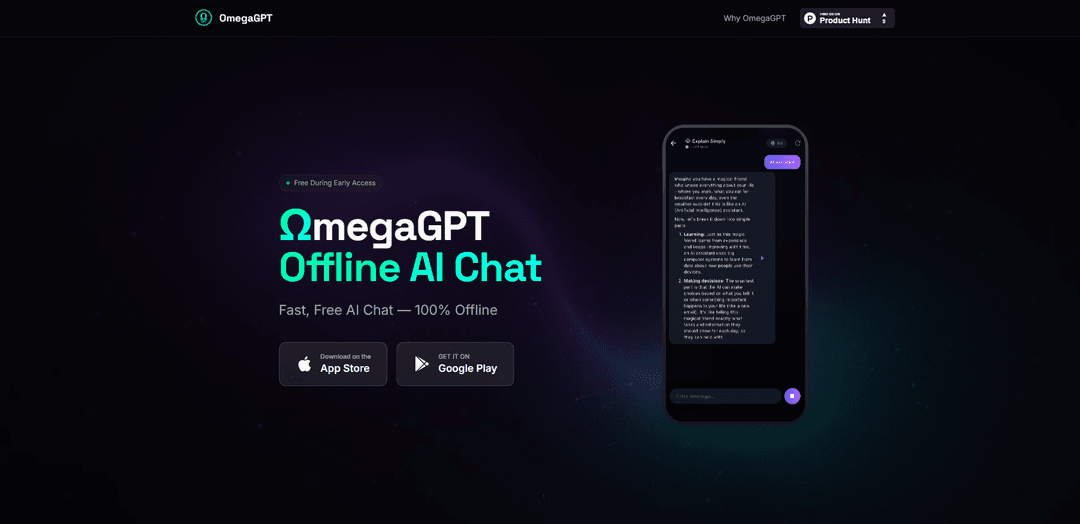
OmegaGPT is a fast, privacy-first AI chat app for iOS and Android that runs 100% offline on-device with no accounts, no cloud dependency, and built-in templates for common tasks.
https://ar-generation.github.io/omegagpt?ref=producthunt
Product Information
Updated:Jun 8, 2026
What is OmegaGPT
OmegaGPT is an offline AI chat assistant designed to let users have unlimited conversations without needing an internet connection. Positioned as a “privacy first” companion, it emphasizes that chats stay on the device and that there are no sign-ups or accounts required. Available on both iOS and Android, OmegaGPT aims to make AI accessible in situations where connectivity is limited—such as travel or remote areas—while also supporting practical everyday use cases like summarizing, translating, and completing task-oriented prompts through built-in templates.
Key Features of OmegaGPT
OmegaGPT is a privacy-first AI chat app for iOS and Android designed to run fully offline on-device. It emphasizes no accounts or sign-ups, keeping conversations local to the device, and providing fast responses without network delays. The app supports unlimited offline chats after downloading an AI model and includes built-in templates for common tasks like summarization, translation, and task assistance, with positioning as a secure, accessible AI companion for users who travel, have limited connectivity, or prefer avoiding cloud-based services.
100% offline AI chat: Works without an internet connection once the on-device model is downloaded, enabling uninterrupted use in low-connectivity environments.
Privacy-first, on-device conversations: Chats remain on the device rather than being sent to cloud servers, reducing exposure to data breaches and third-party access.
No accounts or sign-ups: Designed to be usable without creating an account, supporting anonymous, low-friction access and minimizing tracking surfaces.
Fast responses with no network latency: On-device inference avoids network delays, providing more immediate interactions compared to cloud-dependent chat apps.
Built-in task templates: Includes ready-made prompts/templates for workflows such as summaries, translation, and task-oriented assistance.
On-device voice interaction (where supported): Includes on-device speech recognition for hands-free conversation and more natural dialogue in supported configurations.
Use Cases of OmegaGPT
Travel and remote-field support: Use as an offline assistant for planning, note-taking, translation, and quick Q&A when roaming, flying, or in areas with unreliable connectivity.
Student study helper: Summarize notes, generate practice questions, explain concepts, and draft outlines without needing campus Wi‑Fi or a cloud account.
Professional drafting and brainstorming: Draft emails, proposals, and meeting notes; brainstorm ideas and structure documents while keeping sensitive content on-device.
Privacy-conscious personal companion: Chat and reflect without uploading personal conversations to external servers, appealing to users prioritizing confidentiality.
Language practice and translation: Practice dialogues and translate short texts offline using templates, useful for learners and multilingual communication on the go.
Pros
Operates fully offline after model download, useful for travel and low-connectivity scenarios
Privacy-oriented design: no cloud dependency and conversations stay on-device
No account requirement reduces friction and potential tracking
Fast responses without network latency
Cons
Offline use requires downloading an AI model, which may take storage and initial setup time
On-device performance and stability can vary by phone model and hardware capabilities
May have limitations handling nuanced/ambiguous prompts compared to larger cloud models (and can inherit training-data biases)
How to Use OmegaGPT
1. Install OmegaGPT: Download and install “OmegaGPT — Offline AI Chat” on your iOS or Android device from the official app store listing.
2. Launch the app (no account needed): Open OmegaGPT. It is designed to work without sign-ups or accounts.
3. Download the on-device AI model (required for offline use): When prompted, download the AI model to your device. Offline operation depends on having the model stored locally.
4. Wait for the model to finish loading: Allow the model to fully load before starting a chat. This may take some time depending on your device.
5. Start an offline chat: Type a message in the chat input and send it. OmegaGPT should respond without an internet connection and without network delays.
6. Use built-in templates for common tasks: Open the app’s templates (e.g., Summaries, Translation, Tasks) and follow the prompts to generate outputs for those use cases.
7. Try hands-free interaction (if enabled on your device): Use the app’s on-device speech recognition feature to speak your prompts for more natural, hands-free dialogue.
8. Use it anywhere without connectivity: Once the model is downloaded, continue using OmegaGPT in travel or remote areas without relying on internet access.
9. Troubleshoot if the app stops working after model load: If OmegaGPT stops working after loading the model, contact the developer at [email protected] and include your device/phone model so they can help.
10. Keep the app updated: Install updates when available to get performance improvements, smarter models, and new features.
OmegaGPT FAQs
OmegaGPT is an offline AI chat app that generates human-like text and is designed to run fully on-device without relying on cloud services.
OmegaGPT Video
Popular Articles

Vosko AI: Localize and Dub Videos for Global Audiences
Oct 15, 2026

Atoms: A Multi-Agent AI Platform That Transforms Ideas into Launch-Ready Products
Oct 13, 2026

Nano Banana SBTI: What It Is, How It Works, and How to Use It in 2026
Apr 15, 2026

Atoms Review — The AI Product Builder Redefining Digital Creation in 2026
Apr 10, 2026
Latest AI Tools Similar to OmegaGPT

Folderr
Folderr is a comprehensive AI platform that enables users to create custom AI assistants by uploading unlimited files, integrating with multiple language models, and automating workflows through a user-friendly interface.

Peache.ai
Peache.ai is an AI character chat playground that enables users to engage in flirty, witty, and daring conversations with diverse AI personalities through real-time interactions.

TalkPersona
TalkPersona is an AI-powered video chatbot that provides real-time human-like conversation through a virtual talking face with natural voice and lip-sync capabilities.

Thaly AI
Thaly AI is an AI-powered sales assistant that automates customer conversations and lead qualification to help businesses scale their sales operations while saving time.
Popular AI Tools Like OmegaGPT

GPT‑5.5 | ChatGPT Official
GPT‑5.5 in ChatGPT is OpenAI’s latest work-focused model designed to understand complex goals, use tools effectively, check its work, and carry multi-step tasks (coding, research, documents, spreadsheets) through to completion with stronger safeguards.

DuckDuckGo AI Chat
DuckDuckGo AI Chat is a free, anonymous way to access popular AI chatbots like GPT-3.5, Claude, and others while preserving user privacy.

Arch
Arch is an intelligent Layer 7 gateway built on Envoy Proxy that provides secure handling, robust observability, and seamless integration of prompts with APIs for building fast, robust, and personalized AI agents.

Off-grid LLM over Radio
A platform that integrates Large Language Models (LLMs) with Meshtastic mesh communication networks to enable off-grid AI interactions and automated task execution through radio communication.