
Murmell
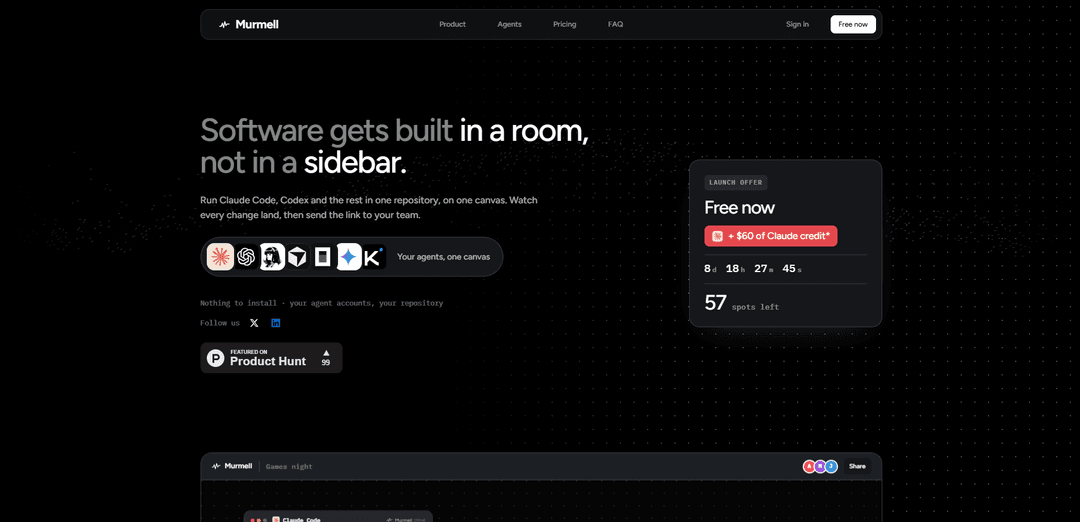
Murmell là một canvas đám mây chung dành cho các đội ngũ và các agent lập trình AI, cho phép Claude Code, Codex, Kimi, OpenCode và các công cụ khác hoạt động đồng thời trong một kho lưu trữ với khả năng cộng tác trực tiếp và bảo vệ quyền ghi ở cấp độ tệp.
https://murmell.com/?ref=producthunt&utm_source=aipure
Thông tin Sản phẩm
Đã cập nhật:Aug 8, 2026
Murmell là gì
Murmell là một môi trường phát triển cộng tác trên trình duyệt được thiết kế cho các đội ngũ sử dụng nhiều agent lập trình AI. Nó chạy các agent trên máy đám mây trong một thư mục dự án chung, cung cấp cho mỗi agent một terminal thực sự riêng biệt đồng thời cho phép đồng đội và người xem được mời quan sát cùng một không gian làm việc, hoạt động terminal, con trỏ và tiến độ theo thời gian thực. Murmell hỗ trợ các nhà cung cấp bao gồm Claude Code, Codex, Kimi và OpenCode, mà người dùng kết nối thông qua tài khoản hoặc khóa API của riêng họ. Công việc của dự án được lưu trữ trong một kho lưu trữ GitHub riêng tư, trong khi không gian làm việc đám mây có thể được hủy bỏ sau khi công việc đã được đẩy lên.
Các Tính năng Chính của Murmell
Murmell là một không gian làm việc đám mây chia sẻ trên trình duyệt để điều phối nhiều agent lập trình AI và người cộng tác trên cùng một kho lưu trữ. Nó chạy các agent dòng lệnh được hỗ trợ như Claude Code, Codex, Kimi và OpenCode trong các cửa sổ terminal riêng biệt trên máy đám mây, đồng thời cung cấp cho tất cả những người tham gia một canvas chia sẻ trực tiếp, khả năng hiển thị terminal theo thời gian thực và sự điều phối ghi ở cấp độ tệp. Các agent sẽ đăng ký giữ đường dẫn trước khi chỉnh sửa, giúp các nhóm tránh các thay đổi xung đột và giảm nhu cầu tạo các bản clone riêng biệt cũng như công việc hợp nhất vào cuối dự án.
Canvas lập trình đám mây chia sẻ: Lưu trữ dự án trên máy đám mây và cho phép nhiều người cùng xem một canvas trình duyệt trực tiếp, bao gồm cửa sổ agent, con trỏ, tên và đầu ra terminal.
Hỗ trợ đa agent: Chạy Claude Code, Codex, Kimi, OpenCode và các công cụ lập trình dòng lệnh bổ sung trong các cửa sổ terminal riêng biệt trên cùng một thư mục dự án.
Đăng ký đường dẫn tệp và bảo vệ chống xung đột: Các agent đăng ký quyền truy cập tệp hoặc đường dẫn trước khi ghi; không gian làm việc sẽ chặn các yêu cầu tranh chấp và chụp ảnh các lần ghi xung đột để các thay đổi không bị mất một cách âm thầm.
Agent điều phối tích hợp sẵn: Người dùng có thể mô tả tác vụ cho agent riêng của Murmell, agent này có thể mở các terminal và phân phối công việc trong kho lưu trữ cho nhiều agent lập trình khác nhau.
Thực thi liên tục trên đám mây: Các agent tiếp tục chạy trên máy của Murmell ngay cả khi người dùng đóng máy tính xách tay, với mức sử dụng không bị tính theo giờ hoặc số lượng cửa sổ đang mở.
Dự án liên kết với GitHub riêng tư: Mỗi dự án được liên kết với một kho lưu trữ GitHub riêng tư, cho phép công việc vẫn được lưu giữ ngay cả khi bản thân không gian làm việc đám mây đang hoạt động chỉ là tạm thời.
Các Trường hợp Sử dụng của Murmell
Phát triển tính năng song song: Một nhóm phần mềm có thể phân công các agent riêng biệt cho các thành phần UI, tích hợp API, kiểm thử và định kiểu trong khi cùng làm việc trên một kho lưu trữ với rủi ro xung đột tệp được giảm thiểu.
Lập trình cặp với AI trực tiếp: Các nhà phát triển có thể chia sẻ liên kết canvas với đồng đội hoặc các bên liên quan để họ có thể xem các agent triển khai, sửa lỗi và giải thích các thay đổi theo thời gian thực.
Phát triển qua đêm và các tác vụ chạy lâu dài: Các nhóm có thể để các agent tiếp tục thực hiện các bản build trên đám mây, tái cấu trúc mã, sửa lỗi kiểm thử hoặc các tác vụ nghiên cứu mà không cần phải mở máy tính xách tay cá nhân.
Tạo bản mẫu cho khởi nghiệp: Các nhóm sản phẩm nhỏ có thể nhanh chóng chia nhỏ công việc tạo bản mẫu giữa các agent—ví dụ: một agent xây dựng vòng lặp trò chơi, một agent khác tạo giao diện và một agent khác kết nối phần xem trước.
Hiện đại hóa cơ sở mã: Các tổ chức kỹ thuật có thể điều phối các agent để cập nhật các thư viện phụ thuộc, di chuyển các thành phần framework, cải thiện độ bao phủ kiểm thử và tái cấu trúc các module trong một không gian làm việc chung.
Cộng tác kỹ thuật từ xa: Các nhóm phân tán, đại lý hoặc người hướng dẫn lập trình có thể sử dụng một không gian làm việc trực tiếp duy nhất để xem xét tiến độ thực hiện và điều phối việc phát triển có hỗ trợ của AI mà không cần trao đổi hướng dẫn thiết lập cục bộ.
Ưu điểm
Cho phép nhiều agent AI và con người cùng làm việc trên một kho lưu trữ mà không cần phụ thuộc vào việc tạo các bản clone riêng biệt và hợp nhất sau đó.
Sử dụng việc đăng ký giữ tệp ở cấp độ tệp và chụp ảnh xung đột để giảm thiểu việc ghi đè vô tình trong quá trình làm việc song song.
Thực thi trên đám mây cho phép công việc tiếp tục độc lập với máy tính xách tay của nhà phát triển.
Hỗ trợ nhiều công cụ agent lập trình phổ biến trong khi người dùng vẫn giữ tài khoản nhà cung cấp và khóa API của riêng họ.
Nhược điểm
Đây là một sản phẩm trả phí lưu trữ trên đám mây, với các gói bắt đầu từ $39 mỗi tháng.
Người dùng phải tự mang theo và trả phí cho gói đăng ký agent AI hoặc khóa API của riêng họ; chi phí token của mô hình không được bao gồm.
Không hỗ trợ tự lưu trữ (self-hosting), điều này có thể không phù hợp với các tổ chức có yêu cầu nghiêm ngặt về hạ tầng hoặc lưu trữ dữ liệu tại chỗ.
Quy trình đăng ký đường dẫn có thể gây ra thời gian chờ khi nhiều agent cần chỉnh sửa cùng một tệp.
Cách Sử dụng Murmell
Chọn một gói dịch vụ và tạo tài khoản: Mở Murmell và đăng ký gói Solo, Pro hoặc Builder. Các gói bao gồm bảy ngày dùng thử miễn phí. Chọn Pro hoặc Builder nếu bạn cần chia sẻ canvas với những người khác.
Tạo một canvas dự án: Tạo một dự án mới trong Murmell. Murmell sẽ cấp phát một máy đám mây cô lập và một thư mục dự án chung cho canvas đó.
Kết nối tài khoản agent lập trình hoặc khóa API của bạn: Đăng nhập vào các công cụ lập trình AI bạn đã sử dụng, chẳng hạn như Claude Code, Codex, Kimi hoặc OpenCode. Murmell chạy các công cụ dòng lệnh này trên máy đám mây của nó và không bán lại token mô hình hay lưu trữ khóa của bạn.
Mở các cửa sổ terminal của agent: Khởi chạy một hoặc nhiều agent được hỗ trợ trong các cửa sổ terminal riêng của chúng trên canvas. Số lượng cửa sổ đồng thời phụ thuộc vào gói của bạn: Solo hỗ trợ hai, Pro hỗ trợ năm và Builder hỗ trợ không giới hạn cửa sổ agent.
Giao việc cho các agent: Giao cho mỗi agent một nhiệm vụ cụ thể hoặc một khu vực của kho lưu trữ. Bạn cũng có thể nói với agent tích hợp sẵn của Murmell những gì bạn muốn xây dựng; nó có thể mở các terminal và phân chia các phần của kho lưu trữ cho các agent.
Để các agent làm việc trong thư mục chung: Tất cả các agent đều hoạt động trên cùng một thư mục dự án thay vì các bản sao riêng biệt. Theo dõi đầu ra terminal và hoạt động tệp của chúng trực tiếp trên trình duyệt.
Sử dụng tính năng chiếm quyền tệp để tránh xung đột: Trước khi một agent ghi vào một đường dẫn, Murmell yêu cầu nó phải chiếm quyền (claim) đường dẫn đó. Chỉ một agent có thể giữ một đường dẫn tệp tại một thời điểm; các agent khác phải chờ cho đến khi quyền truy cập được giải phóng. Nếu xảy ra xung đột khi ghi, Murmell sẽ chụp ảnh tức thời (snapshot) bản ghi hiện có để không bị mất công việc.
Mời người cộng tác hoặc người xem: Gửi liên kết canvas cho đồng đội hoặc các bên liên quan. Những người có liên kết có thể theo dõi canvas trực tiếp mà không cần tài khoản trong khi nó đang chạy, bao gồm con trỏ, tên người tham gia, đầu ra terminal và hoạt động của agent.
Cộng tác theo thời gian thực: Những người cộng tác có thể tham gia vào cùng một canvas đồng thời. Mỗi người có thể điều khiển các agent riêng của mình trong khi mọi người vẫn giữ đồng bộ mà không cần tải lại hoặc phát lại hoạt động.
Giữ cho các agent chạy trên đám mây: Để các nhiệm vụ chạy dài của agent tiếp tục hoạt động ngay cả khi bạn đóng máy tính xách tay. Murmell không tính giờ sử dụng; các agent tiếp tục chạy trên máy đám mây.
Lấy công việc hoàn thành từ GitHub: Murmell tạo một kho lưu trữ GitHub riêng tư cho dự án và đẩy công việc lên trước khi không gian làm việc dùng một lần của nó bị gỡ bỏ. Sử dụng kho lưu trữ đó làm nguồn lưu trữ bền vững cho mã nguồn hoàn chỉnh của bạn.
Video Murmell
Bài viết phổ biến

Vosko AI: Bản địa hóa và Lồng tiếng Video cho Khán giả Toàn cầu
Oct 15, 2026

Atoms: Nền tảng AI đa tác nhân biến ý tưởng thành sản phẩm sẵn sàng ra mắt
May 22, 2026

Nano Banana SBTI: Nó là gì, Cách thức hoạt động và Cách sử dụng nó vào năm 2026
Apr 15, 2026

Đánh giá Atoms — Trình tạo sản phẩm AI định nghĩa lại việc tạo nội dung số vào năm 2026
Apr 10, 2026
Công cụ AI Mới nhất Tương tự Murmell

invoices.dev
invoices.dev là một nền tảng lập hóa đơn tự động tạo hóa đơn trực tiếp từ các cam kết Git của các nhà phát triển, với khả năng tích hợp cho các dịch vụ GitHub, Slack, Linear và Google.
Monyble
Monyble là một nền tảng AI không mã cho phép người dùng khởi động các công cụ và dự án AI trong vòng 60 giây mà không cần chuyên môn kỹ thuật.

Devozy.ai
Devozy.ai là một nền tảng tự phục vụ cho nhà phát triển được hỗ trợ bởi AI, kết hợp quản lý dự án Agile, DevSecOps, quản lý hạ tầng đa đám mây, và quản lý dịch vụ CNTT thành một giải pháp thống nhất để tăng tốc độ cung cấp phần mềm.
Mediatr
MediatR là một thư viện .NET mã nguồn mở phổ biến triển khai mẫu Mediator để cung cấp xử lý yêu cầu/phản hồi đơn giản và linh hoạt, xử lý lệnh và thông báo sự kiện trong khi thúc đẩy sự kết nối lỏng lẻo giữa các thành phần ứng dụng.
Công cụ AI Phổ biến Giống Murmell
Launch
Launch là một nền tảng được hỗ trợ bởi AI cho phép người dùng xây dựng các ứng dụng full-stack ngay lập tức, đồng thời cung cấp các công cụ toàn diện để ra mắt sản phẩm, chương trình khởi nghiệp và thu hút khách hàng.

GitHub Copilot Chat
GitHub Copilot Chat là một trợ lý lập trình được hỗ trợ bởi AI cung cấp các tương tác bằng ngôn ngữ tự nhiên, các gợi ý mã theo thời gian thực, và hỗ trợ theo ngữ cảnh trực tiếp trong các IDE được hỗ trợ và GitHub.com.
Rememberall
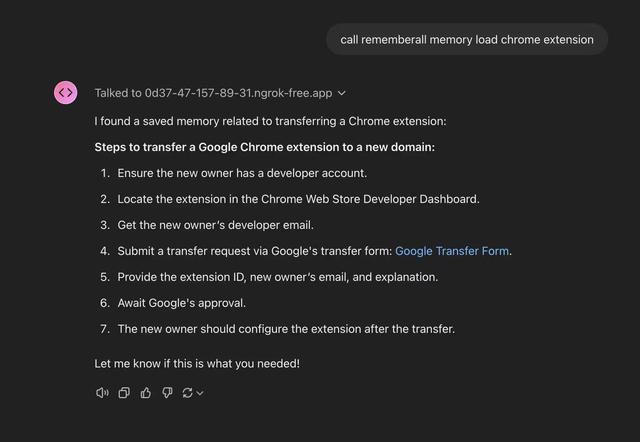
Rememberall là một giải pháp bộ nhớ dài hạn an toàn, mã nguồn mở cho phép các ứng dụng AI và các mô hình GPT duy trì bộ nhớ liên tục qua các cuộc trò chuyện thông qua khả năng tìm kiếm ngữ nghĩa và lưu trữ vector.
Upsonic
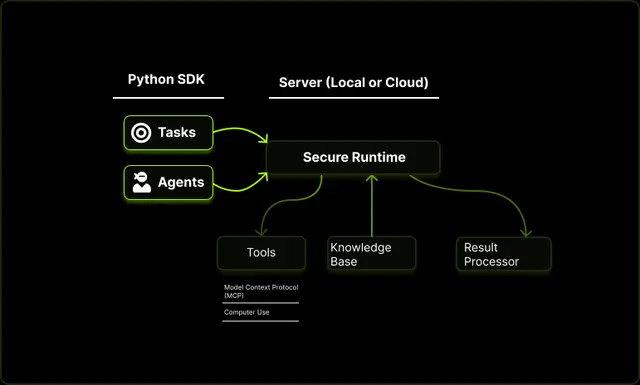
Upsonic là một khung công tác tác nhân AI tập trung vào độ tin cậy với kiến trúc máy khách-máy chủ được docker hóa, cho phép các quy trình làm việc của tác nhân đáng tin cậy thông qua các tính năng nâng cao như lớp xác minh, kiến trúc tam giác và tích hợp Giao thức ngữ cảnh mô hình (MCP).