
Marqly
WebsiteAppBrowser ExtensionFreemium
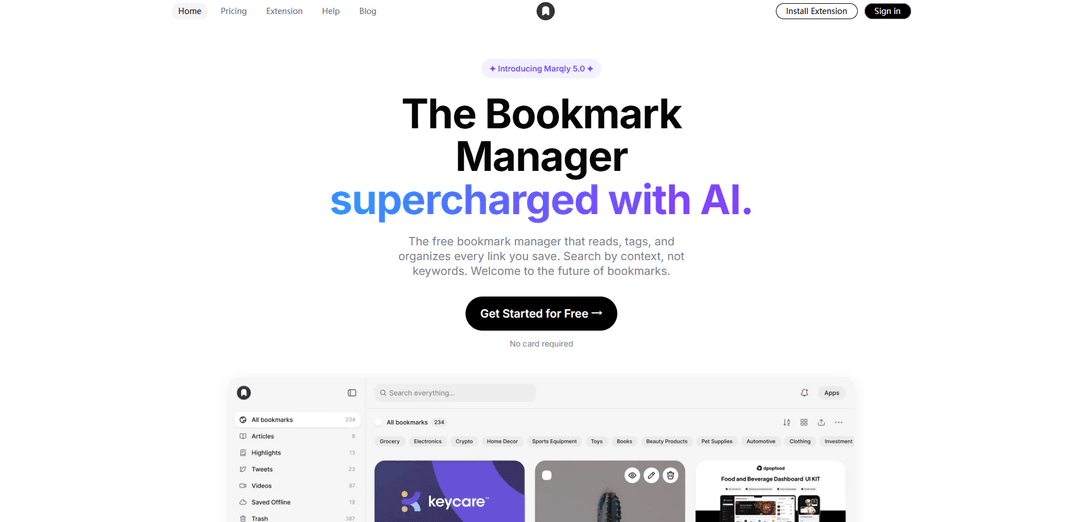
Marqly is a free AI-powered bookmark manager that reads what you save to auto-tag and organize links, enables instant context-based search, and adds tools like reader view, AI summaries, offline access, link health checks, and a tab saver for Chrome/Edge/Firefox (with cross-platform support).
https://www.marqly.com/?ref=producthunt
Product Information
Updated:Jun 8, 2026
What is Marqly
Marqly is a modern, AI-first bookmark manager built for people who save lots of links and don’t want them to disappear into messy folders. Instead of acting like a basic bookmark list, Marqly “understands” your saved pages by analyzing their content and organizing them automatically with smart tags and searchable context. It offers a calm, fast interface across devices, with browser extensions to save links quickly and keep your library accessible whenever you need it.
Key Features of Marqly
Marqly is an AI-powered bookmark and tab manager available as a browser extension (Chrome, Firefox, Edge, Safari) with desktop/mobile access. It saves links in one click, automatically tags and organizes them with AI, and lets you find anything quickly via instant, context-aware search (by text, tag, date, or URL). Beyond basic bookmarking, it supports boards/collections, highlights and saved snippets, reader view with AI summaries, offline access, and link health checks. It also includes a tab-saver feature that collapses open tabs to reduce memory usage (up to ~95%), helping users browse faster and stay organized across devices.
AI auto-organize & smart tagging: Automatically analyzes saved links and applies accurate tags/organization so bookmarks land where they belong with less manual sorting.
Instant, context-aware search: Find bookmarks quickly using text/context, tags, dates, URLs, and filters—useful when you remember the topic but not the exact link.
Boards, nested collections & custom organization: Organize links into boards/collections (including nested structures) and customize how saved items are grouped and viewed.
Highlights & saved snippets: Capture and store key text from webpages alongside bookmarks, creating a quick-reference library for research and notes.
Reader view & AI summaries: Review content in a distraction-free reader mode and get summaries to regain context without reopening the original page.
Tab Saver (OneTab-style) memory reduction: Collapse many open tabs into a list to restore resources and reduce memory/CPU usage (claimed up to ~95%), then restore later.
Use Cases of Marqly
Academic & professional research library: Students, writers, and analysts can save sources, highlight key passages, and retrieve them later by topic via tags and search.
Productivity for multi-project knowledge workers: Consultants, PMs, and operators can separate workstreams into boards, quickly locate references, and keep project context organized.
Content curation & publishing workflows: Marketers and creators can collect inspiration, competitor pages, and campaign references, then search and reuse them efficiently.
Engineering/IT troubleshooting & documentation: Developers can save docs, Stack Overflow threads, runbooks, and snippets, and later find them by tag/context instead of folders.
Browser performance & tab hygiene: Anyone who keeps many tabs open can collapse sessions to reduce memory usage and restore sets of tabs when needed.
Cross-device personal knowledge management: Save on one device (extension/mobile) and access later elsewhere, keeping a consistent, searchable archive of web finds.
Pros
AI tagging/auto-organization reduces manual bookmark maintenance
Fast, flexible search (context, tags, date, URL) improves retrieval
Tab Saver can significantly reduce resource usage for heavy tab users
Supports highlights/snippets plus reader view and summaries for better recall
Cons
Free plan is limited (e.g., 50 bookmarks) and advanced AI/unlimited usage requires Pro
Some third-party descriptions/reviews appear inconsistent about scope (e.g., collaboration features), which may confuse evaluators
As with any cloud-synced tool, users may need to validate privacy/security settings for their specific needs
How to Use Marqly
1) Create your Marqly account: Go to https://app.marqly.com/ and sign up (the official site notes you can get started for free with no card required).
2) Install the Marqly browser extension: From Marqly’s site, install the extension for your browser (Chrome/Edge/Firefox; Safari is also listed as supported). This enables one-click saving while you browse.
3) Save your first bookmark (one-click save): Open any webpage you want to keep, then click the Marqly extension button to save the link to your Marqly library.
4) Let AI auto-organize your saved links: After saving, Marqly automatically reads the page and applies AI-generated tags so links “land where they belong” without manual sorting.
5) Add or edit details on a saved bookmark: Open Marqly and select a saved link to customize it—edit the title/notes and adjust tags as needed to match your preferred organization.
6) Organize with boards/collections (including nested structure): Create boards (and nested collections, if you want hierarchy) and move bookmarks into them to keep projects, topics, or research separated.
7) Save highlighted text snippets from webpages: When reading a page, highlight important text and use Marqly’s save/highlight feature to store the snippet alongside your bookmarks for later reference.
8) Use Instant Search to find anything fast: Use Marqly’s search to retrieve items by text, tag, date, or URL. This is designed to help you search by context, not only by exact keywords.
9) Filter using tags: Click or search for tags to narrow your library to a topic or project. Add more tags to improve future filtering and discovery.
10) Use Reader View (and AI summaries when available): Open a saved link in Marqly’s Reader View for distraction-free reading. Use AI summaries to quickly get the context without fully reopening and scanning the page.
11) Use Tab Saver to reduce memory usage: If you have many tabs open, use Marqly’s Tab Saver to collapse open tabs into a single list (Marqly claims up to 95% memory reduction), then restore tabs later when needed.
12) Access bookmarks across devices (desktop & mobile): Open Marqly on desktop and mobile to access the same saved library via sync, so your bookmarks and notes are available anywhere.
13) Use Offline Mode when you don’t have a connection: When offline, open Marqly to continue accessing your saved content using Offline Mode.
14) Monitor Link Health for broken or stale links: Use Link Health to identify saved pages that no longer work or have gone stale, then update or remove them to keep your library clean.
15) Share a folder or individual bookmark (optional collaboration): To share, open the folder or bookmark you want, click “Share,” then choose how to share it (e.g., email or social). Sharing is optional and only done if you choose to.
16) Periodically review and clean up your library: Every few months, delete outdated bookmarks and refine tags/boards so search stays fast and your saved library remains useful.
Marqly FAQs
Marqly is an AI-powered bookmark manager that reads, tags, and organizes the links you save, helping you find bookmarks by context rather than only keywords.
Popular Articles

Vosko AI: Localize and Dub Videos for Global Audiences
Oct 15, 2026

Atoms: A Multi-Agent AI Platform That Transforms Ideas into Launch-Ready Products
Oct 13, 2026

Nano Banana SBTI: What It Is, How It Works, and How to Use It in 2026
Apr 15, 2026

Atoms Review — The AI Product Builder Redefining Digital Creation in 2026
Apr 10, 2026