
Magic
Magic (formerly Openmagic) is an AI-powered platform that turns product photos, logos, and images into professional, brand-safe videos and images using one-click templates—no filming or editing skills required.
https://app.omagic.ai/?ref=producthunt
Product Information
Updated:May 18, 2026
What is Magic
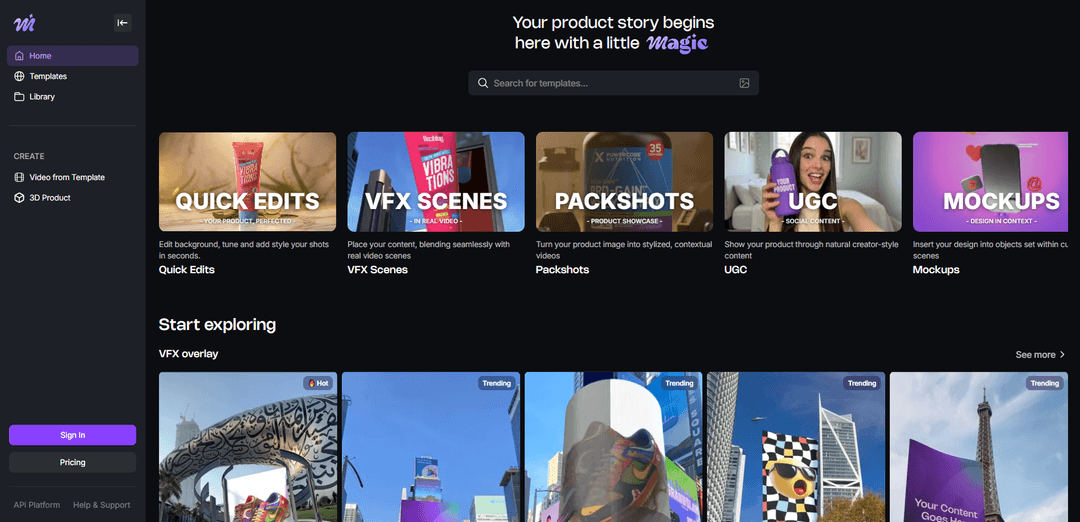
Magic is a creative content-generation platform designed to help brands, marketers, and creators produce high-quality product visuals at scale. Instead of organizing shoots or learning complex 3D/VFX tools, users can upload existing assets (like product photos or logos) and generate polished videos and images in seconds. The platform offers a large library of templates across common commercial use cases—such as packshots, UGC-style social content, mockups, quick edits, and VFX overlays—making it suited for channels like Shopify, Amazon listings, Instagram Reels, and TikTok.
Key Features of Magic
Magic (formerly Openmagic/Omagic) is an AI-powered platform for creating professional product videos and images from existing assets—no filming or advanced editing skills required. Users pick ready-made templates (e.g., VFX overlays, packshots, UGC-style videos, mockups, quick edits), upload product photos/logos/designs, and generate brand-safe visuals fast for channels like Shopify, Amazon, Instagram Reels, and TikTok. It also supports scaling production via batch processing, webhooks, SDKs, and an API (Business plan), with options to customize look and feel (e.g., lighting, textures, camera/animation parameters) and download/share outputs across platforms.
Template-based generation: Choose from a large library of templates across themes like Quick Edits, VFX Scenes, Packshots, UGC videos, and Mockups to generate consistent, on-brand creative quickly.
VFX overlays in real footage: Place products or designs into real-world video scenes (e.g., billboard/screen scenes like Times Square) with seamless blending for attention-grabbing ads.
Packshot & product showcase creation: Turn a single product image into stylized, contextual visuals (e.g., miniature worlds, spa/water/beach scenes) for premium-looking product storytelling.
Quick edits for images: Perform fast enhancements like background editing, tuning, and styling to polish product shots for catalogs and ads.
Commercial-ready outputs & ownership: Designed for marketing use; the platform indicates created 3D content belongs to the user and can be used commercially (with licensing tiers).
Scale via API and automation: Business plan includes API access plus workflow features like webhooks, batch processing, and SDK support to integrate content generation into production pipelines.
Use Cases of Magic
E-commerce product marketing: Generate product videos and images for Shopify/Amazon listings, PDP galleries, and paid ads without reshoots or studio production.
Social short-form content (Reels/TikTok): Create viral-ready UGC-style clips and stylized packshots optimized for fast iteration and frequent posting.
Brand campaigns & OOH-style mock ads: Produce billboard/screen VFX scenes (e.g., Times Square-style placements) for campaign teasers, launches, and brand moments.
Design mockups for creatives and agencies: Insert logos or designs into curated contextual scenes to pitch concepts, visualize branding, or deliver client-ready mockups.
Marketing ops at scale: Use batch processing and API/webhooks to generate large volumes of creative variations for multi-SKU catalogs and A/B testing.
Pros
Fast creation from existing photos—no filming or complex editing required
Template library supports multiple content types (VFX, packshots, UGC, mockups, quick edits)
Automation options (API, batch, webhooks, SDKs) enable scalable production workflows
Designed for consistent, brand-safe outputs across channels
Cons
Free plan can be restrictive (limited credits/usage)
Advanced capabilities like API access require a higher-tier Business subscription
Quality and realism depend on input image quality and template fit for the product
How to Use Magic
1. Open Magic: Go to https://app.omagic.ai/ to access Magic (formerly Openmagic).
2. Sign in to enable generations: Sign in to your Magic account to unlock free generations/credits and start creating.
3. Choose what you want to create (theme/category): From the homepage or Templates page, pick a category that matches your goal: Quick Edits (background/style tweaks), VFX Scenes (blend into real video scenes), Packshots (stylized product showcases), UGC Videos (creator-style social content), or Mockups (place designs into curated scenes).
4. Browse and select a template: Click into the Templates library and choose a specific template (e.g., Times Square screen, Dubai Museum, Miniature World). Templates indicate whether they accept image and/or video inputs.
5. Upload your source asset: Upload the photo, logo, design, or product image you want to transform. Use high-quality images for best results.
6. Customize the output (if available): Adjust settings offered by the template such as style presets and visual parameters (e.g., lighting, textures, animation parameters, camera angles, and material properties) to match your desired look.
7. Generate with AI: Run the generation and let Magic transform your uploaded content into a professional image, CGI look, or 3D-style animation/video in seconds.
8. Review and iterate: If the result isn’t what you want, try a different template or tweak customization options and generate again for a better fit.
9. Download your final content: Once satisfied, download the generated image/video. Output options depend on your plan (e.g., free plan may be 720p and watermarked; paid plans can offer Full HD and no watermark).
10. Share and use commercially (plan-dependent): Share your content on platforms like Shopify, Amazon, Instagram Reels, TikTok, or ads. Magic indicates commercial-ready usage on eligible plans and states generated content can be used for commercial purposes under its licensing tiers.
Magic FAQs
Magic is an AI-powered platform for creating professional product videos and images with 3D and special effects. You upload your content, choose a template, and Magic generates the video for you—no filming required.
Magic Video
Popular Articles

Atoms: A Multi-Agent AI Platform That Transforms Ideas into Launch-Ready Products
May 22, 2026

Nano Banana SBTI: What It Is, How It Works, and How to Use It in 2026
Apr 15, 2026

Atoms Review — The AI Product Builder Redefining Digital Creation in 2026
Apr 10, 2026

Kilo Claw: How to Deploy and Use a True "Do‑It‑For‑You" AI Agent(2026 Update)
Apr 3, 2026
Latest AI Tools Similar to Magic

Loud Fame
Loud Fame is an AI-powered video transformation tool that allows users to convert regular videos into anime-style animations and create AI-generated celebrity talking videos.

BizBoom.ai
BizBoom.ai is an AI-powered platform that automatically generates professional product videos from product links and images with 95% less cost.

EzVideos
EzVideos is an all-in-one video creation tool that helps users generate viral videos for social media platforms like Instagram, TikTok, and YouTube with automated editing features and built-in resources.

Illuminix
Illuminix is an AI-powered platform that empowers businesses with autonomous hyper-experts and specialized tools for automated business processes, data management, and video content creation.
Popular AI Tools Like Magic

HunyuanVideo-I2V
HunyuanVideo-I2V is an open-source AI framework developed by Tencent that transforms static images into high-quality, dynamic videos with customizable motion effects and exceptional visual consistency.

Google Veo 2
Veo 2 is Google DeepMind's state-of-the-art AI video generation model that can create high-quality videos up to 4K resolution with realistic motion, extensive camera controls, and improved physics simulation from text prompts.

Vibing
Vibing is an AI-powered dating app that helps users share authentic moments through video stories and make genuine connections based on personality matching and interactive features.

Edits, an Instagram app
Edits is Instagram's free video creation app that provides creators with professional editing tools, AI features, and analytics capabilities to create high-quality videos directly from their phones.