
PassportReader
WebsiteFree Trial
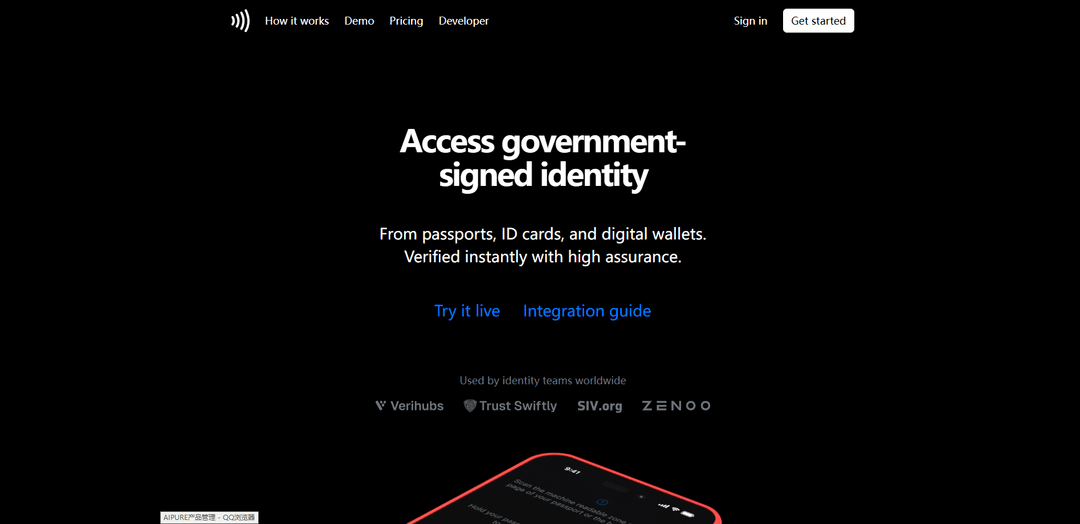
PassportReader is a high-assurance identity verification platform that reads and verifies the cryptographically-signed biometric chips embedded in passports, ID cards, and digital wallets to reduce fraud and simplify onboarding.
https://passportreader.app/?ref=producthunt
Product Information
Updated:Apr 10, 2026
What is PassportReader
PassportReader, developed by Iris Development AB, is an identity verification solution that enables businesses and individuals to authenticate government-issued identity documents through NFC technology. The platform works by scanning the machine-readable zone (MRZ) of a passport or ID card using a device's camera, then reading the embedded biometric chip via NFC to extract and verify cryptographically-signed data. Available as both standalone consumer apps for iOS and Android, as well as SDK integrations for businesses, PassportReader operates completely offline without requiring network connectivity, ensuring privacy and security. The technology supports billions of electronic passports and ID cards globally that comply with ICAO standards, making it a comprehensive solution for identity verification across borders and industries.
Key Features of PassportReader
PassportReader is a high-assurance identity verification solution that enables instant and secure verification of government-issued identity documents through NFC chip reading, OCR scanning, and digital wallet credentials. The platform reads biometric chips embedded in passports and ID cards that are digitally signed by issuing governments and protected against tampering, cloning, and replay attacks. It offers seamless integration through simple APIs, works offline without network connection, supports multiple document types compliant with ICAO 9303 specifications, and can be enhanced with face matching and liveness detection for additional security layers. Available as both consumer-facing apps and SDK integrations for businesses, it serves various industries from fintech to government services with pricing starting at $0.10 per verification.
NFC Chip Reading with Cryptographic Verification: Reads the secure biometric chip embedded in passports and ID cards using NFC technology, with each chip digitally signed by the issuing government and protected against tampering, cloning, and replay attacks for high-assurance identity verification.
Multi-Method Document Scanning: Supports three verification methods in one unified flow: camera-based OCR scanning of the machine readable zone (MRZ), NFC chip reading, and digital wallet credentials, providing flexible options for instant identity verification.
Offline Capability: Functions without network connection, allowing passport and ID verification to be performed completely offline while keeping data only in memory and never uploading to remote servers for enhanced privacy and security.
Enhanced Biometric Authentication: Offers optional face matching and liveness detection as a second factor, combining cryptographic proof with real-time biometric verification for even stronger assurance when needed.
Simple API Integration: Provides easy integration with just a few lines of code through RESTful APIs, supporting both web and native mobile platforms (iOS and Android) with comprehensive SDKs for seamless embedding into existing applications.
Global Document Support: Verifies billions of people worldwide by reading multiple document types compliant with ICAO 9303 specifications including passports, visas, ID cards, and driver licenses, with customization options for non-ICAO documents.
Use Cases of PassportReader
Fintech & Banking Remote Onboarding: Enable instant account opening with high conversion rates and low fraud by verifying customer identity remotely through passport or ID card scanning, eliminating the need for in-person verification while maintaining regulatory compliance.
Government Services & Benefits Access: Provide secure access to government services and benefits based on verified true identity, simplifying citizen authentication for online portals while reducing identity fraud and streamlining administrative processes.
Secure Workforce Management: Streamline employee onboarding, account recovery, and privilege changes by verifying employee identity with government-issued credentials, ensuring only authorized personnel gain access to corporate systems and facilities.
Travel & Hospitality Self Check-in: Enable remote and self check-in for hotels, airlines, and rental services without physical document handling, improving customer experience while maintaining security and compliance with travel regulations.
Marketplace User Verification: Build trust between users on peer-to-peer marketplaces and platforms by verifying account holders with government-issued IDs, reducing fraudulent accounts and increasing confidence in transactions.
Age-Gated Commerce Compliance: Verify customer age for age-restricted products and services without collecting or storing unnecessary personal data, ensuring compliance with regulations while protecting user privacy.
Pros
High security with government-signed cryptographic verification that protects against tampering, cloning, and replay attacks
Privacy-focused design with offline capability and no data storage on remote servers, keeping information only in memory
Quick and easy integration with simple APIs and comprehensive SDKs for multiple platforms, taking just minutes to get started
Affordable pricing starting at $0.10 per verification with 250 free verifications for testing and development
Cons
Requires NFC-enabled devices for chip reading functionality, limiting compatibility with older smartphones
Some users express concerns about trusting third-party apps with sensitive identity documents despite privacy claims
May not work with all passport types as some users report compatibility issues with certain countries' documents
Requires manual input of passport details (number, date of birth, expiry date) in some implementations, adding friction to the user experience
How to Use PassportReader
1: Create a free account with your email and password at passportreader.app
2: Generate API credentials (PUBLIC_KEY and SECRET) from your account dashboard. Save the secret securely as it's only shown once
3: Create a session by making a POST request to the API endpoint: curl http://localhost:4000/api/v1/session.create -u PUBLIC_KEY:SECRET
4: Receive the session response containing an ID and token (e.g., {"id": 5102525283827712, "token": "eyJzZXNzaW9uX2lkIjogNTEwMjUyNTI4MzgyNzcxMn0"})
5: Redirect the user to the session URL with the token: http://localhost:4000/open?token=eyJzZXNzaW9uX2lkIjogNTEwMjUyNTI4MzgyNzcxMn0
6: User scans the Machine Readable Zone (MRZ) on their passport data page or ID card back using their device camera
7: User holds their passport or ID card against their device to read the biometric chip via NFC
8: Wait for the session to complete. The session state will change from CREATED → INITIATED → COMPLETED → APPROVED
9: Retrieve the passport/ID data by making a GET request: curl http://localhost:4000/api/v1/session.get -u PUBLIC_KEY:SECRET -d '{"id": 5102525283827712}'
10: Receive and process the verified data including document_number, expiry_date, issuer, given_names, surname, nationality, date_of_birth, gender, and other fields
11: Optionally add face verification and liveness detection as a second factor for enhanced security
12: For native mobile integration: Download the SDK (Iris library for Android or Iris framework for iOS) and embed it into your app following the integration guide
PassportReader FAQs
PassportReader works in three simple steps: 1) Use the camera to scan the machine readable zone on the data page of your passport or the back of your ID, 2) Hold the passport or ID against your device to read the biometric chip using NFC, 3) The chip information is displayed in the app. Each chip is digitally signed by the issuing government and protected against tampering, cloning, and replay.
Popular Articles

Atoms: A Multi-Agent AI Platform That Transforms Ideas into Launch-Ready Products
May 22, 2026

Nano Banana SBTI: What It Is, How It Works, and How to Use It in 2026
Apr 15, 2026

Atoms Review — The AI Product Builder Redefining Digital Creation in 2026
Apr 10, 2026

Kilo Claw: How to Deploy and Use a True "Do‑It‑For‑You" AI Agent(2026 Update)
Apr 3, 2026