
Happy Horse
Happy Horse is an all-in-one AI video platform for generating and editing cinematic videos—positioned around fast 1080p text/image-to-video creation and, in the HappyHorse-1.0 model narrative, native joint audio-video generation for synchronized sound and visuals.
https://www.happyhorse.com/?ref=producthunt
Product Information
Updated:May 18, 2026
What is Happy Horse
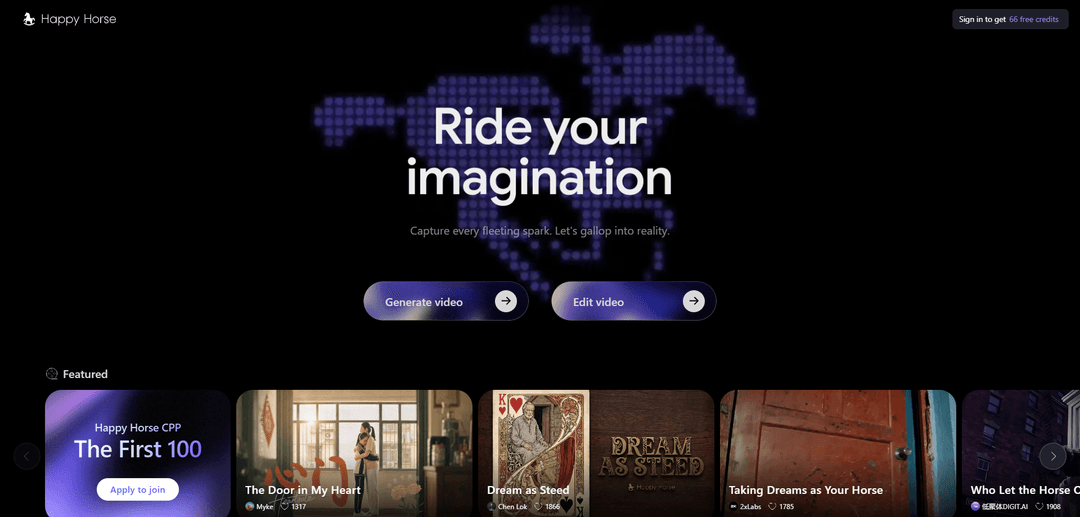
Happy Horse (happyhorse.com) is a web-based AI video creation platform that lets users generate video and edit video from a single interface, marketed as a simple, all-in-one workflow for turning ideas into polished motion content. Public discussion around “HappyHorse-1.0” also describes it as a state-of-the-art video generation model that surfaced on the Artificial Analysis Video Arena leaderboard, drawing attention for strong text-to-video and image-to-video results and for claims of producing both video and audio together rather than adding sound afterward. The product is offered with credits-based usage, including a new-user free credit bundle and periodic discounts on generation features.
Key Features of Happy Horse
Happy Horse (HappyHorse 1.0) is an all-in-one, browser-based AI video platform for generating and editing short videos from text prompts or reference images. It emphasizes cinematic aesthetics (lighting, color grading, realism), supports text-to-video and image-to-video workflows, and is commonly described as capable of HD output (often cited as 1080p) with fast generation and options for multi-shot storytelling. Access is positioned as easy to try (e.g., free credits/promotions), with an API mentioned in community/marketing materials and workflows that can fit marketing, social, and creative production.
Text-to-video generation: Turn a natural-language prompt (scene, motion, lighting, camera) into a short cinematic video draft, optimized for fast iteration and polished visuals.
Image-to-video animation: Upload an image or use reference images to animate a subject and guide style/identity, useful for consistent characters, products, or branded looks.
Cinematic HD output & aesthetics: Marketed around film-grade lighting, rich color, realistic textures, and HD output (frequently referenced as 1080p) to create premium-looking clips.
Multi-shot storytelling & transitions: Designed for short sequences that feel like multiple shots with smoother continuity and transitions rather than a single static camera moment.
In-browser workflow (mobile-friendly): Runs in a web browser with an adaptive layout for smartphones, lowering setup friction (no app install) for quick creation on the go.
Video editing via natural-language instructions: Positioned as supporting edit workflows (not only generation), enabling users to refine or transform videos with instruction-style prompts.
Use Cases of Happy Horse
Performance marketing & ads: Generate rapid variations of short promo videos for paid campaigns, product launches, and social ads, using consistent style and fast iteration.
Ecommerce product visuals: Animate product images into short showcase clips (angles, highlights, lifestyle scenes) for storefronts, listings, and retargeting creatives.
SaaS explainers & onboarding: Create simple feature explainers and onboarding snippets without a full video production pipeline, updating visuals as the product changes.
Social content creation: Produce cinematic short-form clips for TikTok/Reels/Shorts with prompt-led storytelling, stylized looks, and rapid experimentation.
Creative prototyping (film/story ideas): Storyboard and prototype scenes, trailers, or concept sequences quickly from text or reference images before committing to full production.
Pros
Low-friction access: browser-based workflow and promotions/free credits make it easy to try quickly.
Strong emphasis on cinematic aesthetics: lighting, realism, and polished look are core positioning.
Supports both generation and editing workflows, enabling iterative refinement rather than one-off clips.
Cons
Conflicting/unclear public claims across sources (e.g., open-source availability, exact specs, and access paths) can make capabilities hard to verify.
Pricing/credit systems and resolution limits may vary by plan or promotion, which can affect cost predictability for teams.
As with many AI video tools, outputs may require iteration and prompt tuning to reliably match a specific brand or storyboard.
How to Use Happy Horse
1. Open Happy Horse in your browser: Go to https://www.happyhorse.com/ (works in major desktop and mobile browsers; no download required).
2. Sign up / sign in to get starter credits: Use the site’s Sign in / Join flow. New users are offered free credits (the page advertises 66 free credits for first-time sign-up).
3. Choose your workflow: Generate video or Edit video: From the homepage/workspace, pick “Generate video” to create from a prompt (and optionally images), or “Edit video” to modify an existing clip using the editor.
4. (Generate) Pick Text-to-Video or Image-to-Video: If starting from scratch, enter a written prompt; if animating a still, upload an image to turn it into motion. Some workflows also allow reference images to guide character/product look.
5. Write a strong prompt (scene + motion + lighting + camera): Describe the subject and setting, then specify motion (what moves and how), lighting (e.g., golden hour, neon, softbox), and camera behavior (e.g., slow dolly-in, handheld, crane, wide shot).
6. Set generation options (as available): Choose parameters shown in the UI such as aspect ratio, duration, resolution/quality (sources mention 480p/720p/1080p options depending on plan), and audio settings if offered.
7. Generate the video: Click the Generate button and wait for processing. Sources describe fast generation (often under a minute, with some claims of sub-10–40 seconds depending on settings/infrastructure).
8. Preview the result (large + sound): Open the generated clip to review it at full size; the gallery/preview experience supports watching with sound where audio is included.
9. Iterate for better results: Refine your prompt and options: adjust motion verbs, camera moves, lighting, and add/replace reference images to improve identity consistency and style continuity.
10. (Edit) Modify an existing video: Switch to “Edit video,” upload/select a clip, then apply edits using the editor workflow (sources mention natural-language editing capabilities).
11. Download and save your MP4: When satisfied, download the output video file (sources describe downloadable MP4 output).
12. Confirm usage rights before publishing commercially: If you plan to monetize or run ads, review the platform’s current Terms/plan details; sources indicate commercial rights may be tied to premium subscriptions and depend on your rights to any referenced materials (logos, faces, music, etc.).
Happy Horse FAQs
HappyHorse is an all-in-one AI video platform that lets users generate and edit AI videos online. The official site describes it as a “Simple, All-in-One AI Video Platform” with video generation and editing features.
Happy Horse Video
Popular Articles

Atoms: A Multi-Agent AI Platform That Transforms Ideas into Launch-Ready Products
May 22, 2026

Nano Banana SBTI: What It Is, How It Works, and How to Use It in 2026
Apr 15, 2026

Atoms Review — The AI Product Builder Redefining Digital Creation in 2026
Apr 10, 2026

Kilo Claw: How to Deploy and Use a True "Do‑It‑For‑You" AI Agent(2026 Update)
Apr 3, 2026
Latest AI Tools Similar to Happy Horse

Loud Fame
Loud Fame is an AI-powered video transformation tool that allows users to convert regular videos into anime-style animations and create AI-generated celebrity talking videos.

BizBoom.ai
BizBoom.ai is an AI-powered platform that automatically generates professional product videos from product links and images with 95% less cost.

EzVideos
EzVideos is an all-in-one video creation tool that helps users generate viral videos for social media platforms like Instagram, TikTok, and YouTube with automated editing features and built-in resources.

Illuminix
Illuminix is an AI-powered platform that empowers businesses with autonomous hyper-experts and specialized tools for automated business processes, data management, and video content creation.
Popular AI Tools Like Happy Horse

HunyuanVideo-I2V
HunyuanVideo-I2V is an open-source AI framework developed by Tencent that transforms static images into high-quality, dynamic videos with customizable motion effects and exceptional visual consistency.

Google Veo 2
Veo 2 is Google DeepMind's state-of-the-art AI video generation model that can create high-quality videos up to 4K resolution with realistic motion, extensive camera controls, and improved physics simulation from text prompts.

Vibing
Vibing is an AI-powered dating app that helps users share authentic moments through video stories and make genuine connections based on personality matching and interactive features.

Edits, an Instagram app
Edits is Instagram's free video creation app that provides creators with professional editing tools, AI features, and analytics capabilities to create high-quality videos directly from their phones.