Flyne AI
Flyne AI is a free, all-in-one AI creation platform that turns text and images into high-quality images and videos using multiple advanced models, plus a suite of editing and utility tools.
https://flyne.ai/?utm_source=aipure
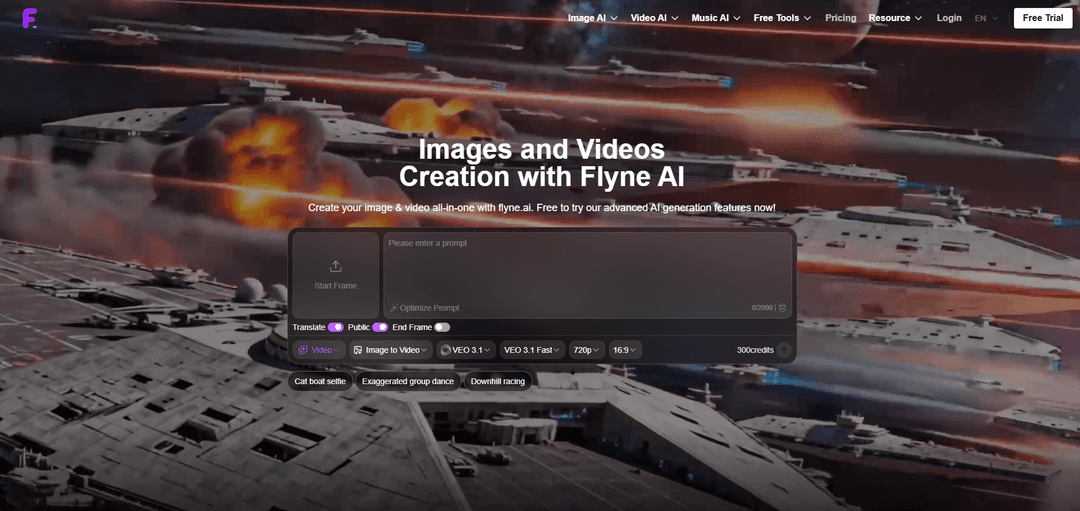
Product Information
Updated:Apr 29, 2026
What is Flyne AI
Flyne AI (flyne.ai) is an AI-powered platform for generating and editing visual content—primarily images and videos—through a single web interface. It provides a broad set of creation modes such as text-to-image, image-to-image, text-to-video, and image-to-video, alongside specialized tools like avatars, headshots, virtual try-on, background changing/removal, object removal, photo restoration, upscaling, and poster generation. The platform positions itself as “free to try” and supports a credit-based system with pricing tiers and optional one-time credit purchases, typically requiring login/registration to access and manage usage.
Key Features of Flyne AI
Flyne AI is an all-in-one, credit-based platform for generating and editing images and videos from text or existing media, offering a broad catalog of AI generators (text-to-image, image-to-image, text-to-video, image-to-video, video-to-video) plus many specialized tools like avatars, headshots, virtual try-on, product photography, background removal, upscaling, and prompt assistance. It aggregates multiple advanced models (e.g., Seedream series, GPT Image 2, Nano Banana, GLM Image, and video models like Google Veo and Kling) into a single interface with smart prompt support, stability, and high-quality outputs, with free trials and optional paid plans for faster queues, more credits, and commercial usage options.
All-in-one image + video generation: Supports text-to-image, image-to-image, text-to-video, image-to-video, and video-to-video workflows in one platform, enabling end-to-end creation from ideation to final media.
Wide selection of advanced AI models: Provides access to multiple image and video models (e.g., Seedream 4.x/5.0, GPT Image 2, Nano Banana, GLM Image; and video models like Google Veo and Kling), letting users pick the best engine for realism, consistency, or speed.
Specialized creation tools and effects: Includes purpose-built generators such as AI avatars, headshots, photo-to-cartoon, Ghibli-style, action figure/Barbie box/plush toy styles, plus themed video generators (e.g., product-to-video, talking avatar, consistent character video).
Image editing and enhancement utilities: Offers practical tools like background removal, upscaling, object removal, colorization, old photo restoration, and background changing to refine assets for publishing and marketing.
Smart prompt assistance and workflow helpers: Provides prompt optimization and utilities like image-to-prompt extraction and image description to speed iteration and improve output quality with less trial-and-error.
Credit-based pricing with free trial and premium options: Uses credits per generation/model (cost varies by model and task), with free trial access and paid plans for more credits, faster queues, extended history, private generations, and commercial rights.
Use Cases of Flyne AI
Marketing and advertising creatives: Generate campaign visuals, product hero images, lifestyle scenes, and short promotional videos quickly; enhance existing photos with background changes and upscaling.
E-commerce product photography: Create product photography variations, clean backgrounds, and polished assets; produce product-to-video clips for storefronts and social ads.
Social media content and creator workflows: Produce stylized images (anime, cartoon, cinematic realism) and trendy short-form videos (talking avatars, themed transformations) with rapid iteration via prompt tools.
Fashion and retail visualization: Use virtual try-on to preview clothing looks and generate model/product scenes, supporting merchandising, lookbooks, and A/B testing creatives.
Brand identity and design prototyping: Explore styles, posters, and visual directions with multiple models; refine assets using object removal, background changer, and upscaling before production.
Photo restoration and personal media projects: Restore and colorize old photos, create headshots/avatars, and transform personal images into different art styles for gifts, profiles, or family archives.
Pros
Broad toolset: combines many generators (image/video) and utility tools (upscaling, background removal, prompt extraction) in one place.
Model flexibility: multiple advanced models available, allowing quality/style tradeoffs depending on the task.
Beginner-friendly workflow: smart prompt assistance and specialized templates reduce the learning curve.
Cons
Credit-based costs can vary by model/task, making budgeting less predictable for heavy use.
Login/registration is required to access and manage credits and features.
Feature breadth may feel overwhelming: many models and generators can require experimentation to find the best fit.
How to Use Flyne AI
1) Open Flyne AI: Go to https://flyne.ai/ and choose the section you need from the top navigation: Image AI, Video AI, Music AI, or Free Tools.
2) Log in / start a free trial: Click “Login” (top-right) and sign in/register to access features, manage credits, and use the free trial.
3) Choose the tool you want: Pick a specific feature page based on your goal, such as AI Image Generator (text-to-image), Image to Image AI (image-to-image), AI Video Generator, Photo to Video, or a Free Tool like Image to Prompt, Upscaler, or Background Remover.
4) Select a model: On the creation page, choose a model that fits your task (examples shown on Flyne AI: Seedream 4.0/4.5/5.0, GPT Image 2, Nano Banana AI, Nano Banana Pro, GLM Image; for video, options include VEO 3/3.1, Seedance 1.0/2.0, Kling, etc.).
5) Provide your input (text and/or image): For text-to-image/video: type your prompt. For image-to-image/editing: upload an image (start frame) and describe what you want changed or generated.
6) Use prompt helpers (optional): Use built-in helpers like “Optimize Prompt” and “Translate” if available on the page to improve or translate your prompt before generating.
7) Set output options: Configure generation settings shown on the page (commonly: resolution, aspect ratio/ratio, model version, and other toggles like Public). For video workflows, you may also set Start Frame and End Frame when available.
8) Generate: Click the generate/create button on the tool page to run the model. The interface will show the credit cost for the generation.
9) Refine by iterating: Adjust your prompt, model, or settings and generate again until you get the result you want. If using the prompt gallery, you can also use “Remix” to regenerate based on an existing prompt/model setup.
10) Explore prompt templates and galleries (optional): Browse the Prompt Market / Image Prompts Gallery to find popular styles (e.g., Wallpaper, Anime, Portrait, Realistic) and reuse them by viewing the prompt/model details and regenerating via Remix.
11) Use Free Tools for finishing (optional): Enhance outputs with utilities like Image Upscaler, Background Remover, Image Converter (WebP/JPG/PNG), or Image Describer, depending on your workflow.
12) Check pricing/credits when needed: If you run out of credits or want higher usage, open the Pricing page (https://flyne.ai/pricing/) to review plans and credit-based costs.
Flyne AI FAQs
Flyne AI is an AI-powered platform for generating images and videos (and also offers music-related tools), positioned as an all-in-one creator suite for text-to-image, image-to-image, and multiple video generation workflows.
Popular Articles

Atoms: A Multi-Agent AI Platform That Transforms Ideas into Launch-Ready Products
May 22, 2026

Nano Banana SBTI: What It Is, How It Works, and How to Use It in 2026
Apr 15, 2026

Atoms Review — The AI Product Builder Redefining Digital Creation in 2026
Apr 10, 2026

Kilo Claw: How to Deploy and Use a True "Do‑It‑For‑You" AI Agent(2026 Update)
Apr 3, 2026
Latest AI Tools Similar to Flyne AI

Loud Fame
Loud Fame is an AI-powered video transformation tool that allows users to convert regular videos into anime-style animations and create AI-generated celebrity talking videos.

BizBoom.ai
BizBoom.ai is an AI-powered platform that automatically generates professional product videos from product links and images with 95% less cost.

EzVideos
EzVideos is an all-in-one video creation tool that helps users generate viral videos for social media platforms like Instagram, TikTok, and YouTube with automated editing features and built-in resources.

Illuminix
Illuminix is an AI-powered platform that empowers businesses with autonomous hyper-experts and specialized tools for automated business processes, data management, and video content creation.
Popular AI Tools Like Flyne AI

HunyuanVideo-I2V
HunyuanVideo-I2V is an open-source AI framework developed by Tencent that transforms static images into high-quality, dynamic videos with customizable motion effects and exceptional visual consistency.

Google Veo 2
Veo 2 is Google DeepMind's state-of-the-art AI video generation model that can create high-quality videos up to 4K resolution with realistic motion, extensive camera controls, and improved physics simulation from text prompts.

Vibing
Vibing is an AI-powered dating app that helps users share authentic moments through video stories and make genuine connections based on personality matching and interactive features.

Edits, an Instagram app
Edits is Instagram's free video creation app that provides creators with professional editing tools, AI features, and analytics capabilities to create high-quality videos directly from their phones.