
FireWally
FireWally is a simple yet powerful free firewall app for Mac that provides real-time monitoring and control of applications' internet access with intelligent AI-powered insights.
https://apps.apple.com/us/app/firewally-ai-firewall-app/id6744357438?mt=12&ref=producthunt
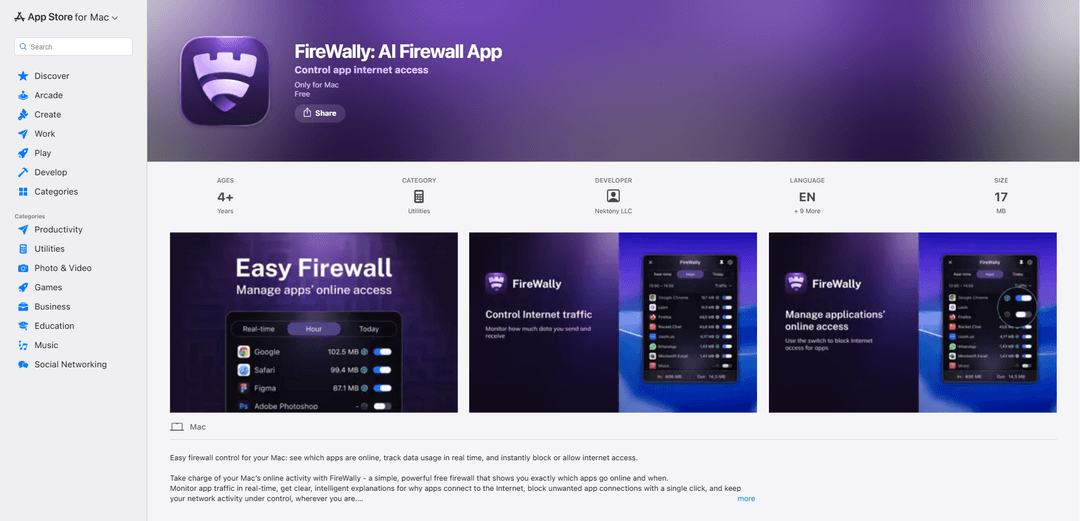
Product Information
Updated:Dec 15, 2025
What is FireWally
FireWally is a user-friendly firewall application designed specifically for macOS 13.0 and later that helps users take control of their Mac's online activity. It offers an intuitive interface that displays which apps are accessing the internet, monitors data usage in real-time, and allows users to instantly block or allow internet access for specific applications. The app is developed by Nektony LLC and is completely free to use, focusing on providing transparency and control over network connections while maintaining user privacy.
Key Features of FireWally
FireWally is a free firewall application for macOS that provides real-time monitoring and control of network connections. It allows users to see which apps are accessing the internet, track data usage, and instantly block or allow internet access for specific applications. The app features Apple Intelligence integration for smart explanations of app network activity and includes data usage tracking capabilities to help users manage their bandwidth consumption.
Real-time Network Monitoring: Provides clear visibility of all active apps and services, showing inbound and outbound traffic with detailed usage statistics in real-time
One-Click App Control: Enables users to instantly block or allow internet access for specific applications with a simple toggle switch
Smart Activity Insights: Leverages Apple Intelligence to provide clear explanations about why apps are connecting to the internet and summarizes network activity
Data Usage Tracking: Monitors and displays network traffic usage over different time ranges (real-time, hourly, daily) to help identify patterns and manage bandwidth
Use Cases of FireWally
Mobile Hotspot Management: Helps travelers and remote workers monitor and control data usage when using mobile hotspots or limited data plans
Privacy Protection: Enables users to identify and block unwanted background connections and prevent apps from sending usage analytics without permission
Bandwidth Optimization: Assists users in identifying bandwidth-heavy applications and managing network resources more efficiently
Pros
Free to use
Simple and user-friendly interface
Powered by Apple Intelligence for smart insights
Cons
Only available for macOS 13.0 or later
Limited to basic firewall functionality compared to enterprise solutions
How to Use FireWally
Download and Install: Download FireWally for free from the Mac App Store and install it on your Mac running macOS 13.0 or later
First Launch Setup: Upon first launch, accept the application's terms and grant necessary permissions when prompted
Enable Network Extensions: Go to System Settings > Network Extensions, locate FireWally and toggle the switch to 'On' position to allow the app to monitor network traffic
Access FireWally: Click the FireWally icon in your Mac's menu bar to open the main interface
Monitor Network Activity: View real-time network activity of all apps, including inbound and outbound traffic, in the main window
Block/Allow Apps: Use the toggle switches next to each application to instantly block or allow their internet access
View Traffic Details: Check detailed traffic statistics over different time ranges (real-time, past hour, current day) to identify patterns
Read App Intelligence: Review Apple Intelligence summaries to understand why specific apps are connecting to the internet
Pin Window (Optional): Use the Pin feature to keep the FireWally window visible on top of other windows for constant monitoring
Manage Data Usage: Monitor and control data consumption when using mobile hotspots or limited data plans
FireWally FAQs
FireWally is a firewall app for Mac that allows you to monitor app internet traffic in real-time, see which apps are online, track data usage, and block or allow internet access for specific applications with a simple switch.
FireWally Video
Popular Articles

Vosko AI: Localize and Dub Videos for Global Audiences
Oct 15, 2026

Atoms: A Multi-Agent AI Platform That Transforms Ideas into Launch-Ready Products
Oct 13, 2026

Nano Banana SBTI: What It Is, How It Works, and How to Use It in 2026
Apr 15, 2026

Atoms Review — The AI Product Builder Redefining Digital Creation in 2026
Apr 10, 2026
Latest AI Tools Similar to FireWally

MultipleWords
MultipleWords is a comprehensive AI platform offering 16 powerful tools for content creation and manipulation across audio, video, and image editing with cross-platform accessibility.

AiTools.Ge
FreemiumMulti-purpose Tools
AiTools.Ge is an all-in-one AI content creation platform offering 70+ templates for generating text, images, voiceovers, code and more across multiple languages.

GiGOS
GiGOS is an AI platform that provides access to multiple advanced language models like Gemini, GPT-4, Claude, and Grok with an intuitive interface for users to interact with and compare different AI models.

Lynklet
Lynklet is an all-in-one social tool platform that combines bio link pages, URL shortening, QR code generation, digital business cards, and file hosting capabilities in one comprehensive solution.
Popular AI Tools Like FireWally

Off-grid LLM over Radio
A platform that integrates Large Language Models (LLMs) with Meshtastic mesh communication networks to enable off-grid AI interactions and automated task execution through radio communication.

Pixelagent
Pixelagent is a declarative Python framework for building custom AI agents that unifies LLM capabilities, storage, and orchestration with build-your-own functionality for memory, tool-calling, and multimodal data handling.

MulmoCast
MulmoCast is an AI-native multi-modal presentation tool that automatically generates videos, podcasts, slides, PDFs, and manga-style content from a single script using various AI technologies.

UTCP
UTCP (Universal Tool Calling Protocol) is an open standard protocol that enables AI agents to directly call any native API endpoint across different communication protocols without requiring middleware or wrapper servers.