Emochi
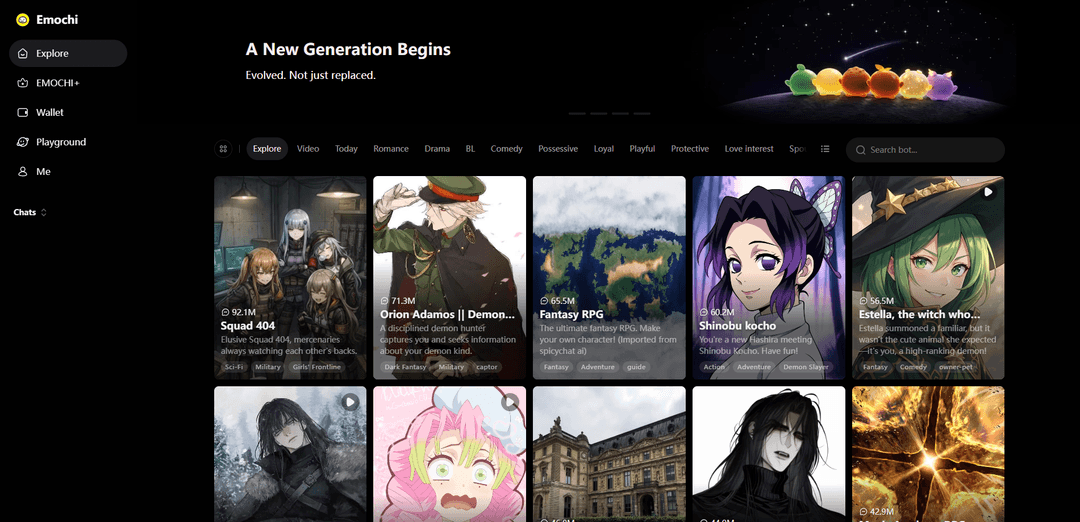
Emochi is an AI character chat and roleplay platform that lets you talk with 1M+ customizable bots for free, create your own companions, and generate immersive stories with long-form responses and creative scenarios.
https://emochi.com/?utm_source=aipure
Product Information
Updated:May 15, 2026
What is Emochi
Emochi is an AI-powered chat platform focused on character-based conversations and interactive roleplay. It offers a large library of user-created characters across popular themes like anime, manga, games, fantasy, romance, horror, and open-world adventures, and it also provides a “Playground” experience for writing interactive roleplay stories with AI-generated chapters, scenes, and dialogue. Users can chat with existing characters or build their own AI companion by defining a persona, backstory, and scenario, then start conversations that feel more like storytelling than standard Q&A.
Key Features of Emochi
Emochi is an anime/manga-leaning AI character chat and roleplay platform (web + mobile) where users can browse a large library of community characters, create/customize personas, and engage in multiple chat modes geared toward ambiance, story progression, or intimacy. Beyond text chat, it supports AI-generated imagery to capture moments from conversations and includes story/novel-style generation for longer narrative arcs. It also offers cross-device synchronization and a free-to-premium model, though users report occasional “memory”/continuity issues and the character library can skew suggestive/NSFW depending on tags and creators.
Massive character library: Browse and chat with a large catalog of user-made and trending characters (heavily anime/fantasy themed), organized with tags/themes for faster discovery.
Roleplay-first chat experience: Designed for immersive roleplay and ongoing scenarios, with characters that maintain a persona and help drive plot forward through dialogue.
Multiple chat modes: Includes different conversation styles (e.g., “delicate” for atmosphere, “novel” for story development, and “intimate” for closer interactions) to match the desired tone.
AI image generation from moments: Generates anime-style visuals to depict key scenes or “snapshots” from your conversations, turning text interactions into illustrated moments.
Character/persona creation tools: Create and customize AI companions with personalities and backstories (with quick vs. expert creation flows), enabling personalized roleplay setups.
Cross-device sync + freemium access: Supports cross-device synchronization; offers free usage with optional premium upgrades (often positioned as fewer interruptions/ads and enhanced models/features).
Use Cases of Emochi
Interactive entertainment & roleplay: Fans can jump into ongoing scenarios (fantasy, sci-fi, romance, adventure) with character-driven dialogue and branching story beats.
Creative writing & story prototyping: Use novel/story modes to draft scenes, dialogue, and chapters; helpful for brainstorming plot twists, character arcs, and world-building.
Fandom engagement & character simulation: Anime/manga/game enthusiasts can roleplay with fandom-inspired personas and explore “what-if” interactions in familiar universes.
Social companionship & casual chat: Users seeking a virtual friend/companion can maintain ongoing conversations, build rapport, and return to persistent character threads.
Visual storytelling for creators: Creators can generate illustrated moments from chats to share, storyboard, or inspire character designs and scene composition.
Pros
Rich, roleplay-oriented experience with multiple modes (including story/novel-style progression).
AI image generation adds a distinctive visual layer to character chats.
Large, easily browsable library with tags/themes and frequent trending content.
Cons
Memory/continuity can be inconsistent in longer chats (users report forgetting prior agreed plot points).
Library skews heavily anime/manga and can be suggestive/NSFW-leaning, which may limit appeal for general audiences.
Customization depth may feel limited for advanced creators (quick/expert modes reported as not very differentiated).
Ads and interruptions may affect flow for free users (reported frequent pop-ups when switching characters).
How to Use Emochi
1) Open Emochi (web or mobile): Go to https://emochi.com/ in a browser, or install the Emochi app from Google Play / Apple App Store to use it on your phone.
2) Sign in / create an account: On the web platform, click the “Me” option to enter the sign-in screen. Continue with Google, or sign in with Twitter, Discord, or Email (options may vary by platform/version).
3) Browse AI characters: From the home/discover area, scroll through featured/trending characters (each card shows a character name, theme, and a link to chat). Use search/categories if available to find a specific genre (anime, fantasy, romance, etc.).
4) Start a chat with a character: Open a character and tap/click “Chat Now” (or enter the character’s chat page). Type your first message to begin the conversation.
5) Choose a chat mode (if available): Some versions mention multiple chat modes (e.g., delicate/atmospheric, novel/story development, intimate/closer interactions). Select the mode that matches the style you want before or during the chat.
6) Roleplay effectively (prompting basics): Be explicit about setting, tone, and your role. For roleplay, write actions in a consistent style (e.g., *actions*), specify goals (e.g., “stay in-character”), and remind the bot of key facts when needed.
7) Create your own AI character: Go to the character creation flow (often labeled Create/Build). Add a name, personality traits, role, and backstory. Optionally upload/select an avatar image. Save to create the character for private use or publishing (depending on settings).
8) Customize your user persona (if available): In the chat interface/profile area, set your persona details (name/role/description) so characters respond to you consistently in roleplay.
9) Save or capture AI-generated “moments” (images): Emochi supports AI-generated imagery tied to chats in some versions. Use the in-chat image/memory feature (if shown) to generate and save visual moments from your conversation.
10) Use cross-device sync: Log into the same account on multiple devices. Emochi supports cross-device synchronization in some implementations, so your chat history can follow you between web and mobile.
11) Manage issues (slow responses / app restarts): If responses are very slow or fail to load, try switching networks, restarting the app/browser tab, or reducing message length. If ads or switching characters restarts the app, reopen the chat from your recent chats list.
12) Send feedback and vote on features: Use the in-app/site feedback option (or feature request/voting page, if provided) to submit suggestions. Upvote existing requests to avoid duplicates and help prioritize improvements.
Emochi FAQs
Emochi is an AI character chat and roleplay platform/app focused on anime, manga, and gaming-style storytelling, where users can chat with and roleplay with AI characters.
Popular Articles

Vosko AI: Localize and Dub Videos for Global Audiences
Oct 15, 2026

Atoms: A Multi-Agent AI Platform That Transforms Ideas into Launch-Ready Products
Oct 13, 2026

Nano Banana SBTI: What It Is, How It Works, and How to Use It in 2026
Apr 15, 2026

Atoms Review — The AI Product Builder Redefining Digital Creation in 2026
Apr 10, 2026
Latest AI Tools Similar to Emochi

Folderr
Folderr is a comprehensive AI platform that enables users to create custom AI assistants by uploading unlimited files, integrating with multiple language models, and automating workflows through a user-friendly interface.

Peache.ai
Peache.ai is an AI character chat playground that enables users to engage in flirty, witty, and daring conversations with diverse AI personalities through real-time interactions.

TalkPersona
TalkPersona is an AI-powered video chatbot that provides real-time human-like conversation through a virtual talking face with natural voice and lip-sync capabilities.

Thaly AI
Thaly AI is an AI-powered sales assistant that automates customer conversations and lead qualification to help businesses scale their sales operations while saving time.
Popular AI Tools Like Emochi

GPT‑5.5 | ChatGPT Official
GPT‑5.5 in ChatGPT is OpenAI’s latest work-focused model designed to understand complex goals, use tools effectively, check its work, and carry multi-step tasks (coding, research, documents, spreadsheets) through to completion with stronger safeguards.

DuckDuckGo AI Chat
DuckDuckGo AI Chat is a free, anonymous way to access popular AI chatbots like GPT-3.5, Claude, and others while preserving user privacy.

Arch
Arch is an intelligent Layer 7 gateway built on Envoy Proxy that provides secure handling, robust observability, and seamless integration of prompts with APIs for building fast, robust, and personalized AI agents.

Off-grid LLM over Radio
A platform that integrates Large Language Models (LLMs) with Meshtastic mesh communication networks to enable off-grid AI interactions and automated task execution through radio communication.