
Duckeebs Swapkey
WebsiteFree
Duckeebs의 SwapKey는 사용자가 구매하기 전에 실시간 모형을 통해 다양한 키보드 및 키캡 조합을 시각화하고 미리 볼 수 있도록 하는 AI 기반 키보드 사용자 지정 도구입니다.
https://duckeebs.com/swapkey?ref=producthunt&utm_source=aipure
제품 정보
업데이트됨:Feb 8, 2026
Duckeebs Swapkey이란?
Duckeebs SwapKey는 기계식 키보드 애호가들이 다양한 키보드 레이아웃과 키캡 세트 조합을 실험할 수 있도록 특별히 설계된 혁신적인 웹 기반 플랫폼입니다. 키보드 커뮤니티 리소스를 중앙 집중화하는 것을 목표로 하는 더 큰 Duckeebs 생태계의 일부인 SwapKey는 비싼 그룹 구매에 참여하기 전에 다양한 키캡 세트가 다양한 키보드 모델에서 어떻게 보일지 시각화하는 데 따르는 일반적인 문제를 해결합니다.
Duckeebs Swapkey의 주요 기능
Duckeebs SwapKey는 사용자가 다양한 키보드 레이아웃과 키캡 세트를 실시간으로 조합해 볼 수 있도록 지원하는 AI 기반 키보드 시각화 도구입니다. 사용자는 구매 전에 다양한 키캡 조합이 여러 키보드 모델에서 어떻게 보이는지 미리 볼 수 있어, 맞춤형 키보드 빌드에 대한 정보에 입각한 결정을 내릴 수 있습니다.
AI 렌더링 엔진: 범례, 크기 및 조명을 정확하게 매칭하여 사실적인 키보드 시각화를 처리하고 렌더링하는 고급 AI 기술입니다.
광범위한 컴포넌트 라이브러리: 다양한 키보드 레이아웃(82개 이상의 모델, 213개 이상의 키보드)과 키캡 세트(294개 이상의 세트, 440개 이상의 옵션)를 조합하여 사용할 수 있습니다.
실시간 미리보기 시스템: 키보드 및 키캡 조합을 즉시 시각화하고 렌더링된 결과를 다운로드하고 공유할 수 있는 옵션을 제공합니다.
필터링된 검색: 사용자가 색상, 재료 및 키보드 크기별로 검색할 수 있는 포괄적인 필터링 시스템입니다.
Duckeebs Swapkey의 사용 사례
구매 전 시각화: 사용자가 구매를 결정하기 전에 선호하는 키보드에서 고가의 공동 구매 키캡 세트를 시각화하는 데 도움을 줍니다.
맞춤 빌드 계획: 키보드 매니아들이 다양한 색상 조합과 레이아웃을 실험하여 맞춤 빌드를 계획하는 데 도움을 줍니다.
커뮤니티 공유: 사용자가 키보드 디자인 컨셉을 기계식 키보드 커뮤니티와 공유하여 피드백과 영감을 얻을 수 있습니다.
장점
잠재적으로 불만족스러운 구매를 방지하여 비용을 절약합니다.
키보드 및 키캡 옵션의 포괄적인 라이브러리입니다.
간단한 3단계 프로세스를 갖춘 사용자 친화적인 인터페이스입니다.
단점
AI 렌더링을 위해 인터넷 연결이 필요합니다.
데이터베이스에서 사용 가능한 모델로 제한됩니다.
Duckeebs Swapkey 사용 방법
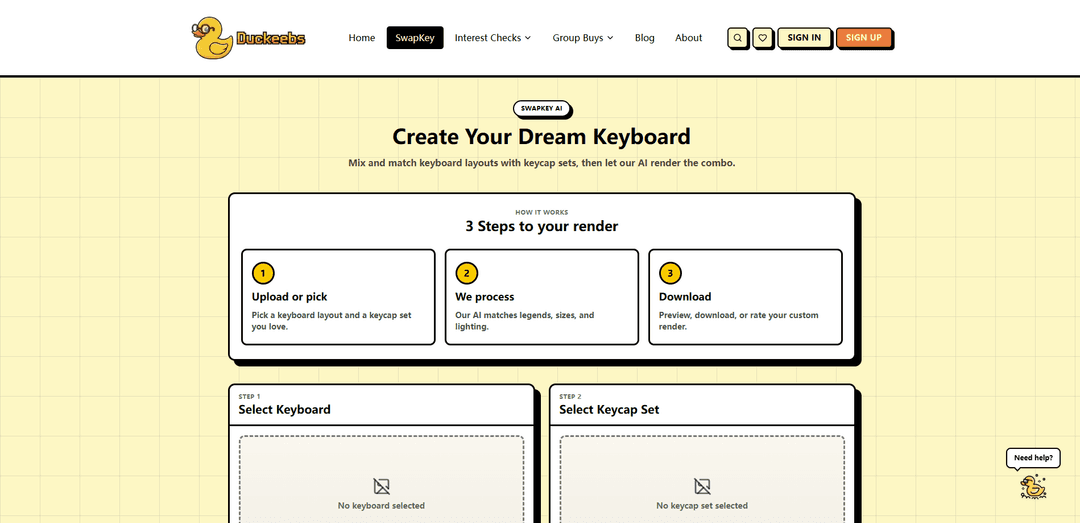
1단계: 키보드 레이아웃 선택: 키보드 카탈로그를 탐색하고 원하는 키보드 레이아웃을 선택합니다. 색상별로 필터링하고 82개 이상의 모델과 213개의 키보드 중에서 기본 보드를 선택할 수 있습니다.
2단계: 키캡 세트 선택: 294개의 세트와 440개의 옵션이 포함된 키캡 카탈로그를 탐색합니다. 선호하는 스타일과 색 구성표에 맞는 키캡 세트를 선택합니다. 색상별로 필터링하여 완벽한 조합을 찾을 수 있습니다.
3단계: 미리보기 생성: '키보드 생성' 버튼을 클릭하여 키보드와 키캡 선택 항목을 결합합니다. AI가 범례, 크기 및 조명을 일치시켜 현실적인 미리보기를 몇 초 안에 처리하고 렌더링합니다.
4단계: 검토 및 다운로드: 생성되면 사용자 지정 키보드 렌더링을 미리 볼 수 있습니다. 다운로드 버튼을 사용하여 이미지를 저장하거나 공유 버튼을 사용하여 다른 사람과 공유할 수 있습니다.
Duckeebs Swapkey 자주 묻는 질문
SwapKey는 Duckeebs에서 만든 AI 키보드 생성기 도구로, 사용자가 키보드 레이아웃과 키캡 세트를 믹스 앤 매치하여 구매 전에 다양한 조합이 어떻게 보이는지 미리 볼 수 있습니다.



