
Demoflow
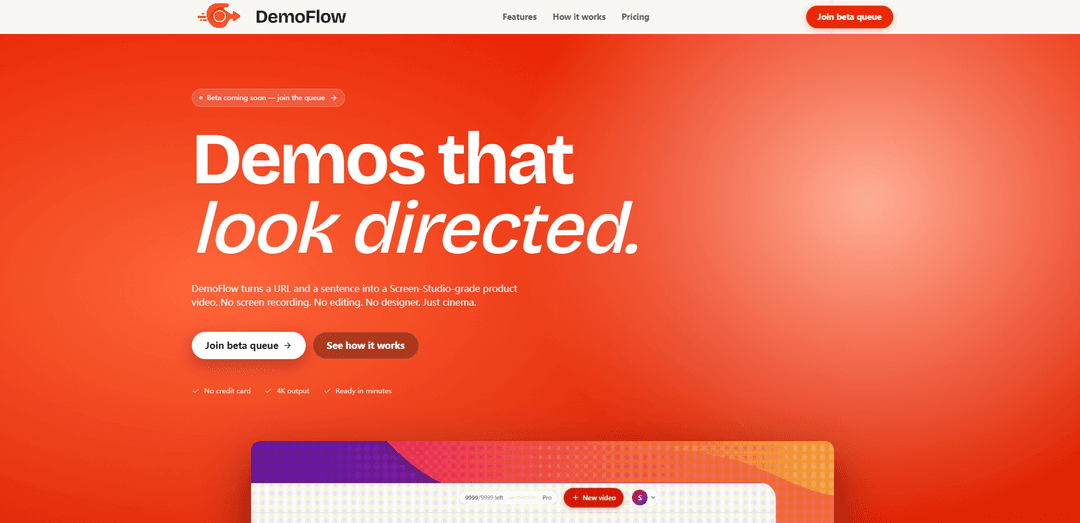
DemoFlow automatically turns any website URL and a plain-English prompt into a cinematic, Screen-Studio-style product demo video—no screen recording, editing, or design work required—with smooth motion, cursor animations, and up to 4K output.
https://demoflow-sigma.vercel.app/?ref=producthunt
Product Information
Updated:Jun 8, 2026
What is Demoflow
DemoFlow is an AI-powered tool for creating polished product demo videos directly from a website. Instead of manually recording your screen and editing footage, you paste a URL and describe what you want shown, and DemoFlow generates a professional MP4 you can use for launch trailers, landing pages, and social media. It’s built to work across public marketing sites, modern JS-heavy web apps, and even authenticated dashboards using cookies or Playwright storage state, with renders typically delivered in minutes via email.
Key Features of Demoflow
DemoFlow is an AI tool that turns a website URL and a plain-English prompt into a polished, cinematic product demo video (MP4) without manual screen recording or editing. It uses an agent to plan and perform on-page actions (scrolls, clicks, hovers), captures the flow on virtually any site (including JS-heavy apps and authenticated dashboards), and renders with professional motion (zooms, parallax, cursor easing, motion blur) in minutes. It supports multiple resolutions up to 4K, delivers renders via email, and emphasizes secure handling of authentication data.
Plain-English scripting agent: Write a sentence or detailed prompt describing what to show; DemoFlow’s agent plans the walkthrough and performs human-like navigation, scrolling, clicking, and highlighting.
Cinematic auto-editing: Automatically applies Screen-Studio-style motion—smooth zooms, parallax pans, motion blur, and eased cursor movement—for a directed, high-production look.
Works on public and authenticated apps: Supports marketing sites, JS-heavy SPAs, and logged-in dashboards using cookies or Playwright storage state for authenticated capture.
Fast background rendering: Produces 2–5 minute renders via a queued pipeline, with priority lanes available for paid tiers and email notification when the MP4 is ready.
Security for secrets and sessions: Authentication payloads are encrypted at rest, used once, and discarded; DemoFlow states it does not log credentials or session cookies.
Multi-resolution output up to 4K: Choose capture sizes from laptop (1440×900) through Full HD/QHD to UHD 4K, suitable for landing pages and social/video platforms.
Use Cases of Demoflow
SaaS product launch trailers: Create cinematic walkthrough videos for new features or launches from a URL + prompt, ready to post on X/YouTube or embed on landing pages.
Sales enablement and outbound: Generate tailored demo videos for specific prospects or verticals by scripting the exact workflow you want to highlight, without editing overhead.
Customer onboarding and support: Produce step-by-step “how to” videos for common tasks in a web app (settings, integrations, reporting), reducing support tickets and training time.
Competitive teardowns and comparisons: Capture competitor website flows and key screens into a shareable MP4 for internal analysis, positioning, or enablement materials.
Agency and content production at scale: Teams can generate many client demos quickly (including custom branding and API access on higher tiers) to support ongoing marketing deliverables.
Pros
Eliminates manual screen recording and video editing by generating a finished cinematic MP4 from a URL and prompt
High-production motion styling (zooms, cursor easing, motion blur) creates a polished “directed” look
Can capture complex sites, including JS-heavy SPAs and authenticated dashboards via cookies/storage state
Supports up to 4K output with faster, prioritized rendering on paid tiers
Cons
Quality depends on how specific and accurate the prompt/workflow description is
Authenticated capture requires providing session data (cookies/storage state), which may be a compliance hurdle even with stated encryption/discarding
Free tier includes limited renders, lower resolution, and a watermark
Render times are queue-based (not instant), which may slow rapid iteration
How to Use Demoflow
1) Join the beta queue / get access: Open DemoFlow AI and join the beta queue (beta is marked as “coming soon”). Once you have access, proceed to create your first demo.
2) Prepare what you want to demo: Decide which site or web app you want to capture (your product, a competitor’s site, a public marketing page, a JS-heavy SPA, or an authenticated dashboard). If the flow requires login, prepare your cookie or Playwright storage state for authenticated capture.
3) Enter the URL: Paste the URL of the website/app you want to demo into DemoFlow.
4) Describe the workflow in plain English: Write a detailed prompt describing exactly what should happen in the video. Be specific about actions (clicks, scrolls, hovers), the order of steps, and what UI elements or outcomes to highlight—so the agent can plan and navigate like a human reviewer.
5) Choose output preferences (optional): Select the capture/output resolution that fits your needs (e.g., laptop 1440×900, Full HD, QHD, or up to 4K UHD depending on your plan).
6) Start the render and let the agent run: Submit the URL + prompt. DemoFlow’s AI agent will navigate the site, perform the actions, capture footage, and render a cinematic MP4 with smooth zooms/pans, cursor easing, and professional timing—no screen recording or manual editing required.
7) Wait for processing: Renders typically complete in about 2–5 minutes in the background queue (priority lanes may apply for paid tiers).
8) Receive and review your MP4: You’ll be emailed when the MP4 is ready. Download and review the video to confirm the flow, pacing, and highlights match your prompt.
9) Iterate if needed: If something is missing or emphasized incorrectly, adjust your prompt (add more explicit click/scroll/hover instructions and highlight targets) and rerender.
10) Upgrade when you need higher volume or 4K/no watermark: Start with the free plan’s included renders, then upgrade for more videos per month, up to 4K UHD output, no watermark, priority queue, team workspace, custom branding, and/or API access.
Demoflow FAQs
DemoFlow is an AI tool that turns a website URL and a written prompt into a cinematic, Screen-Studio-style product demo video (MP4) automatically—without manual screen recording or editing.
Demoflow Video
Popular Articles

Vosko AI: Localize and Dub Videos for Global Audiences
Oct 15, 2026

Atoms: A Multi-Agent AI Platform That Transforms Ideas into Launch-Ready Products
Oct 13, 2026

Nano Banana SBTI: What It Is, How It Works, and How to Use It in 2026
Apr 15, 2026

Atoms Review — The AI Product Builder Redefining Digital Creation in 2026
Apr 10, 2026
Latest AI Tools Similar to Demoflow

Loud Fame
Loud Fame is an AI-powered video transformation tool that allows users to convert regular videos into anime-style animations and create AI-generated celebrity talking videos.

BizBoom.ai
BizBoom.ai is an AI-powered platform that automatically generates professional product videos from product links and images with 95% less cost.

EzVideos
EzVideos is an all-in-one video creation tool that helps users generate viral videos for social media platforms like Instagram, TikTok, and YouTube with automated editing features and built-in resources.

Illuminix
Illuminix is an AI-powered platform that empowers businesses with autonomous hyper-experts and specialized tools for automated business processes, data management, and video content creation.
Popular AI Tools Like Demoflow

HunyuanVideo-I2V
HunyuanVideo-I2V is an open-source AI framework developed by Tencent that transforms static images into high-quality, dynamic videos with customizable motion effects and exceptional visual consistency.

Google Veo 2
Veo 2 is Google DeepMind's state-of-the-art AI video generation model that can create high-quality videos up to 4K resolution with realistic motion, extensive camera controls, and improved physics simulation from text prompts.

Vibing
Vibing is an AI-powered dating app that helps users share authentic moments through video stories and make genuine connections based on personality matching and interactive features.

Edits, an Instagram app
Edits is Instagram's free video creation app that provides creators with professional editing tools, AI features, and analytics capabilities to create high-quality videos directly from their phones.