Contextberg
Contextberg is a local-first memory app for AI coding agents that passively captures your screens, browser activity, and agent/terminal transcripts and serves them back via built-in MCP—no config files and optional fully offline processing with LM Studio.
https://contextberg.com/?ref=producthunt
Product Information
Updated:Jun 8, 2026
What is Contextberg
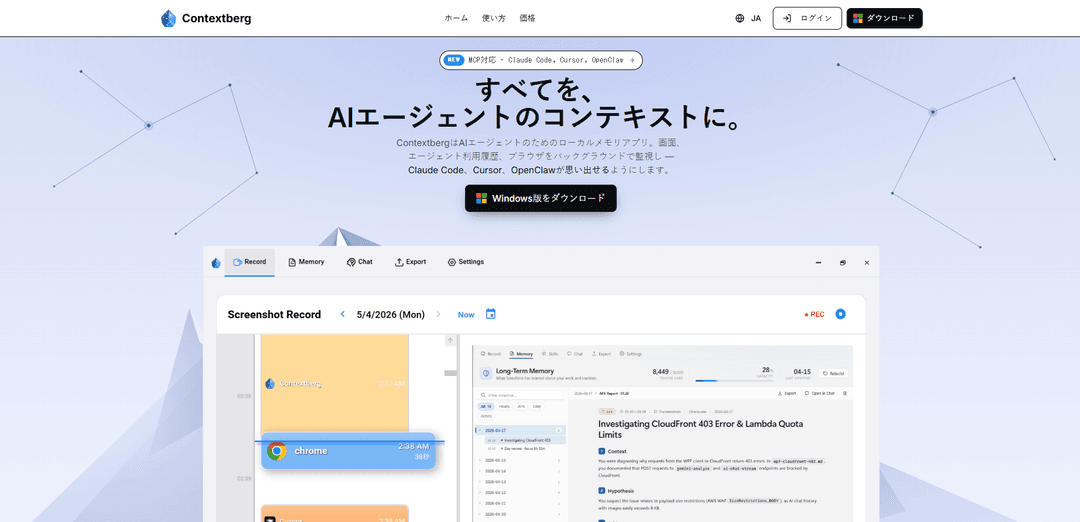
Contextberg is a local memory companion for AI agents such as Claude Code, Cursor, and OpenClaw, designed to eliminate the need to repeatedly re-explain what you were doing. Running on your machine, it continuously observes your work (including screenshots across windows, browser history, and agent conversations/transcripts) and makes that context available to your agent through an integrated MCP server. It’s positioned as a “just connect” tool—no accounts, no cloud lock-in, and minimal setup—currently available for Windows 10/11, with macOS and Linux planned.
Key Features of Contextberg
Contextberg is a local-first memory app for AI coding agents that passively captures your work context—screenshots across windows, browser history, inputs, and agent/terminal conversations—then automatically turns it into structured memories (activity, daily, and long-term) and serves the right context to tools like Claude Code and Cursor via an built-in MCP server. It is designed to reduce repeated re-explaining of what you were doing, help you resume work instantly, and keep data on-device (optionally fully offline when paired with LM Studio), with privacy-sensitive controls (e.g., excluding password inputs) noted as a roadmap focus for cloud-model users.
Passive context capture: Continuously records screens, inputs, browser activity, and agent conversations in the background so your agent can “remember” without you manually saving notes or context.
MCP-ready context delivery: Includes an MCP server that exposes captured context to compatible coding agents (e.g., Claude Code, Cursor, OpenClaw) with minimal setup and no config files.
Automatic multi-layer memory: Generates three memory types: granular activity memory, date-grouped daily memory, and long-term memory summarizing recurring tools and work patterns.
Local-first / offline pipeline: Runs entirely on your machine; when paired with LM Studio, recording, memory generation, and retrieval can stay fully offline with no account required.
Work resumption (“Remember”) view: On return, reconstructs what you were doing before stepping away using recent activities, browser history, and agent usage, and lets you drill down via chat.
Broad developer workflow ingestion: Ingests screenshots across windows plus browser history and transcripts from Claude Code, Cursor, and terminals to provide richer end-to-end debugging/build context.
Use Cases of Contextberg
Software engineering continuity: Developers can resume complex coding/debugging sessions instantly, with the agent receiving prior tabs, terminal output, and recent changes without re-explanation.
Incident response & SRE handoffs: On-call engineers can capture investigative steps (dashboards, logs, commands) and generate daily summaries for smoother shift handovers and post-incident review.
Security and compliance-sensitive development: Teams handling regulated data can keep context and memory on-device (offline with LM Studio), reducing reliance on cloud storage for workflow recall.
Research and knowledge work trails: Analysts can automatically retain browsing and note-taking context, then retrieve “what led to this conclusion” through daily memory and activity-level recall.
Product/QA reproduction of bugs: QA and PMs can capture steps across apps and browsers and provide agents with a precise trail to reproduce issues and propose fixes.
Pros
Local-first design: data stays on-device; can be fully offline with LM Studio.
Reduces context re-entry: automatic capture + structured memories help agents pick up where you left off.
Low setup friction: built-in MCP server and “no config files” positioning.
Cross-surface coverage: combines screens, browser history, and agent/terminal transcripts for richer context.
Cons
Privacy risk surface: continuous screen/input capture can accidentally record sensitive info; stronger exclusion/redaction controls are referenced as roadmap items.
Windows-only at v1.0.0: macOS and Linux are planned but not yet available.
Potential storage/performance overhead: continuous screenshots/transcript capture may require careful retention policies and disk management (not detailed in sources).
How to Use Contextberg
1. Install Contextberg on Windows: Download and install the Windows 10/11 (64-bit) app from the Microsoft Store listing linked on the official site. Contextberg is designed to run efficiently on Windows and works without requiring an account.
2. Launch Contextberg and let it run in the background: Open Contextberg after installation. It quietly monitors your work activity in the background to build context for your AI agents (no config files required).
3. Connect your coding agent via MCP: Use an MCP-capable agent (e.g., Claude Code, Cursor, OpenClaw) and connect it to Contextberg’s built-in MCP server. Once connected, the agent can retrieve your recent context directly from Contextberg.
4. Work normally while Contextberg captures context: As you code/debug, Contextberg records relevant signals such as screenshots across windows, browser history, and agent/terminal transcripts so you don’t have to re-explain what you already did.
5. Use the auto-generated memories: Contextberg automatically generates three memory types: (a) activity memory (fine-grained logs of what you did), (b) daily memory (grouped by date), and (c) long-term memory (your recurring tools and work patterns). Your agent can pull these as needed for better continuity.
6. Resume work with “Instant Session Recovery”: After stepping away (e.g., overnight or over the weekend), open Contextberg to see an automatic summary of what you were doing before you left—compiled from recent activity, browser history, and agent usage—so you can continue immediately.
7. Ask in chat to dig into details: From your agent’s chat, ask follow-up questions like “Where should I start?” or request deeper recall on a specific moment. The agent can query Contextberg to retrieve the relevant screenshots/history/transcripts and the generated summaries.
8. (Optional) Keep everything local with LM Studio: For a fully local-first workflow, pair Contextberg with LM Studio and a local model (e.g., Gemma, Qwen, GLM, Llama) so capture, memory generation, and context retrieval can run offline with data staying on your machine.
9. (Optional) Switch to a cloud model for advanced tasks: If you need stronger reasoning or specialized capabilities, you can optionally use a cloud model (the site mentions Gemini as an example) while still using Contextberg as your local context/memory layer.
Contextberg FAQs
ContextbergはAIエージェントのためのローカルメモリアプリです。画面、入力、ブラウザ、エージェントの会話などをバックグラウンドで記録し、Claude Code、Cursor、OpenClawなどにMCP経由でコンテキストとして提供します。
Contextberg Video
Popular Articles

Atoms: A Multi-Agent AI Platform That Transforms Ideas into Launch-Ready Products
May 22, 2026

Nano Banana SBTI: What It Is, How It Works, and How to Use It in 2026
Apr 15, 2026

Atoms Review — The AI Product Builder Redefining Digital Creation in 2026
Apr 10, 2026

Kilo Claw: How to Deploy and Use a True "Do‑It‑For‑You" AI Agent(2026 Update)
Apr 3, 2026
Latest AI Tools Similar to Contextberg

invoices.dev
invoices.dev is an automated invoicing platform that generates invoices directly from developers' Git commits, with integration capabilities for GitHub, Slack, Linear, and Google services.

Monyble
Monyble is a no-code AI platform that enables users to launch AI tools and projects within 60 seconds without requiring technical expertise.

Devozy.ai
Devozy.ai is an AI-powered developer self-service platform that combines Agile project management, DevSecOps, multi-cloud infrastructure management, and IT service management into a unified solution for accelerating software delivery.
Mediatr
MediatR is a popular open-source .NET library that implements the Mediator pattern to provide simple and flexible request/response handling, command processing, and event notifications while promoting loose coupling between application components.
Popular AI Tools Like Contextberg
Launch
Launch is an AI-powered platform that enables users to build full-stack applications instantly while providing comprehensive tools for product launches, entrepreneurship programs, and customer acquisition.

GitHub Copilot Chat
GitHub Copilot Chat is an AI-powered coding assistant that provides natural language interactions, real-time code suggestions, and contextual support directly within supported IDEs and GitHub.com.

Rememberall
Rememberall is a secure, open-source long-term memory solution that enables AI applications and GPT models to maintain persistent memory across conversations through semantic search and vector storage capabilities.

Upsonic
Upsonic is a reliability-focused AI agent framework with dockerized server-client architecture that enables trusted agent workflows through advanced features like verification layers, triangular architecture, and Model Context Protocol (MCP) integration.