Clico
WebsiteBrowser ExtensionFree
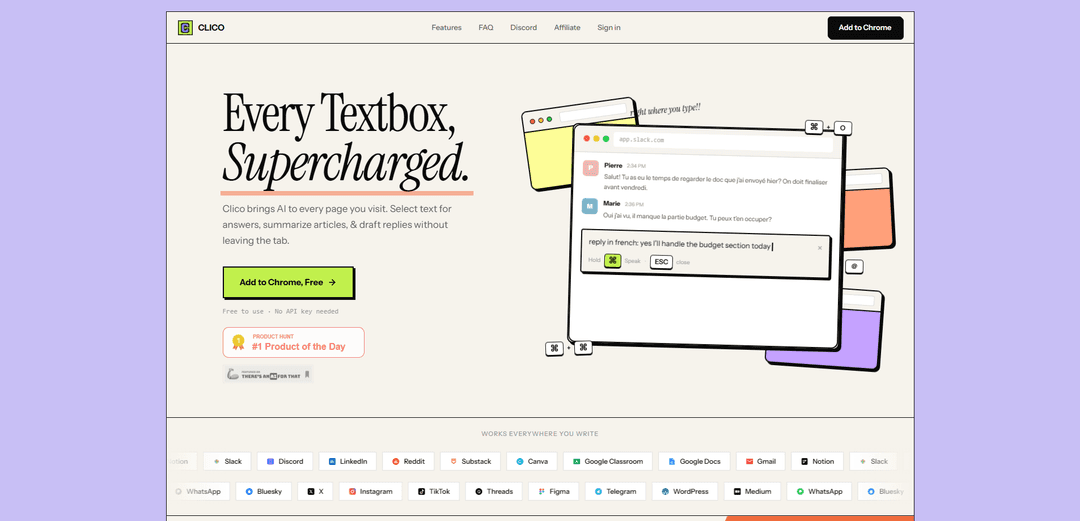
Clico is a browser extension that supercharges every text box with AI-powered writing assistance, allowing users to draft, reply, summarize and get explanations without leaving their current tab.
https://tryclico.com/?ref=producthunt

Product Information
Updated:Mar 31, 2026
What is Clico
Clico is an AI writing assistant that integrates directly into web browsers like Chrome, Edge, Brave, and Arc. It's designed to enhance the writing experience across any website with text input fields, from Gmail and Google Docs to social media platforms like LinkedIn and Twitter. The tool requires no API key or complex setup - users can simply install the extension from the Chrome Web Store and start using it immediately with a free account.
Key Features of Clico
Clico is a browser extension AI writing assistant that integrates directly into any text field across websites. It provides contextual writing assistance, page summarization, voice input capabilities, and instant AI-powered explanations by understanding the content of the current page. The tool works seamlessly across various platforms including Gmail, Google Docs, Notion, Slack, and social media sites without requiring users to switch between tabs or copy-paste content.
Contextual AI Writing: Press ⌘+O in any text field to get AI-generated content that's relevant to the page context, helping draft replies and create content without leaving the current page
Instant Page Summarization: Double-tap ⌘ to get structured summaries with key points and action items from any webpage or document
Voice Input Integration: Hold ⌘ to use real-time voice transcription for hands-free content creation
Text Selection Explanations: Highlight any text to receive instant AI-powered explanations without switching contexts or opening new tabs
Use Cases of Clico
Email Communication: Draft professional responses in Gmail by having Clico analyze email threads and generate contextually appropriate replies
Social Media Management: Create engaging responses and posts across platforms like LinkedIn, Twitter, and Instagram with platform-appropriate content
Content Research: Quickly summarize articles and documents for research purposes, extracting key points and action items efficiently
Document Creation: Generate and edit content in Google Docs, Notion, and other document platforms with AI assistance
Pros
No API key or credit card required - free to use
Works across multiple browsers and platforms
Seamless integration with existing workflows
No need to switch between tabs or copy-paste content
Cons
Limited to Chromium-based browsers
Requires internet connection for AI functionality
May raise privacy concerns due to page content analysis
How to Use Clico
Install Clico: Add the Clico extension from Chrome Web Store to your Chrome, Edge, Brave, Arc or any Chromium-based browser
Create Account: Create a free account to get started - no credit card or API key needed
Use Command+O for AI Writing: Press ⌘+O (Command+O) in any text field to open Clico. It will read the page context and help you draft responses or content right at your cursor
Use Text Selection for Explanations: Highlight any text on a webpage to get an instant AI-powered explanation without leaving the page
Use Double Command for Summaries: Double-tap ⌘ (Command) on any page to get an instant structured summary with key points, takeaways, and action items
Use Voice Input: Hold ⌘ (Command) to speak and release to send with real-time transcription
Access on Various Platforms: Use Clico across platforms like Google Docs, Gmail, Notion, Slack, Discord, LinkedIn, Substack, Reddit and any website with a text field
Clico FAQs
Chrome, Edge, Brave, Arc, and any Chromium-based browser. Install from the Chrome Web Store and it works immediately.
Clico Video
Popular Articles

OpenAI Shuts Down Sora App: What the Future Holds for AI Video Generation in 2026
Mar 25, 2026

Top 5 AI Agents in 2026: How to Choose the Right One
Mar 18, 2026

OpenClaw Deployment Guide: How to Self Host a Real AI Agent(2026 Update)
Mar 10, 2026

Atoms Tutorial 2026: Build a Full SaaS Dashboard in 20 Minutes (AIPURE Hands-On)
Mar 2, 2026