
Cewsco
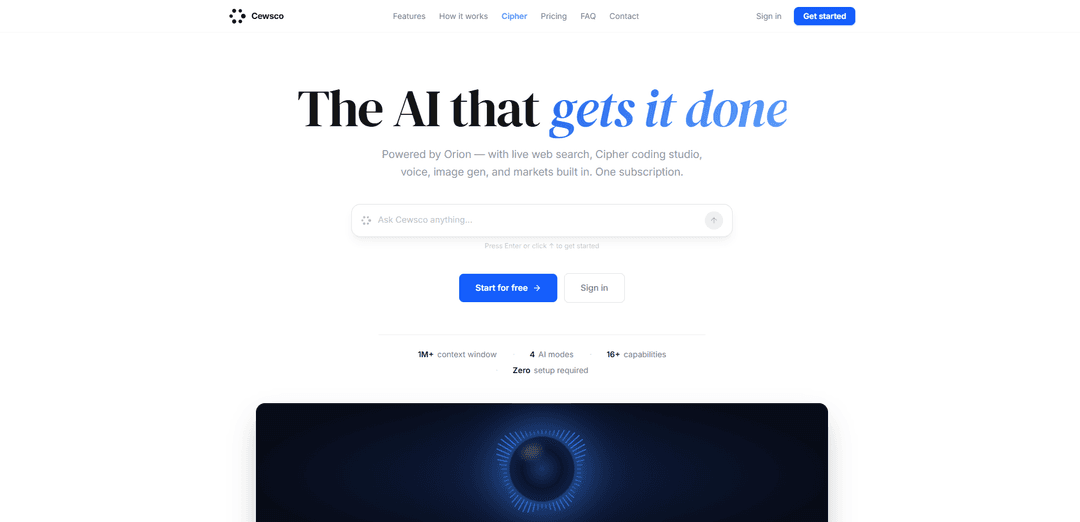
Cewsco is an all-in-one premium AI assistant powered by GPT-4o that combines chat, image and video generation, voice conversations, live web search, real-time market intelligence, and an AI calendar in a single installable web app.
https://cewsco.com/?ref=producthunt
Product Information
Updated:Jul 8, 2026
What is Cewsco
Cewsco is a premium, web-based AI assistant designed to replace multiple standalone AI tools with one unified experience. Powered by GPT-4o and built for everyday use, it supports long, highly contextual conversations (with a 1M+ token context window), understands images and documents, and can generate new visual content on demand. Beyond standard chat, Cewsco positions itself as a practical “do-it-all” assistant by adding hands-free voice interaction, real-time web search for up-to-date answers, finance tools for stocks and crypto, and built-in productivity features like a calendar and contact management—all accessible directly from the browser and installable to your home screen without an app store download.
Key Features of Cewsco
Cewsco is an all-in-one premium AI assistant powered by GPT-4o that combines chat, vision/image analysis, AI image (and video) generation, hands-free voice conversations, and live web search in a single installable web app. It also includes productivity features like an AI-powered calendar, searchable conversation history, location-aware answers, and smart notifications, plus market intelligence for stocks and crypto. For developers, it offers Cipher, a dedicated AI coding studio with file uploads and screenshot debugging, positioned as producing complete, production-ready code.
Unified AI workspace (chat + voice + vision + web): A single interface for text chat, voice conversations, image/screenshot understanding, and live web search—reducing app switching and keeping work in one place.
Live Web Search with sourcing: Searches the live web for time-sensitive questions (news, prices, sports, etc.) and provides answers with clear attribution to sources.
Vision & image analysis: Accepts screenshots, photos, and documents so you can ask questions about what’s on-screen—useful for troubleshooting, summarizing, or extracting details.
AI content generation (images + video): Generates high-resolution images from prompts (multiple aspect ratios) and supports text-to-video generation for quick creative output without extra tools.
Cipher AI Coding Studio (Pro+): A dedicated coding mode designed for complete, production-ready output with syntax highlighting, file uploads, and screenshot-based debugging (not included on the Free plan).
Productivity layer (AI calendar, history, notifications): Built-in calendar management via conversation, searchable auto-titled chat history, and smart reminders—aimed at day-to-day planning and continuity.
Use Cases of Cewsco
Marketing & creative production: Generate campaign visuals, concept art, and short videos; iterate quickly with chat feedback and use the prompt library to speed up copy and creative ideation.
Software engineering & IT support: Use Cipher to draft/refactor code, debug from screenshots or logs, and upload files for context; use vision to interpret UI errors and web search for up-to-date references.
Finance & investing workflows: Pull real-time stock/crypto quotes, earnings info, and market-moving news, then have the AI summarize implications and track follow-ups in the calendar.
Operations & executive assistance: Manage meetings and schedules conversationally, set reminders, store key contacts, and keep a searchable history of decisions and action items.
Research & current-events analysis: Combine live web search with summarization to monitor breaking updates, compare sources, and compile briefings with citations.
Pros
All-in-one bundle (chat, voice, vision, generation, web search, calendar) reduces tool fragmentation and setup time.
Live web search helps keep answers current for time-sensitive topics like markets and news.
Cipher coding studio (Pro+) emphasizes complete, non-truncated, production-ready code with file and screenshot support.
Cons
Some advanced capabilities (e.g., Cipher) require paid tiers; free plan does not include everything.
As a broad “do-everything” platform, depth/quality may vary by feature compared with best-in-class single-purpose tools.
Value depends on usage limits and plan selection (daily chat limits on some tiers).
How to Use Cewsco
1) Open Cewsco: Go to https://cewsco.com/ (the app is designed to work immediately in the browser with “zero setup”).
2) Start a chat right away (no setup required): On the homepage, type your request into the input box and press Enter (or click the ↑ button) to get a response.
3) Create an account (optional, but needed for saved history and full use): Sign up using your email and a password. The site states you can start with no credit card needed.
4) Choose a plan when you’re ready: Pick a plan based on your needs (Free to start; paid plans include Pro, Premium, Unlimited, and Business). You can upgrade or cancel anytime from settings.
5) Use Cewsco for everyday Q&A and long-context work: Ask questions or give tasks in plain language. Cewsco supports a large context window and streams responses word-by-word, so you can iterate quickly.
6) Analyze images, screenshots, or documents (Vision & Image Analysis): Paste or upload a screenshot/photo/document into the chat, then ask questions about what’s shown. Cewsco will interpret the visual content directly in the conversation.
7) Generate images (AI Image Generation): Describe the image you want in a sentence. Choose an orientation (square/portrait/landscape) if desired, then generate and download the result in one click.
8) Generate videos (AI Video Generation): Type a description of the video you want to see. Cewsco will generate a video from text (“text to motion”) without requiring editing tools.
9) Talk hands-free (Hands-Free Voice AI): Start speaking to Cewsco. It listens automatically, detects when you’re done, then responds by voice. You can also ask it to navigate the app for you.
10) Search the live web when answers must be current (Live Web Search): Ask about time-sensitive topics (news, stock prices, sports scores, etc.). Cewsco will search the live web for those queries and cite where the answer came from.
11) Use the Prompt Library for faster workflows: Open the prompt library and pick from 40+ curated prompts for writing, coding, research, business, and creativity. Launch a prompt with one click and fill in your details.
12) Use Cipher for coding (Pro+ only): If you’re on Pro, Premium, Unlimited, or Business, open Cipher (the dedicated coding studio). Paste code, upload files, or share screenshots of errors for debugging, refactoring, and complete production-ready output.
13) Manage your schedule with the built-in AI calendar: In chat, ask Cewsco to add events, reschedule meetings, or list what’s coming up. It updates your Cewsco calendar conversationally (no form-filling).
14) Add and reference people with Contacts & People: Store names, numbers, and emails of people you work with inside Cewsco so the AI can reference them across conversations.
15) Get real-time market intelligence (Markets & Finance): Ask for live stock quotes, crypto prices, earnings reports, and market-moving news. Cewsco pulls data in real time and explains it clearly.
16) Build a budget (Budget Planning): Share your income and expenses in chat. Cewsco will create a working budget, identify overspending, suggest cuts, and help you track month to month.
17) Revisit and search past work (Full Conversation History): Use the saved, searchable conversation history to pick up where you left off. Chats are automatically titled based on what you discussed.
18) Enable location-aware help (Location-Aware AI): If prompted, allow location access so Cewsco can tailor answers to your area (local weather, nearby places, timezone-aware times, and relevant recommendations).
19) Turn on reminders (Smart Notifications): Grant notification permission so Cewsco can nudge you before calendar events and send reminders for what’s coming up.
20) Review privacy/security expectations: Cewsco states conversations are encrypted end-to-end, stored securely, not sold or shared, and not used to train AI models.
21) Use Deep Reasoning Mode for complex tasks: When you have a complex problem, switch to (or request) Deep Reasoning Mode so Cewsco works through the logic more carefully before answering.
22) Upgrade, add seats, or cancel from Settings: If you need more usage or team access, change your plan (including Business seat packages) from settings. The site notes you can upgrade or cancel anytime.
Cewsco FAQs
Cewsco is an all-in-one premium AI assistant that provides chat, image generation, voice conversations, live web search, real-time market intelligence (stocks/crypto), and an AI-powered calendar in a single web app.
Popular Articles

Atoms: A Multi-Agent AI Platform That Transforms Ideas into Launch-Ready Products
May 22, 2026

Nano Banana SBTI: What It Is, How It Works, and How to Use It in 2026
Apr 15, 2026

Atoms Review — The AI Product Builder Redefining Digital Creation in 2026
Apr 10, 2026

Kilo Claw: How to Deploy and Use a True "Do‑It‑For‑You" AI Agent(2026 Update)
Apr 3, 2026
Latest AI Tools Similar to Cewsco

Folderr
Folderr is a comprehensive AI platform that enables users to create custom AI assistants by uploading unlimited files, integrating with multiple language models, and automating workflows through a user-friendly interface.

Peache.ai
Peache.ai is an AI character chat playground that enables users to engage in flirty, witty, and daring conversations with diverse AI personalities through real-time interactions.

TalkPersona
TalkPersona is an AI-powered video chatbot that provides real-time human-like conversation through a virtual talking face with natural voice and lip-sync capabilities.

Thaly AI
Thaly AI is an AI-powered sales assistant that automates customer conversations and lead qualification to help businesses scale their sales operations while saving time.
Popular AI Tools Like Cewsco

GPT‑5.5 | ChatGPT Official
GPT‑5.5 in ChatGPT is OpenAI’s latest work-focused model designed to understand complex goals, use tools effectively, check its work, and carry multi-step tasks (coding, research, documents, spreadsheets) through to completion with stronger safeguards.

DuckDuckGo AI Chat
DuckDuckGo AI Chat is a free, anonymous way to access popular AI chatbots like GPT-3.5, Claude, and others while preserving user privacy.

Arch
Arch is an intelligent Layer 7 gateway built on Envoy Proxy that provides secure handling, robust observability, and seamless integration of prompts with APIs for building fast, robust, and personalized AI agents.

Off-grid LLM over Radio
A platform that integrates Large Language Models (LLMs) with Meshtastic mesh communication networks to enable off-grid AI interactions and automated task execution through radio communication.