
Brisa — Your personal wealth OS
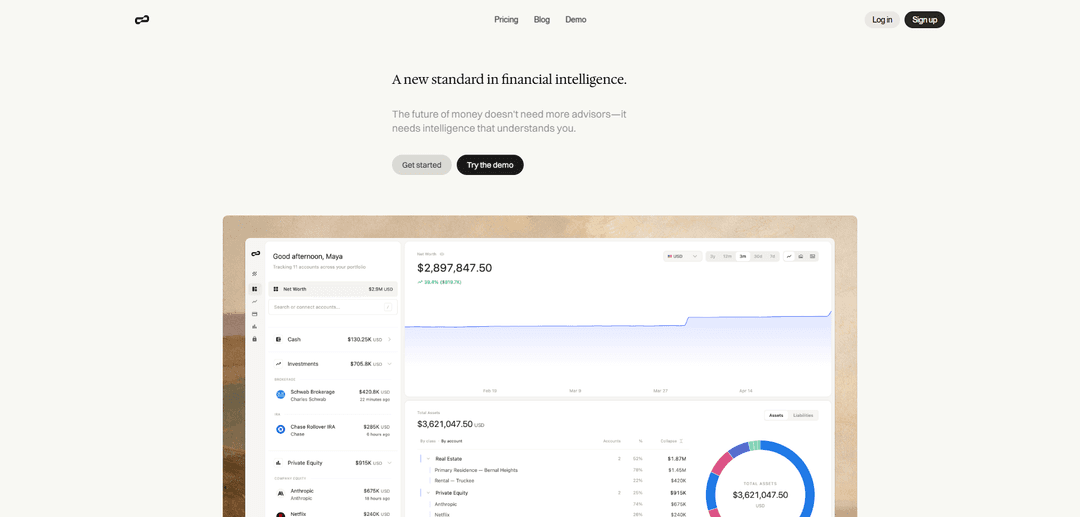
Brisa is a desktop-only personal wealth OS that unifies your full financial picture—accounts, investments, real estate, private equity, liabilities, documents, and currencies—then delivers context-aware AI insights and reasoning on demand.
https://joinbrisa.com/?ref=producthunt
Product Information
Updated:Jun 8, 2026
What is Brisa — Your personal wealth OS
Brisa — Your personal wealth OS is an AI-first wealth organization and intelligence platform designed to replace fragmented spreadsheets, portals, and folders with a single, private system for understanding your money. It aggregates assets and liabilities across bank accounts, brokerages, custodians, and properties, adds portfolio and performance tracking, and includes a secure document vault for key financial records like statements, tax files, policies, and estate documents. Brisa positions itself as a personal finance platform (not a bank, broker, or financial advisor) and is currently optimized for desktop to provide a comprehensive, detailed view of your finances.
Key Features of Brisa — Your personal wealth OS
Brisa is an AI-first personal wealth organization platform (“personal wealth OS”) that consolidates your full financial picture—banking, investments, real estate, private equity, liabilities, documents, and multi-currency holdings—into a single, calm desktop experience. It integrates with 12,000+ financial institutions, provides portfolio and net-worth tracking, a secure document vault with file analysis, and an AI concierge that delivers context-aware research and reasoning in plain language. Brisa emphasizes security (encryption in transit and at rest, access controls, MFA options) and states it does not sell personal information, while noting it may share data with providers/partners or for legal compliance.
Unified net worth dashboard: Aggregates assets, liabilities, accounts, entities, and property into one live view to track net worth and changes over time.
12,000+ institution integrations: Connects to a wide range of banks, brokerages, and custodians to reduce manual updates and fragmented tracking.
AI concierge for financial intelligence: Delivers instant answers, analysis, and context-aware insights tailored to your financial picture, with explanations in plain language.
Secure Financial Vault + document analysis: Stores statements, tax files, policies, estate documents, and agreements, and can extract key facts from uploaded files.
Portfolio performance intelligence: Monitors holdings and performance across investment accounts, asset classes, and time for a clearer view of results.
Alternatives + global wealth tracking: Supports real estate valuations, private equity tracking (e.g., vesting schedules), and multi-currency views for global balance sheets.
Use Cases of Brisa — Your personal wealth OS
High-net-worth household financial command center: Centralize complex finances (multiple accounts, properties, entities, currencies) and use AI to answer questions quickly without relying on scattered spreadsheets and portals.
Self-directed investor portfolio oversight: Track performance across brokerages and custodians, understand allocation and returns, and get AI-assisted context for market summaries and portfolio questions.
Real estate owner/operator balance sheet tracking: Maintain up-to-date property values alongside mortgages and other liabilities to understand true net worth and leverage across properties.
Private equity / startup equity organization: Track private investments and vesting schedules and store related documents (K-1s, subscription docs) in a single vault for ongoing reference.
Tax-time document readiness: Keep tax forms, statements, and supporting documents organized year-round, using file analysis to extract key facts and reduce last-minute scrambling.
Cross-border professional financial visibility: Use multi-currency support to view global assets and liabilities in a preferred currency for clearer decision-making across countries.
Pros
Comprehensive aggregation across accounts, assets, liabilities, documents, and alternatives in one platform
AI concierge provides context and reasoning, not just raw numbers
Strong stated security posture (TLS, AES-256, access controls, MFA options) and claims it does not sell personal data
Integrates with 12,000+ banks/brokerages/custodians to reduce manual tracking
Cons
Desktop-only (no mobile experience currently)
Not a bank, broker, or financial advisor (may limit users seeking regulated advice/execution)
Data may be shared with service providers/business partners or for legal compliance (even if not sold)
How to Use Brisa — Your personal wealth OS
1) Open Brisa on desktop: Brisa is currently desktop-only and optimized for larger screens. Go to https://joinbrisa.com/ and sign in (or create an account) to access the web app.
2) Connect your financial institutions: Link your accounts so Brisa can build a live view of your finances. Brisa integrates with 12,000+ banks, brokerages, and custodians—connect the institutions where you hold cash, investments, and other accounts.
3) Confirm your “full financial picture” is populating: After linking accounts, review that your assets, liabilities, and accounts are appearing together in one place so your net worth view can be calculated and kept up to date.
4) Use Net Worth tracking to monitor changes over time: Navigate to the net worth view to see your combined assets and liabilities in one live snapshot, and track how it changes across time.
5) Ask Concierge for analysis and answers: Use Brisa’s AI (“concierge”) to request research, reasoning, and polished answers based on your connected financial context (e.g., summaries, insights, and explanations in plain language).
6) Review Portfolio Intelligence for investments performance: Go to the portfolio/performance area to understand how investments are performing across accounts, asset classes, and time.
7) Track real estate valuations: Add or review property holdings and use Brisa’s automated estimates to keep property values current within your overall net worth picture.
8) Track private equity and vesting schedules: Record private investments and vesting schedules so they appear alongside your other assets and can be monitored with the rest of your financial picture.
9) Enable multi-currency viewing (if you have global assets): If you hold assets or liabilities in multiple currencies, set your preferred currency and use Brisa’s multi-currency support to view everything consistently.
10) Upload and organize documents in the Financial Vault: Use the document vault to store and organize statements, tax files (e.g., K-1s), policies, estate documents, and agreements. Brisa can analyze uploaded files and extract key facts for easier reference.
11) Review security and access settings: Confirm you’re using available security controls (e.g., multi-factor authentication options). Brisa states data is encrypted in transit (TLS 1.2+) and at rest (AES-256), with role-based access controls.
12) Update your profile details when needed: Use the Account and Profile sections to update your account information as your details change.
13) Delete your account (optional): If you want to leave the platform, go to the Account tab and select “Permanently Delete Account” to request deletion.
14) Understand data sharing at a high level: Brisa states it may share data with service providers, business partners, or for legal compliance, and that it does not sell personal information. Consult the Privacy Policy for specifics.
Brisa — Your personal wealth OS FAQs
Brisa is a private wealth organization platform (“personal wealth OS”) that brings your full financial picture into one place—bank accounts, investments, real estate, private equity, liabilities, documents, and currencies—so you can track net worth and get context-aware insights.
Brisa — Your personal wealth OS Video
Popular Articles

Vosko AI: Localize and Dub Videos for Global Audiences
Oct 15, 2026

Atoms: A Multi-Agent AI Platform That Transforms Ideas into Launch-Ready Products
Oct 13, 2026

Nano Banana SBTI: What It Is, How It Works, and How to Use It in 2026
Apr 15, 2026

Atoms Review — The AI Product Builder Redefining Digital Creation in 2026
Apr 10, 2026
Latest AI Tools Similar to Brisa — Your personal wealth OS

MarketYap!
MarketYap! is an AI-powered investment news aggregation platform that simplifies stock research by gathering and summarizing articles from multiple reputable sources.
Feetr.io
Feetr.io is an AI-powered stock analysis platform that leverages machine learning, social media analytics, and real-time market data to identify potential stock movements before they go mainstream.

ML Alpha
ML Alpha is an AI-driven investment platform that combines machine learning algorithms with community-powered portfolio insights to help investors make data-driven investment decisions in the US stock market.

TradingAPI.rest
TradingAPI.rest is a comprehensive trading platform that provides Technical Analysis API and AI-Powered Trading Assistant to help traders make data-driven decisions through real-time market analysis, 180+ technical indicators, and natural language insights.
Popular AI Tools Like Brisa — Your personal wealth OS

MacroMicro
MacroMicro is a comprehensive macro analytics platform that combines technology and research expertise to empower investors with data-driven insights into global market trends.

StockStory
StockStory is an AI-powered stock research and investment advice platform that aims to help individual investors beat the market.

Composer
Composer is an AI-powered trading platform and investment app that allows users to create, backtest, and execute trading strategies using a no-code interface.

ChainGPT
ChainGPT is a cutting-edge AI platform that integrates blockchain and crypto technology to provide advanced tools and utilities for users.