Anijam AI
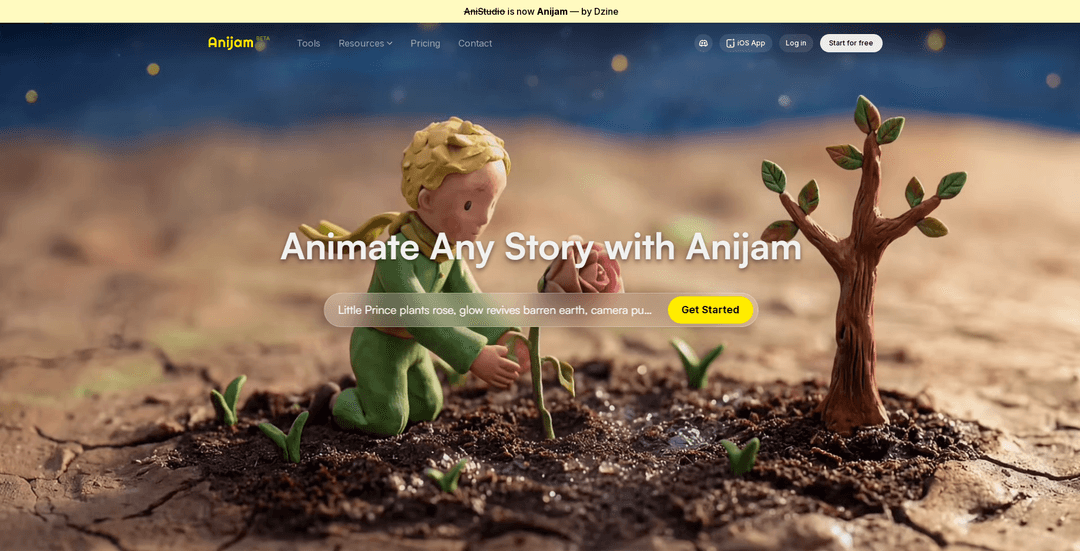
Anijam AI is an all-in-one AI animation platform that uses an AI Agent to take you from idea to finished animated video with script-to-scenes generation, character consistency, lip-sync, and timeline editing in one workspace.
https://www.anijam.ai/?utm_source=aipure
Product Information
Updated:May 9, 2026
What is Anijam AI
Anijam is that streamline the entire animation production process. Unlike traditional tools that require manual timeline editing and frame-by-frame work, Anijam allows creators to describe their vision in natural language and receive fully animated videos. The platform handles character consistency, scene generation, lip-sync, and styling automatically while offering professional-grade control through an intuitive canvas-based workflow. Positioned as a modern alternative to traditional animation software, it delivers production speed approximately three times faster than conventional methods.
Key Features of Anijam AI
Anijam AI is an all-in-one AI animation platform built around a conversational “AI Agent” that guides and automates the end-to-end pipeline—from script and scene generation to maintaining character consistency, adding animation-optimized lip sync, and refining results in a timeline editor. It supports text/image-to-animation workflows, offers a professional style library (with options to train a custom style), and integrates multiple leading video models (e.g., Kling, Luma, Runway, Google Veo, Sora) within one canvas for faster idea-to-screen production and 1080p exports (per third-party descriptions).
Agentic end-to-end workflow: A conversational AI Agent helps manage the full production pipeline (story/script → scenes → edits), reducing the need to stitch together separate tools.
Character consistency across scenes: Design a character once and keep identity traits (look, proportions, costume, facial features and overall continuity) stable throughout multiple scenes/storylines.
Animation-optimized lip sync + voice options: Built-in lip-sync engine aligns mouth movements to audio with expressive timing, supported by a voice library and customizable vocal identities (and typically user audio upload per third-party sources).
Timeline editor for precise control: A unified timeline enables scene sequencing and fine adjustments to pacing, transitions, and coherence after AI generation.
Professional style library + custom style training: Choose from a range of aesthetics (classic to modern) and train a signature style to keep a consistent artistic look across a project.
Multi-model video generation partners: Works with multiple integrated model partners (e.g., Kling, Wan, Hailuo, Luma, PixVerse, Runway, Google Veo, Seedream, Sora, Vidu) to generate and iterate within one workspace.
Use Cases of Anijam AI
Indie shorts and web series production: Rapidly turn scripts into episodic animated content with consistent characters, scene continuity, and quick iteration via the timeline editor.
Marketing and product storytelling: Create animated ads, explainers, and product demo narratives with on-brand styles, character-led stories, and fast turnaround for campaigns.
Education and training content: Produce animated lessons, scenario-based training, and multilingual dialogue scenes using voice/lip-sync features to improve engagement.
Social content and creator workflows: Generate short-to-mid length animated clips for YouTube/TikTok/Reels with a streamlined idea-to-export pipeline and style presets.
Previsualization and storyboarding: Convert written concepts into rough animated sequences to test pacing, camera framing, and scene transitions before committing to full production.
Pros
Unified, end-to-end workflow (agent + canvas + timeline) reduces tool switching and speeds production.
Strong focus on animation-specific needs like character consistency and lip sync.
Style library and custom style training help maintain a cohesive visual identity.
Cons
Pricing and plan details may change and can be unclear in third-party listings—best verified on the official site.
Less suited for studios needing full frame-by-frame/manual control compared to traditional animation pipelines.
Longer projects may require more editing/render time than short clips (often better as episodes, per third-party guidance).
How to Use Anijam AI
1) Sign up / log in: Go to https://www.anijam.ai/ and click “Get Started” or “Start for Free”, then create an account or log in to open the canvas-based workspace.
2) Start a new project on the Canvas: Create your first project in the “Production Workflow on the Canvas,” where the AI Agent guides you from idea to finished animation in one place.
3) Describe your animation idea (chat with the AI Agent): In natural language, tell the AI Agent what you want to make (story premise, characters, setting, tone). You can also upload a reference image to guide the look.
4) Generate a story outline / script: Ask the AI Agent to turn your concept into a structured outline and dialogue. Iterate by chatting (e.g., change the ending, adjust pacing, rewrite lines).
5) Break the script into scenes (storyboard sequencing): Have the AI Agent convert the script into scenes/beats. Confirm the scene list and order before generating animation to keep the narrative coherent.
6) Choose a visual style (Style Library or custom style): Pick a look from the Professional Style Library (classic to modern). If available to you, train/use a signature style so frames match your desired aesthetic.
7) Create or import characters (enable character consistency): Use “Design Your Character” to create a unique character (appearance + behavior) or upload your own assets. Ensure the character consistency feature is applied so the same identity persists across all scenes.
8) Add voices and lip sync: Use the voice library or upload your own audio. Enable the animation-optimized lip-sync engine so mouth movements match the dialogue with accurate timing and expression.
9) Generate animation for each scene: Click Generate for scenes (text-to-animation and/or image-to-video). Anijam can leverage partnered video models (e.g., Kling, Runway, Luma, Google Veo, PixVerse, Vidu, etc.) within the unified workflow.
10) Refine timing and edits in the Timeline Editor: Open the built-in Timeline Editor to adjust scene duration, reorder shots, refine motion/camera cues, tweak dialogue timing, and iterate on any scene by chatting or regenerating.
11) Iterate via conversation (fast revisions): Make changes by telling the AI Agent what to modify (e.g., “make the main character look younger,” “more dramatic music in scene 2,” “change the background,” “add a new scene”).
12) Export the final video: When satisfied, render/export the project (commonly MP4; many plans support HD such as 720p/1080p). Download and publish to YouTube, social platforms, or use in presentations/marketing.
Anijam AI FAQs
Anijam (formerly AniStudio) is an end-to-end, browser-based AI animation platform/agent that takes a story idea through the full pipeline—script, scenes, consistent characters, lip sync, and timeline editing—so users can produce a finished animated short in one workspace.
Popular Articles

Vosko AI: Localize and Dub Videos for Global Audiences
Oct 15, 2026

Atoms: A Multi-Agent AI Platform That Transforms Ideas into Launch-Ready Products
Oct 13, 2026

Nano Banana SBTI: What It Is, How It Works, and How to Use It in 2026
Apr 15, 2026

Atoms Review — The AI Product Builder Redefining Digital Creation in 2026
Apr 10, 2026
Latest AI Tools Similar to Anijam AI

Loud Fame
Loud Fame is an AI-powered video transformation tool that allows users to convert regular videos into anime-style animations and create AI-generated celebrity talking videos.

BizBoom.ai
BizBoom.ai is an AI-powered platform that automatically generates professional product videos from product links and images with 95% less cost.

EzVideos
EzVideos is an all-in-one video creation tool that helps users generate viral videos for social media platforms like Instagram, TikTok, and YouTube with automated editing features and built-in resources.

Illuminix
Illuminix is an AI-powered platform that empowers businesses with autonomous hyper-experts and specialized tools for automated business processes, data management, and video content creation.
Popular AI Tools Like Anijam AI

HunyuanVideo-I2V
HunyuanVideo-I2V is an open-source AI framework developed by Tencent that transforms static images into high-quality, dynamic videos with customizable motion effects and exceptional visual consistency.

Google Veo 2
Veo 2 is Google DeepMind's state-of-the-art AI video generation model that can create high-quality videos up to 4K resolution with realistic motion, extensive camera controls, and improved physics simulation from text prompts.

Vibing
Vibing is an AI-powered dating app that helps users share authentic moments through video stories and make genuine connections based on personality matching and interactive features.

Edits, an Instagram app
Edits is Instagram's free video creation app that provides creators with professional editing tools, AI features, and analytics capabilities to create high-quality videos directly from their phones.