AI Video Generator: Collart AI
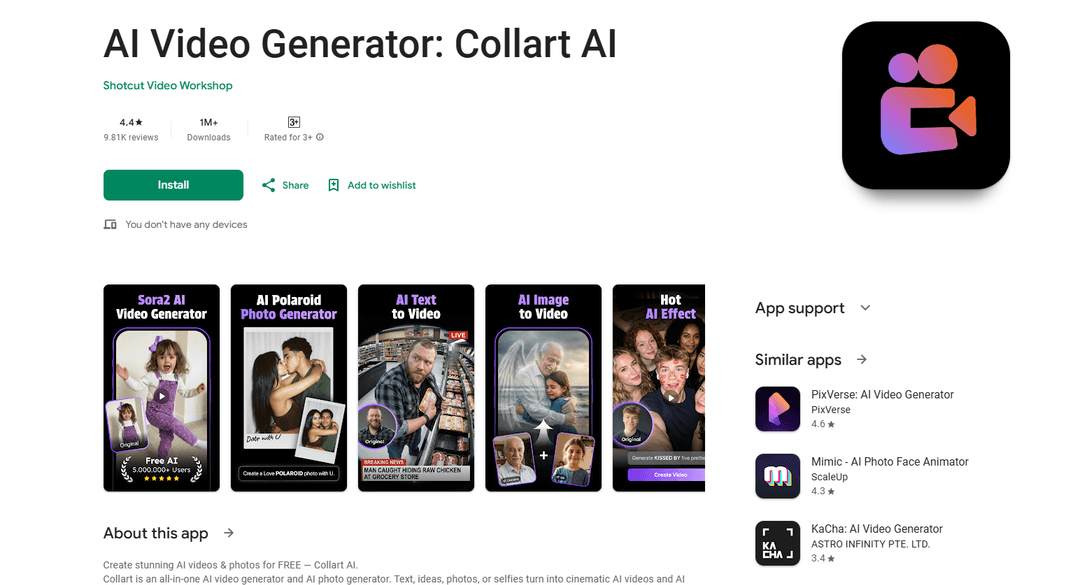
Collart AI is an all-in-one AI video and photo generator app that transforms text, ideas, photos, and selfies into high-quality cinematic videos and images using advanced AI technology like Sora AI and Veo3.1.
https://play.google.com/store/apps/details?id=free.ai.photo.generator.collart.ai&hl=en
Product Information
Updated:Jan 19, 2026
What is AI Video Generator: Collart AI
AI Video Generator: Collart AI is a comprehensive mobile application that enables users to create AI-generated videos and photos with minimal effort. Powered by cutting-edge AI technologies including Sora AI and Veo3.1, it offers a wide range of creative tools for both free and premium users. The app provides features like image-to-video conversion, text-to-video generation, AI photo enhancement, and various trending AI effects and filters. With over 1 million downloads and a 4.7-star rating, Collart AI has established itself as a popular choice for content creators, digital artists, and casual users looking to transform their creative ideas into professional-looking visual content.
Key Features of AI Video Generator: Collart AI
AI Video Generator: Collart AI is an all-in-one AI-powered creative tool that combines video and photo generation capabilities. It can transform text, ideas, photos, and selfies into cinematic videos and images using advanced AI technologies like Sora AI and Veo3.1. The app offers various features including image-to-video animation, text-to-video conversion, AI photo enhancement, and multiple creative effects like Polaroid style, anime transformation, and 3D model generation.
AI Image to Video Conversion: Transform static photos into smooth, lifelike videos with natural motion and depth using advanced AI animation technology
Text-to-Video Generation: Convert written descriptions into cinematic videos without requiring technical skills or complex editing
Multiple AI Effects & Filters: Access various creative tools including Polaroid style, AI Kiss & Hug, 3D model generation, and anime transformation effects
Enhanced Photo Processing: Improve image quality with AI-powered enhancement tools and background removal capabilities
Use Cases of AI Video Generator: Collart AI
Social Media Content Creation: Create engaging video content for platforms like Instagram, TikTok, and YouTube with viral-ready effects and templates
Personal Memory Enhancement: Transform personal photos into animated memories with creative effects and motion
Digital Art Production: Generate artistic content like anime-style portraits and 3D character models for creative projects
Business Marketing: Create professional headshots and promotional videos for business purposes with minimal effort
Pros
Offers multiple AI-powered creative tools in one application
Provides free features with ad-supported options
User-friendly interface requiring no technical skills
Cons
Limited credits in paid subscription compared to free version
Processing times can be slow even with priority processing
Some users report inconsistent quality in generated content
How to Use AI Video Generator: Collart AI
Download and Install: Download AI Video Generator: Collart AI from Google Play Store and install it on your device. The app requires at least 2GB RAM and 5GB free disk space.
Choose Creation Type: Select what you want to create: AI Video (from text or image), AI Photo, or apply AI effects like Polaroid, Kiss, Hug, etc.
For Text-to-Video: Type your script or describe the scene you want to create in the text prompt. The AI will generate a video matching your description.
For Image-to-Video: Upload a photo you want to animate. You can adjust the output aspect ratio and add background audio if desired.
Customize Settings: Choose video duration (5s, 8s, or 10s), select portrait or landscape mode, and adjust other available parameters.
Process Generation: Wait for the AI to process and generate your content. Free users may need to watch ads, while paid subscribers get priority processing.
Preview and Export: Preview the generated content. If satisfied, export the final video/image. If not, you can try generating again with different settings.
Credit Management: Free version gives 4 free creations per day. Paid subscription provides 200 credits per week. One video generation typically costs 30 credits.
AI Video Generator: Collart AI FAQs
Collart AI offers multiple AI features including: AI Image to Video conversion, Text to Video generation, Text to Image generation, AI Polaroid effects, AI Kiss & Hug animations, AI 3D Model generation, AI Anime style conversion, AI dance video creation, AI Photo Enhancement, and AI Remove Tool for removing unwanted objects.
Popular Articles

Vosko AI: Localize and Dub Videos for Global Audiences
Oct 15, 2026

Atoms: A Multi-Agent AI Platform That Transforms Ideas into Launch-Ready Products
Oct 13, 2026

Nano Banana SBTI: What It Is, How It Works, and How to Use It in 2026
Apr 15, 2026

Atoms Review — The AI Product Builder Redefining Digital Creation in 2026
Apr 10, 2026
Latest AI Tools Similar to AI Video Generator: Collart AI

Loud Fame
Loud Fame is an AI-powered video transformation tool that allows users to convert regular videos into anime-style animations and create AI-generated celebrity talking videos.

BizBoom.ai
BizBoom.ai is an AI-powered platform that automatically generates professional product videos from product links and images with 95% less cost.

EzVideos
EzVideos is an all-in-one video creation tool that helps users generate viral videos for social media platforms like Instagram, TikTok, and YouTube with automated editing features and built-in resources.

Illuminix
Illuminix is an AI-powered platform that empowers businesses with autonomous hyper-experts and specialized tools for automated business processes, data management, and video content creation.
Popular AI Tools Like AI Video Generator: Collart AI

HunyuanVideo-I2V
HunyuanVideo-I2V is an open-source AI framework developed by Tencent that transforms static images into high-quality, dynamic videos with customizable motion effects and exceptional visual consistency.

Google Veo 2
Veo 2 is Google DeepMind's state-of-the-art AI video generation model that can create high-quality videos up to 4K resolution with realistic motion, extensive camera controls, and improved physics simulation from text prompts.

Vibing
Vibing is an AI-powered dating app that helps users share authentic moments through video stories and make genuine connections based on personality matching and interactive features.

Edits, an Instagram app
Edits is Instagram's free video creation app that provides creators with professional editing tools, AI features, and analytics capabilities to create high-quality videos directly from their phones.