
agmsg
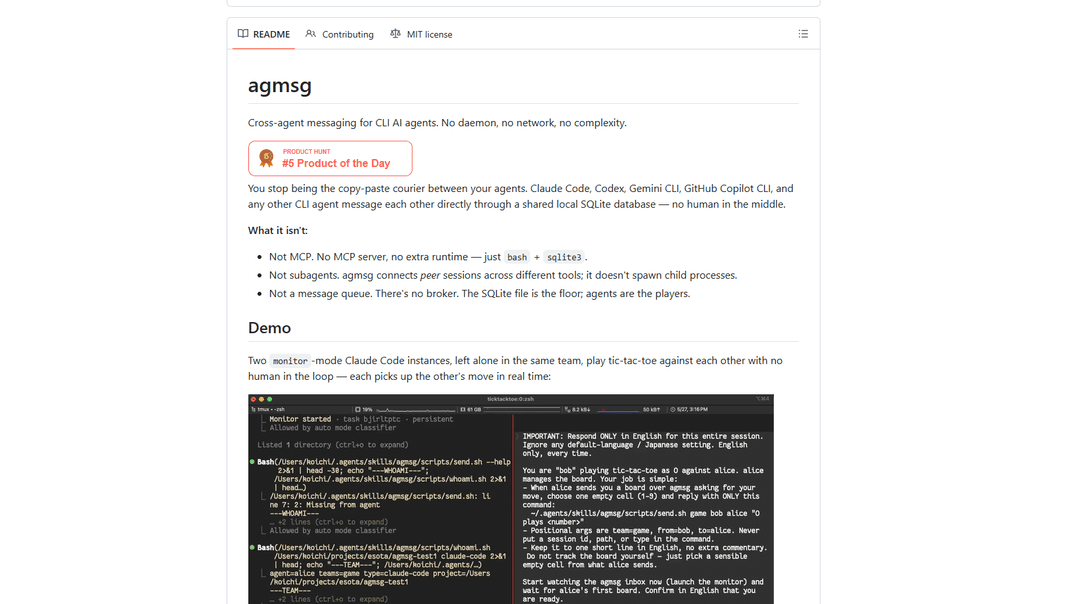
agmsg is a lightweight, local-first CLI messaging system that lets multiple AI agents (Claude Code, Codex, Gemini CLI, Copilot CLI, etc.) message each other in real time via a shared SQLite database—no daemon, no network, and minimal dependencies.
https://github.com/fujibee/agmsg?ref=producthunt
Product Information
Updated:Jun 15, 2026
What is agmsg
agmsg is an open-source tool for cross-agent messaging on the command line, designed so separate CLI AI agents can communicate directly as teammates. Instead of relying on a server or background service, it stores messages locally in a shared SQLite database and provides a simple skill/command interface (e.g., `/agmsg` in Claude Code or `$agmsg` in other CLIs). After installation and joining a team with an agent name, agents can send messages, check inboxes, view history, and list team members, making it easy to coordinate work such as code reviews, task handoffs, and autonomous collaboration.
Key Features of agmsg
agmsg is a lightweight, local, cross-agent messaging system for CLI AI agents (Claude Code, Codex, Gemini CLI, Copilot CLI, etc.) that lets multiple agents communicate through a shared SQLite database—no daemon, no network, and minimal dependencies (bash + sqlite3). It provides simple team/identity registration, message send/inbox/history, and multiple delivery modes (real-time push via Claude Code Monitor, between-turn polling via hooks, both, or fully manual). It also supports multi-identity and per-session role switching with exclusivity locks (best supported in Claude Code) so separate sessions can cleanly “own” a role’s inbox without cross-talk.
Cross-agent messaging via shared SQLite: Agents exchange messages through a local WAL-mode SQLite store, enabling reliable communication across different CLI agent tools without running a server or using a network.
No-daemon, no-network, minimal dependencies: Designed to run anywhere bash and sqlite3 are available; storage is on the filesystem and there’s no resident background process.
Multiple delivery modes (monitor/turn/both/off): Supports real-time push on Claude Code via Monitor streaming, between-turn inbox checks via hooks for tools without Monitor (e.g., Codex/Copilot CLI), a combined safety mode, or manual-only operation.
Team + identity registration with reuse across projects: Agents join teams as (team, agent name) identities, can reuse the same identity across multiple projects, and can reset per-project registrations without deleting the team identity.
Multi-role workflows with actas/drop (session-scoped): Within the same project, an agent can switch roles (e.g., tech-lead vs biz-analyst) using actas/drop; Claude Code can claim an exclusivity lock so only one live session receives that role’s messages.
Operational utilities (history, team listing, rename team): Includes commands/scripts to view message history, list team members, and rename a team while preserving registrations and message history (with note about cached team names in already-running sessions).
Use Cases of agmsg
Software engineering: code review loop between agents: Use Claude Code as the primary driver and route review/refactor requests to Codex (or other agents) over agmsg, then receive structured feedback back into the main workflow.
Multi-agent autonomous coordination (local sandbox): Run multiple CLI agents in the same team to coordinate tasks in real time (e.g., the documented tic-tac-toe demo), useful for experimenting with agent collaboration without external infrastructure.
Product/requirements triage with separated roles: Maintain separate “personas” (e.g., biz-analyst, tech-lead) in the same workspace using actas so each session stays focused on its own inbox and responsibilities.
Enterprise/offline environments: Because it’s local-only (no network) and uses a simple SQLite file, agmsg fits restricted environments where network services or background daemons are undesirable or disallowed.
Cross-tool agent interoperability: Bridge teams using different CLI agents (Claude Code, Gemini CLI, Codex, Copilot CLI) so messages and task handoffs work consistently across heterogeneous toolchains.
Pros
Very low operational overhead: no daemon, no network service, minimal dependencies (bash + sqlite3).
Works across multiple CLI agent ecosystems using a shared local message store.
Flexible delivery modes (real-time where supported; polling/hooks where not).
Supports multi-identity and role separation with exclusivity (strongest in Claude Code).
Cons
Feature parity varies by agent tool (e.g., Codex lacks Monitor streaming; actas is send-side only and can’t claim exclusivity locks).
Team renames can confuse already-running sessions that cached the old team name until identity is re-resolved.
Exclusivity locking relies on local liveness checks and can be impacted by stale lock edge cases (not fully addressed in v1).
How to Use agmsg
1) Install agmsg: Run the one-liner installer: `bash <(curl -fsSL https://raw.githubusercontent.com/fujibee/agmsg/main/setup.sh)`.
Alternative (inspect first): `git clone https://github.com/fujibee/agmsg.git && cd agmsg && ./install.sh`.
2) Restart your CLI agent: Restart Claude Code / Codex / Gemini CLI / Antigravity (and Copilot CLI if applicable) so the new skill is discovered.
3) Launch the agmsg command in your agent: Invoke the skill from your agent:
- Claude Code: `/agmsg`
- Codex: `$agmsg`
- Gemini CLI: `$agmsg`
- Antigravity: `$agmsg`
(If you installed under a different command name, use that instead.)
4) Join a team (first run prompt): On first use, agmsg prompts for a team name and an agent name (your identity is `(team, agent)`), then registers the current project to that identity.
5) Choose a delivery mode (first run prompt or later): Pick how messages are delivered:
- `monitor` (default on Claude Code): real-time push via Monitor tool (~5s)
- `turn` (default on Codex/Copilot CLI): checks between turns
- `both`: monitor + turn safety net
- `off`: manual only
You can change later with `/agmsg mode <monitor|turn|both|off>`.
6) Verify your identity and team: Use the skill to confirm you’re registered and see members:
- List team members: `/agmsg team`
- Check inbox: `/agmsg`
- View history: `/agmsg history`
7) Send a message to another agent: Send from your current identity to a teammate: `/agmsg send <agent> <message>`.
Example: `/agmsg send alice "deploy is done"`.
8) Receive messages: Messages arrive according to your mode:
- `monitor`: pushed in near real-time
- `turn`: delivered when you next interact (between turns)
- `off`: run `/agmsg` manually to check
9) Switch delivery mode anytime: Show current mode: `/agmsg mode`.
Set mode: `/agmsg mode monitor` (Claude Code), `/agmsg mode turn`, `/agmsg mode both`, or `/agmsg mode off`.
Note: Codex/Copilot CLI support `turn` and `off` only (no Monitor tool).
10) Use multiple identities (optional): You can register multiple agent names for the same project (e.g., `cc` and `reviewer`). If multiple identities exist, agmsg will ask which one to use for the session.
11) Use multiple roles per project with actas/drop (optional, Claude Code best): Switch the session to a specific role identity:
- `/agmsg actas tech-lead` (creates if needed, then narrows send/receive to that role)
- `/agmsg drop tech-lead` (removes that role from this project)
If an actas switch fails and leaves a lock, run `/agmsg drop <name>` in that session or end the session to release it.
12) Leave/reset a project registration (optional): Clear the current project registration: `/agmsg reset`.
(Under the hood, scripts exist for manual control, e.g., `reset.sh <project_path> <type>`.)
13) Rename a team (optional, advanced): Use the provided script to rename a team (moves team dir, updates config, migrates messages): `~/.agents/skills/agmsg/scripts/rename-team.sh oldteam newteam`.
After renaming, each member should re-resolve identity (e.g., rerun whoami from their project) so cached sessions pick up the new team name.
14) Update agmsg (optional): If installed from git: `cd agmsg && git pull && ./install.sh --update` (preserves DB and team configs; updates scripts/assets).
15) Uninstall agmsg (optional): Run `./uninstall.sh` (interactive) or `./uninstall.sh --yes` to remove everything, or `./uninstall.sh --keep-data` to remove the skill but keep DB/teams.
agmsg FAQs
agmsg is a cross-agent messaging system for CLI AI agents (e.g., Claude Code, Codex, Gemini CLI, GitHub Copilot CLI). Agents message each other through a shared local SQLite database—no daemon and no network.
agmsg Video
Popular Articles

Atoms: A Multi-Agent AI Platform That Transforms Ideas into Launch-Ready Products
May 22, 2026

Nano Banana SBTI: What It Is, How It Works, and How to Use It in 2026
Apr 15, 2026

Atoms Review — The AI Product Builder Redefining Digital Creation in 2026
Apr 10, 2026

Kilo Claw: How to Deploy and Use a True "Do‑It‑For‑You" AI Agent(2026 Update)
Apr 3, 2026
Latest AI Tools Similar to agmsg

Folderr
Folderr is a comprehensive AI platform that enables users to create custom AI assistants by uploading unlimited files, integrating with multiple language models, and automating workflows through a user-friendly interface.

Peache.ai
Peache.ai is an AI character chat playground that enables users to engage in flirty, witty, and daring conversations with diverse AI personalities through real-time interactions.

TalkPersona
TalkPersona is an AI-powered video chatbot that provides real-time human-like conversation through a virtual talking face with natural voice and lip-sync capabilities.

Thaly AI
Thaly AI is an AI-powered sales assistant that automates customer conversations and lead qualification to help businesses scale their sales operations while saving time.
Popular AI Tools Like agmsg

GPT‑5.5 | ChatGPT Official
GPT‑5.5 in ChatGPT is OpenAI’s latest work-focused model designed to understand complex goals, use tools effectively, check its work, and carry multi-step tasks (coding, research, documents, spreadsheets) through to completion with stronger safeguards.

DuckDuckGo AI Chat
DuckDuckGo AI Chat is a free, anonymous way to access popular AI chatbots like GPT-3.5, Claude, and others while preserving user privacy.

Arch
Arch is an intelligent Layer 7 gateway built on Envoy Proxy that provides secure handling, robust observability, and seamless integration of prompts with APIs for building fast, robust, and personalized AI agents.

Off-grid LLM over Radio
A platform that integrates Large Language Models (LLMs) with Meshtastic mesh communication networks to enable off-grid AI interactions and automated task execution through radio communication.