
AgentEcho
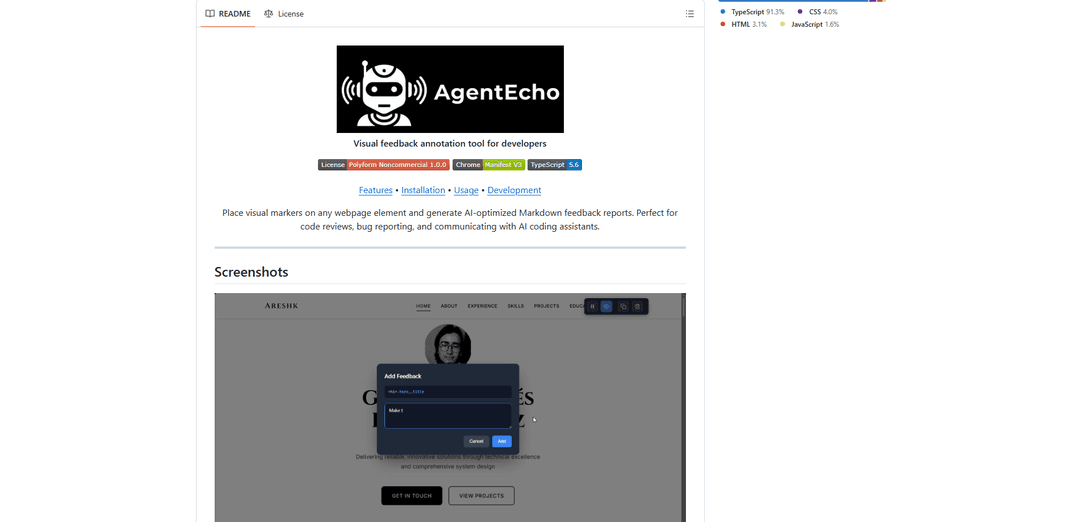
AgentEcho is a visual feedback annotation tool for developers that allows placing markers on webpage elements and generating AI-optimized Markdown reports for better communication between developers and AI coding assistants.
https://github.com/Areshkew/agentecho?ref=producthunt
Product Information
Updated:Feb 8, 2026
What is AgentEcho
AgentEcho is a Chrome browser extension designed to bridge the gap between developers and AI coding tools through visual annotation and structured feedback generation. It offers both a paid version on the Chrome Web Store for $2 and a free version available for developers to build from source. The tool enables developers to provide precise, context-rich feedback about web elements by combining visual markers with detailed technical information about the targeted DOM elements.
Key Features of AgentEcho
AgentEcho is a visual feedback annotation tool for developers that allows users to place markers on webpage elements and generate AI-optimized Markdown feedback reports. It features framework detection for React and Angular components, smart element analysis for extracting CSS selectors and attributes, and a visual annotation system with persistent markers, all while maintaining style isolation through Shadow DOM.
Visual Annotation System: Enables users to place numbered markers on any webpage element with blue hover highlights and persistent positioning, making it easy to identify and track feedback points
Framework Detection: Automatically identifies React and Angular components, providing deeper insight into the technical structure of web applications
Smart Element Analysis: Generates unique CSS selectors and extracts comprehensive element information including classes, IDs, data attributes, and component names
Markdown Export: One-click export of structured feedback reports optimized for AI coding agents, including all element context and precise technical details
Use Cases of AgentEcho
Code Review Collaboration: Developers can visually mark and document interface issues or improvements needed during code reviews
Bug Reporting: QA teams can create detailed bug reports with precise technical context about affected elements and components
AI Assistant Communication: Developers can generate structured feedback that's optimized for communication with AI coding assistants and automated tools
UI/UX Feedback: Design teams can provide specific feedback on interface elements with technical context for developers
Pros
Works on any website with Shadow DOM isolation
Provides comprehensive technical element analysis
Offers both free (source build) and paid (Chrome Store) options
Cons
Cannot inject into cross-origin iframes due to browser security
Framework detection may fail on production/minified builds
Selectors may break if DOM structure changes significantly
How to Use AgentEcho
Install AgentEcho: Either purchase from Chrome Web Store for $1 or build from source by cloning the GitHub repository, running 'npm install' and 'npm run build', then loading the dist/ directory as an unpacked extension in Chrome
Activate the Extension: Click the AgentEcho icon in your browser toolbar and click 'Activate' to enable annotation on the current webpage
Hover Over Elements: Move your mouse over any webpage element to see it highlighted in blue, showing what you can annotate
Add Feedback Markers: Click on a highlighted element to place a numbered marker and open a feedback modal
Enter Feedback: Type your feedback comments in the modal that appears after placing a marker
Add Multiple Markers: Repeat the process of clicking and adding feedback for as many elements as needed
Generate Report: Click 'Copy' in the toolbar to copy all feedback as a formatted Markdown report to your clipboard
Use Keyboard Shortcuts: Optional: Use shortcuts like 'C' to copy, 'H' to toggle markers, Delete/Backspace to clear markers, and Escape to exit annotation mode
Manage Annotations: Use toolbar controls to Pause highlighting, Hide/Show markers, Copy feedback, Clear all markers, or Exit the extension
AgentEcho FAQs
AgentEcho is a visual feedback annotation tool for developers that allows users to place visual markers on webpage elements and generate AI-optimized Markdown feedback reports. It's particularly useful for code reviews, bug reporting, and communicating with AI coding assistants.
AgentEcho Video
Popular Articles

Vosko AI: Localize and Dub Videos for Global Audiences
Oct 15, 2026

Atoms: A Multi-Agent AI Platform That Transforms Ideas into Launch-Ready Products
Oct 13, 2026

Nano Banana SBTI: What It Is, How It Works, and How to Use It in 2026
Apr 15, 2026

Atoms Review — The AI Product Builder Redefining Digital Creation in 2026
Apr 10, 2026
Latest AI Tools Similar to AgentEcho

Cursor Search
Cursor Search is an AI-powered browser extension that provides instant access to world knowledge and information retrieval directly from your cursor.
PixieBrix
PixieBrix is a low-code browser extension platform that allows users to customize, automate, and enhance web applications with AI, integrations, and collaboration features.
AI Form Fill
AI Form Fill is an AI-powered browser extension that automatically completes online forms with a single click, saving time and boosting productivity.

Duang AI Tab
Duang AI Tab is a popular browser extension that beautifies your homepage, improves productivity, and provides one-click access to AI tools anywhere.
Popular AI Tools Like AgentEcho
Edge Copilot Mode
Edge Copilot Mode is Microsoft's experimental AI-powered browser feature that combines search, chat, and web navigation into a single interface, enabling users to browse smarter with AI assistance while maintaining privacy and control.

BrowserAI
BrowserAI is an open-source library that enables running local Large Language Models (LLMs) directly in web browsers with WebGPU acceleration, offering privacy-focused AI capabilities without requiring server infrastructure.

iBrowsy
iBrowsy is a modern, AI-powered web browser for macOS that combines intelligent features, privacy-first design, and seamless user experience with built-in GPT-4 assistance.
OpenDia
OpenDia is an open-source browser automation tool that enables AI models to control your browser seamlessly while leveraging your existing digital assets like logged-in accounts, cookies, and browsing history.