Agent 37 Cloud
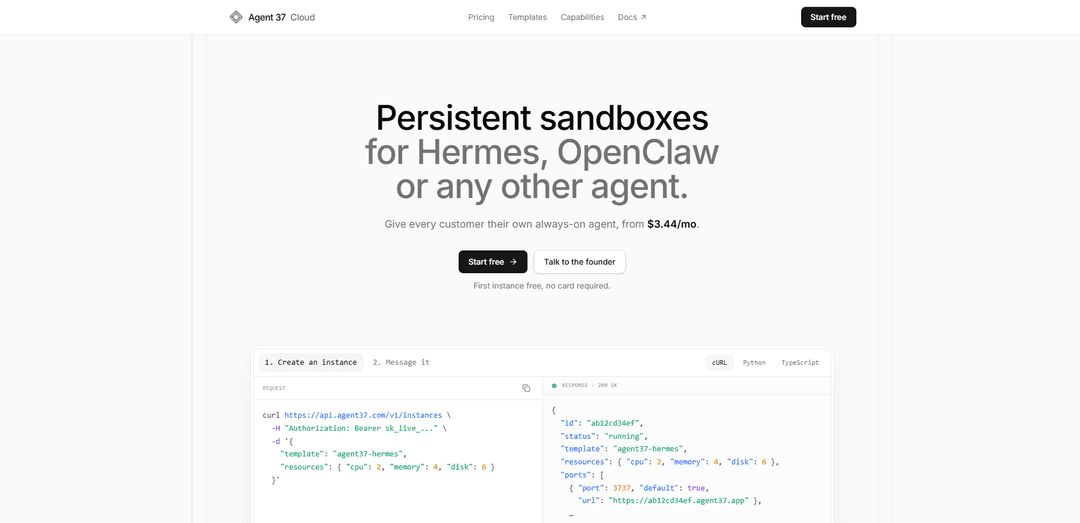
Agent 37 Cloud est un "sandbox" d'agent hébergé en marque blanche, toujours actif, qui provisionne un "ordinateur" persistant et isolé par client en un seul appel API, avec des réponses en streaming, un accès au terminal, des fichiers, des intégrations et une facturation basée sur l'utilisation à partir d'un solde prépayé.
https://www.agent37.com/cloud?ref=producthunt&utm_source=aipure
Informations sur le produit
Mis à jour:Jul 8, 2026
Qu'est-ce que Agent 37 Cloud
Agent 37 Cloud est une plateforme gérée pour l'exécution d'environnements d'agents IA persistants (tels que Hermes et OpenClaw) sans avoir à construire et maintenir votre propre flotte de VPS, de conteneurs, de routage ou de gestion d'état. Chaque client peut se voir attribuer sa propre instance permanente, avec son propre système de fichiers, un contexte de longue durée et des outils connectés, afin que vous puissiez commercialiser un produit agent sous votre propre marque pendant qu'Agent 37 gère l'infrastructure. Les instances se lancent rapidement via API, exposent des points de terminaison routables (par exemple, https://{id}.agent37.app) et peuvent être configurées pour utiliser vos propres clés de modèle ou des modèles mesurés avec des plafonds de dépenses.
Caractéristiques principales de Agent 37 Cloud
Agent 37 Cloud est une plateforme gérée pour le provisionnement d'« instances d'agent » persistantes et toujours actives (environnements isolés) par client via une API simple. Chaque instance est livrée avec des URL routables, une interface REST propre (y compris le streaming via SSE) et des contrôles orientés production tels que la facturation prépayée basée sur l'utilisation, des plafonds de dépenses par instance et une isolation au niveau du noyau (gVisor). Elle prend en charge des modèles tels que Hermes et OpenClaw (ainsi que des images Docker personnalisées), permet des intégrations avec plus de 1 000 applications et offre des capacités opérationnelles telles que le transfert de fichiers, l'exécution de commandes, les exécutions planifiées et un terminal/bureau/explorateur de fichiers intégrable, afin que les équipes puissent livrer des produits d'agent en marque blanche sans gérer leur propre infrastructure VPS/conteneur.
Provisionnement en un seul POST pour les ordinateurs agents persistants: Créez une instance toujours active par client avec un seul appel API; l'instance conserve les fichiers, la mémoire/l'historique et les outils connectés jusqu'à ce que vous la supprimiez.
Routage géré et accès authentifié par instance: Chaque instance est accessible à l'adresse https://{id}.agent37.app avec des ports déjà routés et protégés via votre clé API ou des URL signées – pas de DNS, de proxy inverse ou de certificats à gérer.
Streaming des réponses de l'agent et de l'activité des outils (SSE): Exécutez des tours via POST /v1/responses et diffusez des événements texte/raisonnement/outil en direct via Server-Sent Events; réutilisez session_id pour continuer les discussions sans renvoyer l'historique complet.
Modèles + images Docker personnalisées: Partez de modèles prêts à l'emploi comme Hermes (chat/navigation/code/fichiers) ou OpenClaw (agent de canaux et de modèles), ou enregistrez et exposez des ports à partir de votre propre image Docker personnalisée.
Intégrations, fichiers, commandes shell et exécutions planifiées: Connectez-vous à plus de 1 000 applications (par exemple, Gmail/Slack/Notion), téléchargez/téléchargez des fichiers, exécutez des commandes shell à l'intérieur de l'instance et planifiez des exécutions non surveillées de type cron.
Contrôles de production : isolation, mesure et modèles BYOK: Les instances fonctionnent avec une isolation au niveau du noyau (gVisor) et des quotas de disque; la tarification est basée sur le calcul à partir d'un solde prépayé, avec une mesure de modèle facultative et des plafonds de dépenses par instance (apportez vos propres clés de modèle ou utilisez des modèles mesurés).
Cas d'utilisation de Agent 37 Cloud
Fournisseurs SaaS offrant un agent dédié par locataire: Provisionnez une instance persistante par client afin que chaque locataire dispose de son propre agent de longue durée avec un contexte, des fichiers et des comptes connectés conservés, sans avoir à créer une gestion d'état multi-locataire et un hébergement.
Agences proposant des automatisations en marque blanche pour les clients: Regroupez des flux de travail d'agent reproductibles (invites, compétences, packs d'intégration) sous votre marque pendant qu'Agent 37 gère le provisionnement, l'isolation, le routage et le suivi des coûts par client.
Copilotes de support client et d'opérations avec accès aux outils: Exécutez des agents toujours actifs connectés à Slack/Gmail/Notion et à d'autres outils pour trier les demandes, rédiger des réponses, mettre à jour les documents internes et exécuter des listes de contrôle opérationnelles selon un calendrier.
Environnements de développement pour la création et le débogage de flux de travail d'agent: Utilisez le terminal/bureau/explorateur de fichiers hébergé et l'exécution de commandes pour itérer sur le code de l'agent et les intégrations dans un environnement cloud inspectable, puis créez un modèle pour le réutiliser.
Exécuteurs d'automatisation du commerce électronique et du marketing: Déployez des agents persistants qui surveillent les boîtes de réception/prospects, effectuent des recherches, génèrent des brouillons de contenu et transmettent des mises à jour aux CRM ou aux outils de marketing à l'aide d'intégrations pré-câblées et d'exécutions planifiées.
Agents de tâches internes « toujours actifs » pour les petites équipes: Donnez à chaque équipe ou fonction une instance dédiée (par exemple, opérations financières, opérations de recrutement) qui exécute des tâches récurrentes, gère les fichiers de travail et fournit des mises à jour de statut en continu à votre application.
Avantages
Délai de mise en production rapide : provisionnez des instances persistantes et communiquez avec elles via une API REST gérée + streaming sans exécuter votre propre pile VPS/conteneur.
Compatible marque blanche : les clients interagissent avec votre produit tandis que les instances restent isolées par client avec des URL routables et un accès authentifié.
Transparence des coûts : facturation horaire prépayée basée sur le calcul avec des plafonds de dépenses par instance; supprimez à tout moment avec des retours de solde au prorata.
Inconvénients
Des interruptions opérationnelles peuvent survenir en raison des mises à jour/redémarrages de la plateforme (notées dans le cadre des mises à jour hebdomadaires des instances).
Les détails de sécurité/conformité peuvent être moins documentés que les plateformes d'entreprise, ce qui peut être une préoccupation lorsque les agents s'exécutent avec un accès shell complet et des clés API externes.
Comment utiliser Agent 37 Cloud
1) Créez une clé API Agent 37 Cloud: Dans le tableau de bord Agent 37, générez une clé API (sk_live_...). Copiez-la immédiatement (elle n'est affichée qu'une seule fois). Vous l'enverrez en tant que jeton Bearer à chaque requête.
2) Provisionnez une nouvelle instance persistante (une par client): POST vers le plan de contrôle Agent 37 Cloud pour créer une instance à partir d'un modèle (par exemple, Hermes/OpenClaw) et choisir les ressources (cpu, mémoire, disque). Exemple : curl https://api.agent37.com/v1/instances -H "Authorization: Bearer sk_live_..." -d '{"template":"agent37-hermes","resources":{"cpu":2,"memory":4,"disk":6}}'
3) Capturez l'ID de l'instance et l'URL routée par défaut: À partir de la réponse de création d'instance, stockez l'ID de l'instance (par exemple, ab12cd34ef) et l'URL du port par défaut (par exemple, https://ab12cd34ef.agent37.app). C'est cette URL d'instance que vous utiliserez ensuite.
4) Démarrez un tour de conversation sur l'instance via REST: Envoyez un POST au point de terminaison /v1/responses de l'instance avec votre entrée. L'instance est toujours active et conserve son propre état (fichiers, mémoire, outils connectés) jusqu'à ce que vous la supprimiez.
5) Activez le streaming (Server-Sent Events) lorsque vous souhaitez une sortie en direct: Définissez stream: true sur POST /v1/responses pour recevoir des événements SSE au fur et à mesure que l'agent produit du texte, du raisonnement, des appels d'outils et des réponses finales.
6) Réutilisez session_id pour continuer le même fil de discussion: Conservez le session_id renvoyé par l'instance et réutilisez-le lors des appels ultérieurs afin de n'envoyer que les nouvelles entrées utilisateur. L'agent conserve l'historique complet sur l'instance.
7) Exécutez plusieurs sessions sur la même instance si nécessaire: Utilisez la même instance pour plusieurs sessions (ou plusieurs fils de discussion) tout en conservant le système de fichiers persistant, la mémoire et les intégrations de l'instance intacts pour ce client.
8) Choisissez comment les modèles sont facturés : BYOK ou mesurés via Agent 37: Apportez vos propres clés de fournisseur de modèles (BYOK) ou utilisez des modèles via la passerelle d'Agent 37. Lorsque vous utilisez la passerelle, appliquez des plafonds de dépenses par instance pour contrôler les coûts.
9) Utilisez des modèles (Hermes, OpenClaw ou Docker personnalisé) pour correspondre à votre produit: Choisissez un modèle intégré (Hermes pour le chat/navigation/code/fichiers ; OpenClaw pour l'hébergement d'agents de canaux et de modèles) ou enregistrez une image Docker publique comme modèle personnalisé et exposez les ports que vous souhaitez router.
10) Ajoutez des intégrations (Gmail/Slack/Notion/plus de 1000 applications) pour l'accès aux outils: Connectez des applications tierces (via les intégrations de la plateforme) afin que votre instance puisse agir via ces outils ; les intégrations sont routées et peuvent être mesurées.
11) Téléchargez/téléchargez des fichiers pour prendre en charge des flux de travail réels: Utilisez les capacités de fichiers de la plateforme pour envoyer des documents à une instance et récupérer les artefacts générés par l'agent, directement depuis votre backend.
12) Exécutez des commandes shell à l'intérieur de l'instance depuis votre backend: Utilisez la capacité d'exécution de commandes pour exécuter des commandes shell arbitraires dans le sandbox, permettant des installations, des scripts et des étapes d'automatisation sans gérer votre propre VPS.
13) Planifiez des exécutions non surveillées (style cron): Attribuez un calendrier à un agent afin qu'il s'exécute automatiquement ; lisez ensuite les résultats via l'API de l'instance.
14) Intégrez des outils d'opérateur (terminal/bureau/explorateur de fichiers) avec des URL signées: Lorsque vous avez besoin que des opérateurs humains inspectent ou interviennent, intégrez un terminal, un bureau ou un explorateur de fichiers en direct à l'aide d'URL signées afin que les clients ne voient toujours que votre produit.
15) Adaptez les ressources ou le disque à mesure que les besoins des clients augmentent: Augmentez le CPU/RAM pour les charges de travail plus lourdes (par exemple, utilisation intensive du navigateur ou de nombreux agents) et étendez le disque si nécessaire ; la tarification est basée sur le calcul et le disque est extensible par Go.
16) Personnalisez votre produit agent en marque blanche: Affichez l'instance avec votre propre UX produit. Les clients interagissent avec votre application tandis qu'Agent 37 fournit des sandboxes isolés au niveau du noyau (gVisor), le routage et l'API REST derrière votre clé ou vos URL signées.
17) Supprimez une instance lorsqu'un client se désabonne ou que vous n'en avez plus besoin: Supprimez l'instance pour arrêter les frais de calcul en cours. La facturation est basée sur l'utilisation à partir d'un solde prépayé et est calculée au prorata de l'heure ; le temps prépayé non utilisé retourne à votre solde.
FAQ de Agent 37 Cloud
Agent 37 Cloud est une plateforme hébergée pour l'exécution d'« instances » d'agents persistantes et toujours actives (bac à sable) pour Hermes, OpenClaw ou des modèles Docker personnalisés. Chaque instance est un environnement dédié avec ses propres fichiers, sa mémoire, ses outils et son point d'API qui reste disponible jusqu'à ce que vous le supprimiez.
Vidéo de Agent 37 Cloud
Articles populaires

Vosko AI : Localisez et doublez vos vidéos pour une audience mondiale
Oct 15, 2026

Atoms : Une plateforme d'IA multi-agents qui transforme les idées en produits prêts à être lancés
May 22, 2026

Nano Banana SBTI : Qu'est-ce que c'est, comment ça marche et comment l'utiliser en 2026
Apr 15, 2026

Atoms : L'outil de création de produits IA qui redéfinit la création numérique en 2026
Apr 10, 2026
Derniers outils d'IA similaires à Agent 37 Cloud

invoices.dev
invoices.dev est une plateforme de facturation automatisée qui génère des factures directement à partir des commits Git des développeurs, avec des capacités d'intégration pour GitHub, Slack, Linear et les services Google.

Monyble
Monyble est une plateforme d'IA sans code qui permet aux utilisateurs de lancer des outils et des projets d'IA en moins de 60 secondes sans nécessiter d'expertise technique.

Devozy.ai
Devozy.ai est une plateforme de libre-service pour développeurs alimentée par l'IA qui combine la gestion de projet Agile, DevSecOps, la gestion d'infrastructure multi-cloud, et la gestion des services informatiques en une solution unifiée pour accélérer la livraison de logiciels.
Mediatr
MediatR est une bibliothèque .NET open-source populaire qui implémente le modèle Médiateur pour fournir un traitement simple et flexible des requêtes/réponses, un traitement des commandes et des notifications d'événements tout en favorisant un couplage lâche entre les composants de l'application.
Outils d'IA populaires comme Agent 37 Cloud
Launch
Launch est une plateforme basée sur l'IA qui permet aux utilisateurs de créer instantanément des applications full-stack tout en fournissant des outils complets pour les lancements de produits, les programmes d'entrepreneuriat et l'acquisition de clients.

GitHub Copilot Chat
GitHub Copilot Chat est un assistant de codage alimenté par l'IA qui fournit des interactions en langage naturel, des suggestions de code en temps réel et un soutien contextuel directement dans les IDE pris en charge et sur GitHub.com.

Rememberall
Rememberall est une solution de mémoire à long terme sécurisée et open-source qui permet aux applications d'IA et aux modèles GPT de maintenir une mémoire persistante à travers les conversations grâce à des capacités de recherche sémantique et de stockage vectoriel.

Upsonic
Upsonic est un framework d'agent d'IA axé sur la fiabilité avec une architecture client-serveur dockerisée qui permet des flux de travail d'agent fiables grâce à des fonctionnalités avancées telles que les couches de vérification, l'architecture triangulaire et l'intégration du protocole de contexte de modèle (MCP).