
OpenWork
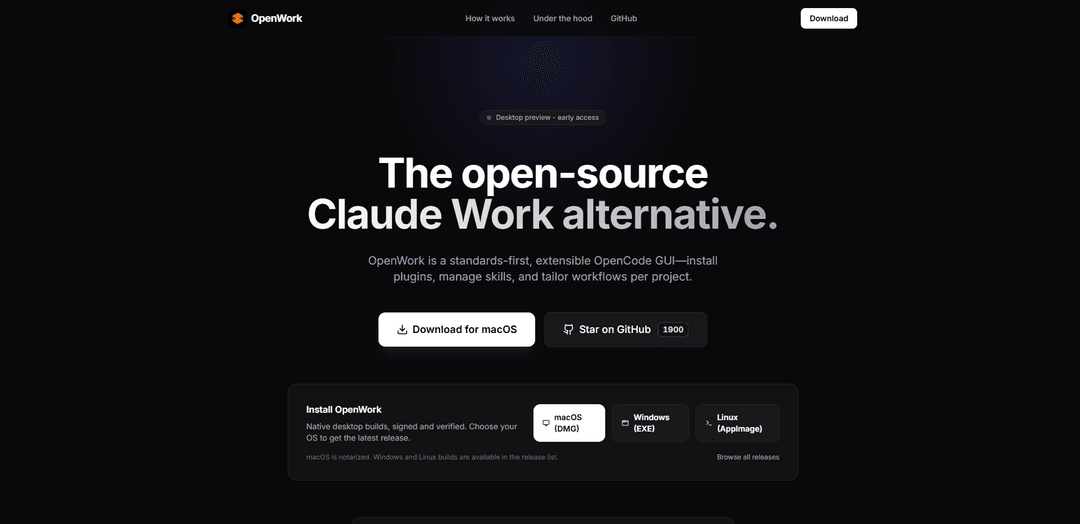
OpenWork is an open-source, standards-first AI desktop agent that runs locally on your machine to automate file management, document creation, and knowledge work while providing complete control and transparency.
https://openwork.software/?ref=producthunt
Product Information
Updated:Feb 8, 2026
What is OpenWork
OpenWork is an extensible, open-source alternative to Claude Cowork, designed specifically for knowledge workers. Built on OpenCode, it provides a clean, guided user interface that transforms complex AI agent capabilities into a polished, professional product. The software operates as a native desktop application that can run either locally on your machine or connect to a remote server, allowing users to manage AI workflows, install plugins, and tailor experiences per project while maintaining data privacy and security.
Key Features of OpenWork
OpenWork is an open-source desktop AI agent system that provides a clean, guided user interface for automating knowledge work. It runs locally on users' machines or can connect to remote servers, allowing users to manage files, create documents, and automate repetitive tasks while maintaining data privacy. The system features workspace management, skill plugins, permission controls, and real-time progress tracking, all built on OpenCode standards.
Local-First Architecture: Runs directly on your machine with option to connect to remote servers, ensuring data privacy and control while allowing flexibility for long-running tasks
Extensible Skills Management: Built-in package manager for installing and managing plugins and skills through the Skills tab, reading and writing opencode.json
Permission-Based Security: Clear permission prompts for file access and tool execution, allowing users to control what the AI can access and modify
Real-Time Progress Tracking: Renders AI tasks as a functional timeline, showing plan updates and agent actions in real-time
Use Cases of OpenWork
File Organization Projects: Scans, identifies, and reorganizes scattered documents across folders according to specified rules and content types
Software Development: Assists developers with code generation, automated testing, and deployment workflows through skill plugins
Research Data Processing: Helps academic researchers standardize and consolidate data from multiple sources into structured datasets
Team Workflow Standardization: Allows teams to distribute specific skill folders or plugins for non-technical members to run sophisticated AI workflows
Pros
100% free and open source under MIT license
No subscription fees or hidden costs - only pay for API calls
Strong focus on privacy and local control
Cons
Currently only available for macOS
Requires own API keys from providers like OpenAI/Anthropic
Still in alpha release stage (v0.1.16)
How to Use OpenWork
Download and Install: Download the signed and notarized macOS DMG file from GitHub releases page and drag it to Applications folder (currently only supports macOS with Apple Silicon)
Set Up API Keys: Provide your own API key from supported providers (OpenAI, Anthropic, Google, xAI) or set up local models via Ollama
Choose Run Mode: Select either Local mode (runs on your computer) or Remote mode (connects to your private server) depending on your needs
Select Workspace: Choose which folders OpenWork can access by selecting your workspace directory
Review First-Run Session: Go through the 'Welcome to OpenWork' onboarding session that teaches basic usage through practical examples
Install Skills: Use the built-in package manager (opkg) to install skills and OpenCode plugins from the Skills tab
Start Tasks: Begin tasks by asking OpenWork to perform actions like summarizing documents, cleaning folders, or creating reports
Manage Permissions: Review and approve permission requests (allow once/always/deny) when OpenWork needs to access files or execute tools
Monitor Progress: Watch task execution progress in real-time through the streaming output interface
Save Templates: Save successful workflows as reusable templates in .openwork/templates for future use
OpenWork FAQs
OpenWork is an open-source Claude Work alternative - a standards-first, extensible OpenCode GUI that allows users to install plugins, manage skills, and tailor workflows per project.
OpenWork Video
Popular Articles

Vosko AI: Localize and Dub Videos for Global Audiences
Oct 15, 2026

Atoms: A Multi-Agent AI Platform That Transforms Ideas into Launch-Ready Products
Oct 13, 2026

Nano Banana SBTI: What It Is, How It Works, and How to Use It in 2026
Apr 15, 2026

Atoms Review — The AI Product Builder Redefining Digital Creation in 2026
Apr 10, 2026
Latest AI Tools Similar to OpenWork

invoices.dev
invoices.dev is an automated invoicing platform that generates invoices directly from developers' Git commits, with integration capabilities for GitHub, Slack, Linear, and Google services.

Monyble
Monyble is a no-code AI platform that enables users to launch AI tools and projects within 60 seconds without requiring technical expertise.

Devozy.ai
Devozy.ai is an AI-powered developer self-service platform that combines Agile project management, DevSecOps, multi-cloud infrastructure management, and IT service management into a unified solution for accelerating software delivery.

Mediatr
MediatR is a popular open-source .NET library that implements the Mediator pattern to provide simple and flexible request/response handling, command processing, and event notifications while promoting loose coupling between application components.
Popular AI Tools Like OpenWork

Launch
Launch is an AI-powered platform that enables users to build full-stack applications instantly while providing comprehensive tools for product launches, entrepreneurship programs, and customer acquisition.

GitHub Copilot Chat
GitHub Copilot Chat is an AI-powered coding assistant that provides natural language interactions, real-time code suggestions, and contextual support directly within supported IDEs and GitHub.com.

Rememberall
Rememberall is a secure, open-source long-term memory solution that enables AI applications and GPT models to maintain persistent memory across conversations through semantic search and vector storage capabilities.

Upsonic
Upsonic is a reliability-focused AI agent framework with dockerized server-client architecture that enables trusted agent workflows through advanced features like verification layers, triangular architecture, and Model Context Protocol (MCP) integration.