
Cue
Cue is a comprehensive social media management platform that helps creators and teams schedule, publish, and analyze content across multiple social platforms with AI-powered assistance.
https://oncue.so/?ref=producthunt

Product Information
Updated:Feb 8, 2026
What is Cue
Cue is a modern social media scheduling and management tool designed for creators, marketers, and teams to streamline their social media presence. The platform supports 8 major social networks including Twitter/X, Bluesky, Instagram, Threads, LinkedIn, Facebook, Mastodon, and TikTok, with YouTube and Pinterest integration coming soon. It offers a simple yet powerful dashboard that combines content creation, scheduling, and analytics in one place.
Key Features of Cue
Cue is a comprehensive social media management platform that allows users to schedule and publish content across multiple social platforms including Twitter/X, Bluesky, Instagram, Threads, LinkedIn, Facebook, Mastodon, and TikTok. It features AI-powered content creation, smart scheduling based on audience engagement patterns, multi-platform publishing capabilities, and analytics tools to track performance. The platform also includes a REST API for custom integrations.
Multi-Platform Publishing: Create and schedule content once to publish across multiple social media platforms simultaneously, with automatic format optimization for each platform
AI-Powered Content Creation: Built-in AI writer helps craft engaging posts, suggest improvements, and maintain consistent brand voice across platforms
Smart Scheduling: Analyzes engagement patterns to automatically schedule posts at optimal times when audience is most active
Content Calendar Management: Visual calendar interface for planning and organizing content, with queue management and real-time post tracking
Use Cases of Cue
Solo Content Creators: Individual creators can manage multiple social accounts and maintain consistent posting schedules across platforms
Marketing Agencies: Agencies can manage multiple client accounts and brands from a single dashboard while maintaining distinct brand voices
Business Teams: Organizations can collaborate on social media content and maintain consistent brand messaging across all channels
Pros
User-friendly interface with simple dashboard
Comprehensive platform support for major social networks
AI assistance for content creation and optimization
Flexible pricing plans starting with a free tier
Cons
Some platforms like YouTube and Pinterest not yet supported
AI credits are limited on lower-tier plans
Post limits on free and lower-tier plans
How to Use Cue
Sign up for an account: Create a free Starter account on Cue - no credit card required. Choose between Starter, Growth, Pro or Enterprise plans based on your needs.
Connect social media accounts: Connect your social media accounts from the supported platforms: Twitter/X, Bluesky, Instagram, Threads, LinkedIn, Facebook, Mastodon, and TikTok.
Create content: Write your posts using the built-in editor. You can use the AI Writer to help craft engaging content while maintaining your brand voice. Generate custom images using the image generation feature if needed.
Schedule posts: Choose a specific date and time for your posts, or add them to your queue. Cue will analyze engagement patterns and schedule posts at optimal times for your audience.
Create threads: Use the Threads feature to create multi-post content that tells a bigger story across different platforms.
Manage content calendar: Use the Calendar View to see your entire content plan and know exactly what's being published when. Track scheduled and queued posts.
Monitor analytics: Track performance and engagement using the analytics dashboard to refine your content strategy.
Review notifications: Cue will notify you when posts are published successfully or if something needs attention.
Cue FAQs
No, OnCue is not a cloud service. The application runs locally on your machine and case data is stored locally. It only connects to the internet to check for updates and verify license validity.
Cue Video
Popular Articles

Vosko AI: Localize and Dub Videos for Global Audiences
Oct 15, 2026

Atoms: A Multi-Agent AI Platform That Transforms Ideas into Launch-Ready Products
Oct 13, 2026

Nano Banana SBTI: What It Is, How It Works, and How to Use It in 2026
Apr 15, 2026

Atoms Review — The AI Product Builder Redefining Digital Creation in 2026
Apr 10, 2026
Latest AI Tools Similar to Cue

AIFluencerPro
AIFluencerPro is an AI-powered platform that allows users to create photorealistic AI influencers and generate high-quality AI images in minutes using advanced generative AI technology.

Lynklet
Lynklet is an all-in-one social tool platform that combines bio link pages, URL shortening, QR code generation, digital business cards, and file hosting capabilities in one comprehensive solution.

Re-Engage
Re-Engage is an innovative content repurposing tool that transforms YouTube videos, articles, newsletters, and documents into high-performing social media content optimized for Twitter and LinkedIn virality.

Trump Donald
Trump Donald is a unique political fundraising platform that lets users send physical letters to Mar-a-Lago while making donations to organizations working to defeat Donald Trump.
Popular AI Tools Like Cue
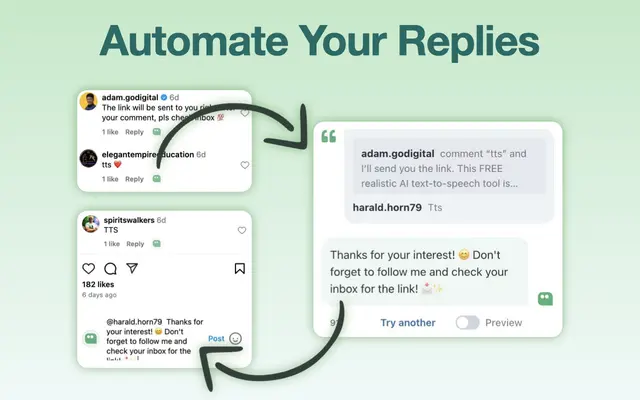
AI Reply Generator - social24
AI Reply Generator - Social24 is a browser extension that helps users generate smart, personalized AI replies for multiple social media platforms including Instagram, Facebook, TikTok, YouTube, and LinkedIn with custom prompt templates and seamless integration.

Read & Give by Bono
Read & Give by Bono is a Chrome extension that uses AI to analyze news content and suggests relevant charitable donation opportunities based on the articles you read.
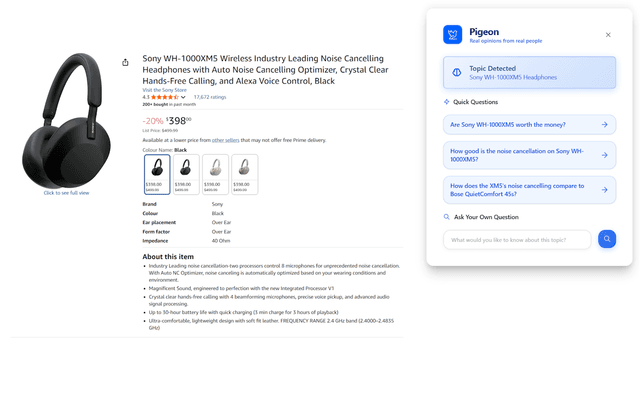
Pigeon
Pigeon is a lightweight Chrome extension that helps users discover and analyze real user opinions from Reddit discussions about any webpage they're browsing.
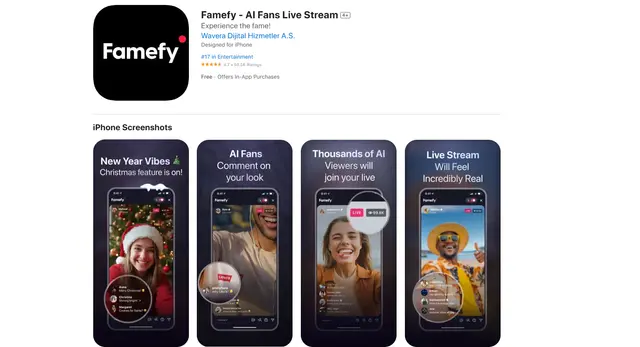
Famefy
Famefy is an AI-powered live streaming platform that lets users experience virtual stardom by interacting with AI-generated fans who provide real-time engagement and feedback.